
Navigating Compliance Challenges

4 Steps to Optimize Business IT Support for Healthcare CFOs

Overview

To optimize business IT support for healthcare CFOs, it is crucial to recognize the unique challenges they face. This article outlines four key steps:

  1. Identifying unique IT support needs
  2. Evaluating IT support providers
  3. Assessing cost-effectiveness
  4. Establishing communication protocols

Each step underscores the necessity of aligning IT strategies with operational goals, ensuring compliance with regulations such as HIPAA, and enhancing overall efficiency to improve patient care. By following these steps, healthcare CFOs can address the pressing demands of their roles and ensure robust IT support that meets both regulatory requirements and operational objectives.

Introduction

In an industry where precision and compliance are paramount, the significance of cybersecurity in healthcare cannot be overstated. Healthcare CFOs face the daunting task of optimizing IT support to enhance operational efficiency while safeguarding sensitive patient information. This guide outlines essential steps to:

  1. Identify unique IT needs
  2. Evaluate potential providers
  3. Assess cost-effectiveness

Providing CFOs with a roadmap to align technology with organizational goals. As the digital landscape evolves, healthcare leaders must consider how their IT strategies can not only comply with regulations but also adapt to the rapid pace of technological change.

How can they ensure that these strategies effectively address the unique challenges presented by cybersecurity threats?

Identify Your Unique IT Support Needs in Healthcare

Recognizing distinct IT requirements is crucial for healthcare organizations to ensure optimal operational efficiency and compliance. The following key steps will guide your assessment:

  1. Conduct a Needs Assessment: Engage with various departments—clinical, administrative, and IT—to gather insights on their specific IT challenges and requirements. This collaborative approach guarantees a thorough understanding of the organization's needs.
  2. Evaluate Compliance Requirements: Recognize the regulatory landscape, particularly standards like HIPAA, which mandate specific IT practices. Understanding these requirements is essential for and safeguarding patient information. Implementing application allowlisting can significantly enhance your compliance efforts by ensuring that only approved applications operate on your systems, thereby reducing the risk of unauthorized access and data breaches. Features such as continuous monitoring of application activity and centralized management of allowlists further strengthen your security posture.
  3. Analyze Current Infrastructure: Review existing IT systems to identify gaps in support, security, and functionality. This analysis helps pinpoint areas that require immediate attention and improvement. Continuous monitoring of application activity is vital to detect any attempts to run unauthorized software, ensuring immediate identification and blocking of threats.
  4. Prioritize Requirements: Rank the identified requirements based on their urgency and potential impact on patient care and operational efficiency. This prioritization allows for strategic resource allocation and effective decision-making. By incorporating comprehensive cybersecurity solutions, including proactive risk management and audit assistance, medical organizations can better safeguard patient health information (PHI) and ensure adherence to HIPAA standards.

A comprehensive requirements evaluation not only aligns IT support with operational objectives but also enhances the quality of patient care. As Simon Lorenz, co-founder of Klara, emphasizes, effective communication and understanding of organizational requirements are essential for successful IT implementation in the medical field. Furthermore, nearly 50% of all medication errors occur when a medication is prescribed or ordered, underscoring the critical need for robust IT systems that can help mitigate such risks. By following these steps, CFOs in the medical sector can ensure their IT strategies are resilient, compliant, and tailored to their unique operational challenges.

Each box represents a crucial step in understanding IT needs. Follow the arrows to see how each step builds upon the last, leading to effective IT support tailored for healthcare.

Evaluate IT Support Providers for Healthcare Expertise

In today's digital landscape, the significance of robust cybersecurity in healthcare cannot be overstated. Evaluating IT support providers is critical, and organizations must consider the following essential criteria:

  1. Industry Experience: Seek providers with a proven track record in business IT support. Look for case studies or references from similar organizations to assess their expertise. For instance, Cyber Solutions demonstrated its capability through a rapid response to a ransomware attack, mobilizing a specialized incident response team within 24 hours to mitigate risks and ensure continuity of care.
  2. Compliance Knowledge: Ensure the provider is well-versed in medical regulations, particularly HIPAA. Their ability to showcase compliance capabilities is vital, as the medical sector is heavily regulated and non-compliance can result in substantial penalties.
  3. Service Offerings: Evaluate if the provider delivers a complete variety of services, including cybersecurity, data management, and round-the-clock assistance. This is crucial as 52 percent of medical organizations are to safeguard sensitive information. Cyber Solutions, for example, provides continuous network monitoring and alerts to detect anomalies and potential vulnerabilities, ensuring proactive threat prevention.
  4. Response Time and Assistance: Assess their service level agreements (SLAs) to confirm they can fulfill your organization's requirements for prompt help. Quick response times are vital in healthcare settings, where delays can impact patient care. Cyber Solutions' around-the-clock efforts during a ransomware incident exemplify the importance of immediate support in critical situations.
  5. Scalability: Choose a provider that can grow with your organization, adapting to changing needs and technologies. The medical sector produces about 30 percent of the globe’s data, and with an annual growth rate of 36 percent anticipated, scalability is crucial for effectively handling rising data demands.

By thoroughly assessing potential providers of business IT support against these criteria, healthcare organizations can ensure they collaborate with firms that grasp the complexities of healthcare IT and can provide customized solutions to enhance operational efficiency and compliance.

The central theme is the evaluation of IT support providers. Each branch represents a key criterion, and the sub-branches provide additional details or examples, making it easy to understand the factors influencing the decision.

Assess Cost-Effectiveness and Budget Alignment

To ensure budget alignment and assess cost-effectiveness in healthcare IT spending, it is essential to follow these structured steps:

  1. Analyze Current IT Spending: Begin with a comprehensive review of your existing IT budget. This step is critical for identifying areas of overspending or inefficiencies. Notably, nearly 80% of hospitals and health systems have recently increased their IT and software spending, underscoring the necessity for vigilant financial oversight.
  2. Compare Provider Costs: Next, gather quotes from various IT assistance providers to evaluate their pricing structures. Be vigilant for potential hidden fees that may inflate overall costs. Understanding the can establish a benchmark for your business IT support assessments.
  3. Evaluate ROI: It is vital to assess the potential return on investment (ROI) from enhanced business IT support. Business IT support through improved IT services can significantly reduce downtime and enhance compliance, both of which are crucial for maintaining operational efficiency and adhering to regulatory standards.
  4. Budget for Future Needs: Proactively anticipate future IT requirements, including necessary upgrades and expansions. This forward-thinking budgeting approach ensures that your financial plan remains flexible and responsive to evolving technological demands and compliance obligations.
  5. Monitor and Adjust: Finally, regularly review IT spending against performance metrics. This ongoing analysis guarantees alignment with your financial goals and allows for timely adjustments, ensuring that your IT investments achieve the desired outcomes.

By conducting a thorough cost assessment, healthcare organizations can make informed decisions that enhance both operational efficiency and financial health.
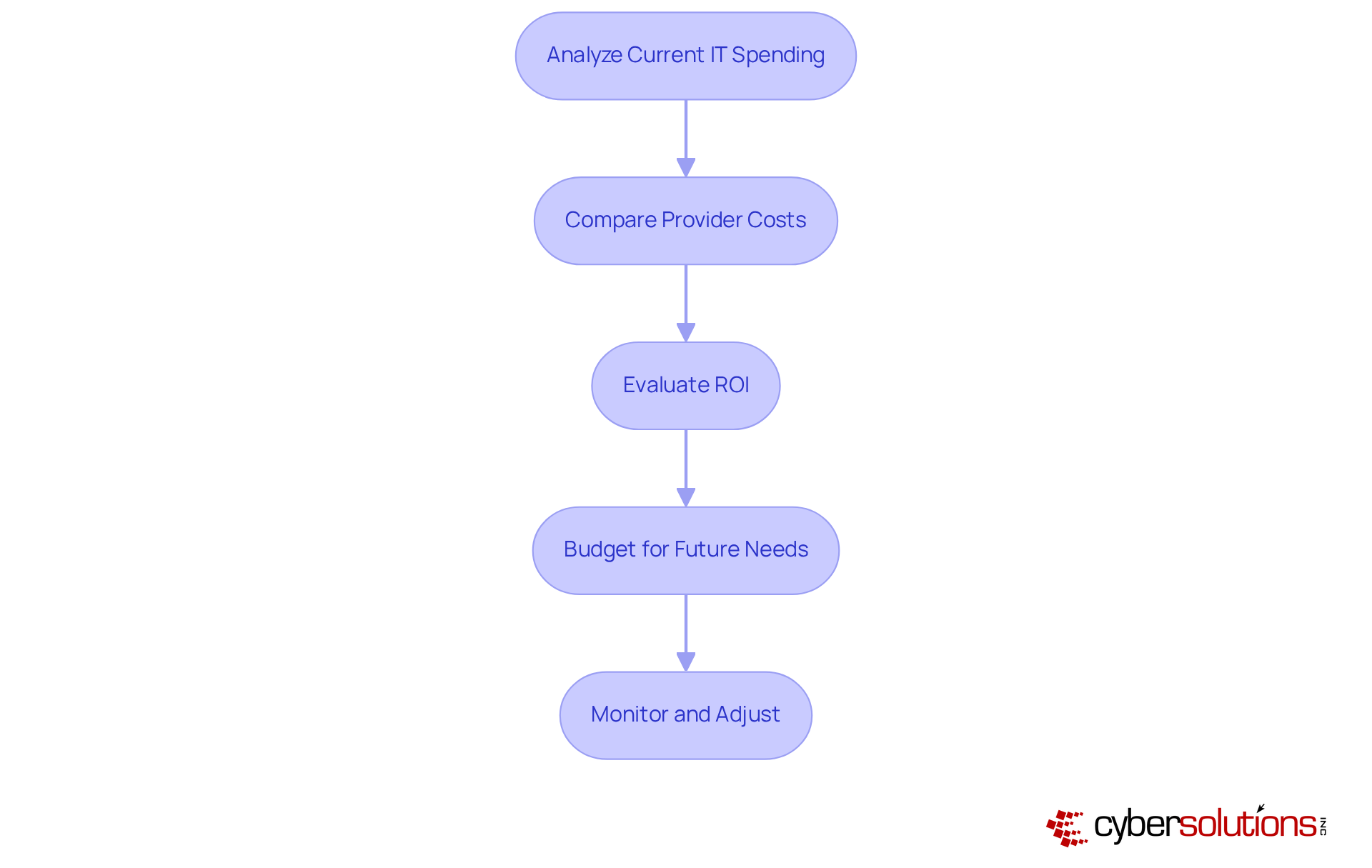
Each box represents a step in the process of evaluating IT spending. Follow the arrows to understand how each step leads to the next, ensuring a comprehensive approach to budget alignment.

Establish Communication and Support Protocols

To establish effective communication and support protocols, it is imperative to implement the following steps:

  1. Define Communication Channels: Clearly outline how staff should communicate IT issues—such as through help desk tickets or direct calls—and ensure that everyone is aware of these channels.
  2. Set Response Time Expectations: Establish clear expectations for response times based on the severity of the issue, ensuring that urgent matters are prioritized.
  3. Regular Training: Conduct for staff on how to effectively communicate IT needs and utilize available assistance resources.
  4. Feedback Mechanism: Establish a feedback system to collect input from staff regarding the effectiveness of IT assistance and identify areas for enhancement.
  5. Documentation: Maintain clear records of protocols and procedures to guarantee consistency and accountability.

By establishing robust communication and support protocols, you can significantly enhance the efficiency of your IT support and ensure that staff can effectively address their technology needs.

This flowchart shows the steps to improve IT communication and support. Start at the top and follow the arrows down to see what you need to do in order.

Conclusion

Optimizing IT support for healthcare CFOs is not just beneficial; it is essential for enhancing operational efficiency, ensuring compliance, and ultimately improving patient care. Understanding and addressing the unique IT needs of healthcare organizations allows for the creation of a robust framework that meets regulatory standards while supporting the dynamic environment of healthcare.

Key strategies encompass:

  1. Conducting thorough needs assessments
  2. Evaluating potential IT support providers for industry expertise and compliance knowledge
  3. Ensuring cost-effectiveness through diligent budgeting practices

Moreover, establishing clear communication and support protocols significantly enhances the effectiveness of IT support, empowering healthcare staff to address technology challenges swiftly and efficiently.

In conclusion, integrating strategic IT support transcends mere technical necessity; it is a critical component of healthcare management that directly influences patient safety and organizational success. By prioritizing these steps, CFOs can guide their organizations toward a future where technology not only enhances operational capabilities but also improves patient outcomes. Implementing these best practices will safeguard sensitive information and foster a culture of continuous improvement in healthcare IT.

Frequently Asked Questions

Why is it important for healthcare organizations to identify their unique IT support needs?

Identifying unique IT support needs is crucial for healthcare organizations to ensure optimal operational efficiency and compliance with regulatory standards.

What is the first step in assessing IT support needs in healthcare?

The first step is to conduct a needs assessment by engaging with various departments—clinical, administrative, and IT—to gather insights on their specific IT challenges and requirements.

How do compliance requirements impact IT support in healthcare?

Compliance requirements, particularly standards like HIPAA, mandate specific IT practices that are essential for maintaining compliance and safeguarding patient information.

What is application allowlisting, and how does it enhance compliance efforts?

Application allowlisting ensures that only approved applications operate on IT systems, reducing the risk of unauthorized access and data breaches. It includes features like continuous monitoring of application activity and centralized management of allowlists to strengthen security.

What should be analyzed when evaluating current IT infrastructure?

Existing IT systems should be reviewed to identify gaps in support, security, and functionality, helping to pinpoint areas that require immediate attention and improvement.

How should healthcare organizations prioritize their IT requirements?

Organizations should rank identified requirements based on their urgency and potential impact on patient care and operational efficiency, allowing for strategic resource allocation and effective decision-making.

What role does cybersecurity play in healthcare IT support?

Comprehensive cybersecurity solutions, including proactive risk management and audit assistance, are essential for safeguarding patient health information (PHI) and ensuring adherence to HIPAA standards.

What is the overall benefit of conducting a thorough IT support needs assessment in healthcare?

A comprehensive evaluation aligns IT support with operational objectives and enhances the quality of patient care, helping to mitigate risks such as medication errors.

Recent Posts
5 Best Practices for Achieving CMMC 1.0 Compliance Success
Implementing Multi-Factor Authentication: A Step-by-Step Guide for Leaders
What Is Endpoint Detection and Why It Matters for Your Business
What is an IR Plan? Importance, Components, and Evolution Explained
Master Email Security Training: 4 Steps for C-Suite Leaders
What is EDR? Understanding Its Role in Cybersecurity for Leaders
10 Benefits of Network Managed Service Providers for C-Suite Leaders
5 Steps to Build an Effective Cyber Response Plan for Leaders
7 Steps to Build a Successful Managed Service Provider Business
5 Best Practices to Manage Cloud Document Systems Effectively
Master Backup and Data Recovery: Best Practices for C-Suite Leaders
Understanding Hybrid Work Environment Meaning for C-Suite Leaders
What Is a Hybrid Work Environment? Key Features and Evolution Explained
CMMC Compliance Definition: What It Means for Your Organization
10 Essential Dark Web Scanners for C-Suite Leaders in 2025
Essential Best Practices for Your Software Disaster Recovery Plan
Understanding CMMC Compliance Meaning for Business Leaders
Master Fully Managed Cybersecurity: Key Steps for Executives
4 Best Practices for Effective Cyber Risk Assessments
Master Server Managed Services: Best Practices for C-Suite Leaders
Understanding the Benefits of Privileged Access Management for Leaders
Essential Email Safety Tips for C-Suite Leaders to Implement
Understanding NIST Guidelines for Passwords: Importance and Key Insights
Maximize ROI with Tailored IT Solutions and Managed Services
Achieve NIST 800 Compliance: 4 Essential Steps for Leaders
Compare 4 Dark Web Monitoring Companies: Features, Benefits, Pricing
Master the NIST Incident Response Process for Effective Security
Best Practices for Selecting Multi-Factor Authentication Tools
10 Managed Security Services Companies to Watch in 2025
Navigating DOD CMMC Requirements: Compare Compliance Impacts and Trends
Understanding Desktop-as-a-Service: Key Insights for Executives
Understanding Failover Systems: Importance and Key Configurations
10 Essential Strategies for Small Business Ransomware Protection
Understanding Managed Cybersecurity Solutions: Importance and Benefits
Understanding Secure Infrastructure Solutions: Importance and Key Features
How Vulnerability Scanning Works: A Guide for C-Suite Leaders
10 Essential Managed IT Solutions in Maine for Business Leaders
Master Cybersecurity and Compliance: Best Practices for C-Suite Leaders
Backup vs Disaster Recovery: Key Differences for C-Suite Leaders
Why Managed IT Compliance Services Are Essential for Business Success
Understanding Disaster Recovery Tiers: Importance and Key Features
4 Best Practices for Effective Backup and Continuity Strategies
Achieve CMMC 2.0 Level 2 Compliance: A Step-by-Step Approach
Create an Effective Acceptable Use Policy (AUP) in 7 Steps
10 Essential Strategies for Hybrid Work Security Success
10 Essential Cyber Security KPIs for Business Resilience
Comparing Cyber Security Pricing Models for Strategic Decision-Making
Understanding the Benefits of a Managed Service Provider for Leaders
7 Managed Security Services Cloud Solutions for Business Resilience
9 Key Benefits of Cyber Attack Simulation Exercises for Leaders
What an Acceptable Use Policy (AUP) Means for Your Organization
Why Use a Managed Service Provider for Strategic Business Success
10 Key Benefits of the Managed Service Provider Business Model
Understanding the Difference Between MSP and MSSP for Leaders
10 Managed Network IT Services to Boost Business Efficiency
What is a Managed Services Consultant and Why It Matters for Leaders
Understanding the Cost of Cybersecurity for Small Businesses
7 Top Data Center Managed Services Providers for C-Suite Leaders
10 Essential MSP IT Plans for C-Suite Leaders to Enhance Efficiency
Understanding Managed Services Benefits and Risks for Executives
10 Essential Security Services in Information Security for C-Suite Leaders
Create Your CMMC SSP: A Step-by-Step Guide for Leaders
Understanding CVE Funding Cuts: Impacts and Strategies for Leaders
IT Spending as a Percentage of Revenue by Industry: Key Insights
Understanding MSP Company Meaning: Role and Impact for Leaders
10 Examples of Managed Service Providers for C-Suite Leaders
10 Benefits of Defensive Artificial Intelligence for C-Suite Leaders
10 Key Insights on What Juice Jacking Means for Your Business
10 Insights on IT Spending as Percentage of Revenue for Leaders
10 Key Benefits of SSL DPI for C-Suite Leaders
10 Benefits of Managed Firewall Solutions for Business Security
10 Essential Emergency IT Support Services for C-Suite Leaders
Understanding Hourly IT Support Rates: Key Factors and Calculations
10 Essential SMB IT Services to Enhance Security and Efficiency
10 Digital Certificate Types Every C-Suite Leader Should Know
Understanding Juice Jacking Meaning: Protect Your Business Today
10 Essential Practices for Effective Cybersecurity Documentation
Protect Your Business: Combat USB Drop Attacks Effectively
Essential IT Services SMBs Must Consider for Success
What Is Threat Intelligence in Cybersecurity and Why It Matters
Understanding Endpoint Protection: Definition and Key Insights
10 Key Benefits of Managed Services Security Companies for Leaders
Backup vs Archiving: Key Insights for C-Suite Leaders
Meet the CMMC Compliance Deadline: Steps for C-Suite Leaders
3 Best Practices for Effective Disaster Recovery Storage Solutions
10 Essential Malware Prevention Best Practices for Executives
10 Essential Strategies for Effective Voice Disaster Recovery
Best Practices for Data and System Recovery in Your Organization
Understanding Outsourced IT Support Costs for Strategic Leaders
10 Key Factors Influencing Cyber Security Certification Cost
Mastering Your Information Security Assessment: A Step-by-Step Guide
10 Key Elements of a NIST Incident Response Plan for Leaders
Master Cyber Security Assessment: A Step-by-Step Approach
7 Managed Services Billing Software Solutions for C-Suite Leaders
10 Essential CMMC Controls for C-Suite Leaders to Implement
Master Compliance in Cyber Security: Strategies for C-Suite Leaders
10 Benefits of 24/7 Managed IT Services for C-Suite Leaders
Master Cyber Security KPIs to Align with Business Goals
10 Managed Services Cyber Security Strategies for C-Suite Leaders
What Does Compliance Mean in Business? Key Insights for Leaders

Join our newsletter

Sign up for the latest industry news.
We care about your data in our privacy policy.
Thank you! Your submission has been received!
Oops! Something went wrong while submitting the form.