

Introduction
In an age where cyber threats loom larger than ever, the significance of IT security alerts has become paramount for organizations striving to protect their digital assets. These alerts serve as critical indicators of potential vulnerabilities, enabling swift responses that can prevent devastating breaches and financial losses. However, with the overwhelming volume of notifications, how can C-suite leaders effectively prioritize and respond to these alerts to ensure their organizations remain resilient against evolving threats?
This article delves into the essential insights that executives need to master IT security alerts, transforming them from mere notifications into powerful tools for proactive risk management.
Understanding the current landscape of cybersecurity threats is crucial. Organizations face a barrage of potential risks that can jeopardize their operations and reputation. The implications of these threats are profound, particularly for those in leadership positions who must navigate these challenges while safeguarding their assets. By mastering the art of interpreting and responding to IT security alerts, executives can not only mitigate risks but also foster a culture of security within their organizations.
As we explore the intricacies of IT security alerts, we will uncover how these notifications can be leveraged effectively, ensuring that organizations are not just reactive but proactive in their approach to cybersecurity.
Define IT Security Alerts and Their Importance
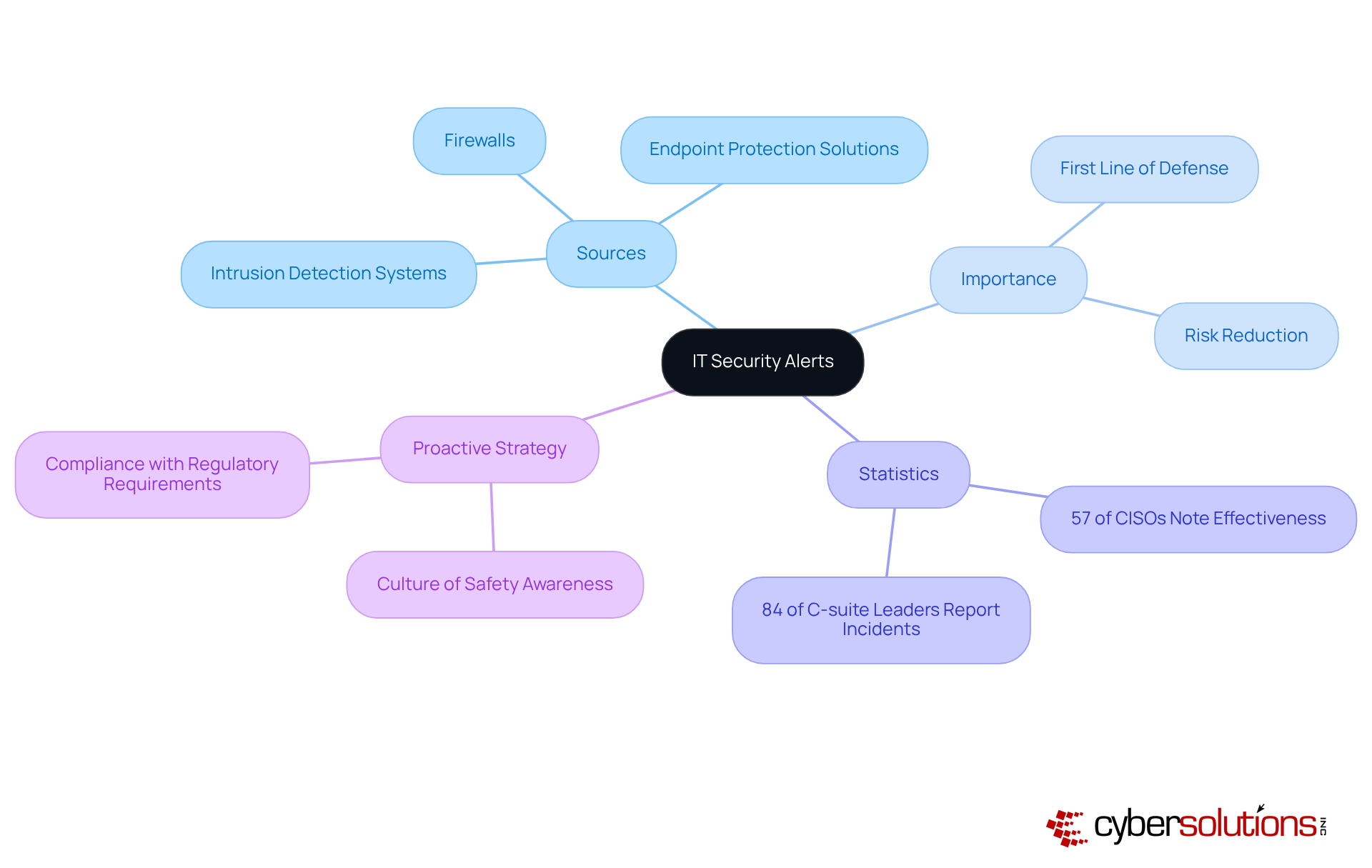
are essential messages generated by security systems to indicate potential security incidents or vulnerabilities within an entity's IT infrastructure. These notifications originate from various sources, including intrusion detection systems, firewalls, and antivirus software. Their significance cannot be overstated; they represent the first line of defense against cyber threats, allowing organizations to respond swiftly to incidents that could generate costly data breaches, financial losses, or reputational damage.
Recent statistics reveal that 84% of C-suite leaders have reported experiencing a security breach in the past three years, underscoring the urgent need for effective incident response strategies. Additionally, organizations that prioritize security alerts can significantly reduce their risk exposure; firms with robust security systems often witness a decrease in incidents associated with cybercriminals, with 57% of CISOs acknowledging this correlation.
Experts assert that security alerts are not merely reactive tools but vital components of a comprehensive security strategy. By fostering a culture of security awareness and ensuring timely responses, executives can bolster their organizations' resilience against emerging threats. This proactive approach not only aids in compliance with regulatory requirements but also enhances overall security posture, making it imperative for C-suite executives to prioritize the management of IT security alerts.
Categorize Types of IT Security Alerts
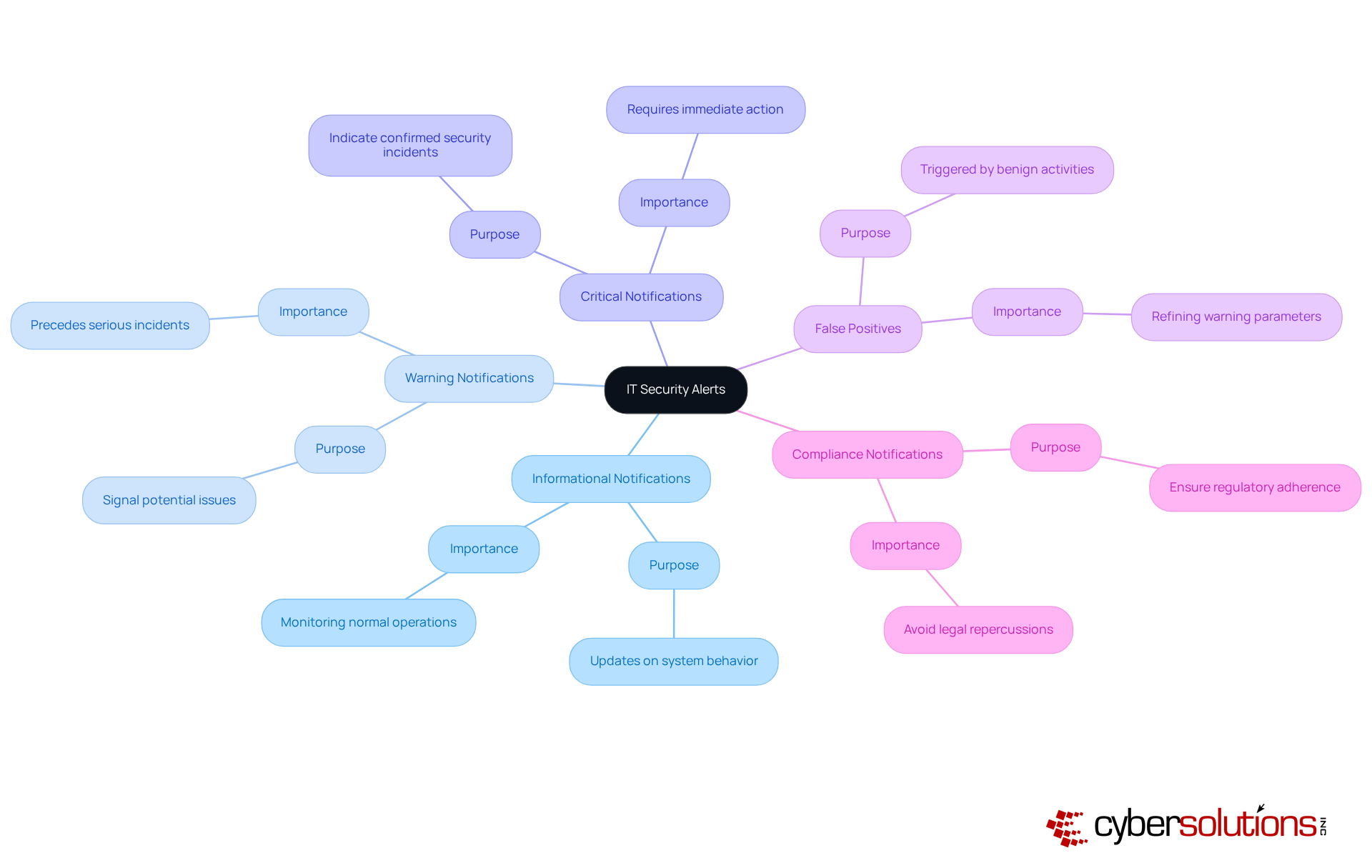
can be categorized into various types, each indicating different levels of threat and urgency. Understanding these classifications is essential for organizations, particularly in enhancing and implementing security measures, including responding to incidents. Here are some common types of IT security alerts:
- Informational Notifications: These notifications provide updates on system behavior and do not indicate malicious activity. They are useful for monitoring normal operations and identifying trends over time.
- Warning Notifications: These notifications signal potential issues that may require attention but do not necessarily indicate an immediate threat. For example, a warning notification might indicate unusual login attempts that could precede a more serious incident.
- Critical Notifications: These notifications indicate a confirmed security incident that requires immediate action. For instance, a discovered malware infection or a successful unauthorized access attempt would prompt a critical notification, necessitating a swift response to mitigate harm. Notably, research indicates that a significant portion of organizations report facing security incidents, underscoring the necessity of readiness. Rapid strategies, including an incident response team on-site within 24 hours, can substantially enhance recovery efforts and minimize damage, particularly in addressing breaches.
- False Positives: Alerts that are triggered by benign activities but are mistakenly identified as threats. While they can clutter notification systems, understanding their nature is crucial for refining warning parameters and reducing notification fatigue, which can lead to genuine threats being overlooked. Experts recommend utilizing advanced filtering methods to diminish false positives and enhance notification accuracy.
- Compliance Notifications: These notifications are generated to ensure adherence to regulatory requirements, such as data protection laws. They assist entities in maintaining compliance and avoiding potential legal repercussions, which is increasingly vital in today’s regulatory landscape. For example, entities in the healthcare sector frequently encounter compliance issues related to HIPAA regulations.
By classifying notifications, including compliance alerts, C-suite leaders can prioritize their responses based on the severity and potential impact of each notification type, ensuring that resources are allocated effectively to address the most pressing threats. Furthermore, organizations such as Cyber Solutions have successfully established services that feature 24/7 monitoring, significantly enhancing their response times and minimizing notification fatigue, ultimately fortifying their overall cybersecurity posture.
Best Practices for Responding to IT Security Alerts
In today's digital landscape, the importance of IT security alerts cannot be overstated, especially for organizations navigating the complex realm of IT security. To effectively respond to security alerts, organizations must adopt best practices that not only safeguard their assets but also enhance their operational resilience.
- Establish a Response Plan: A comprehensive Cyber Security Incident Response Plan (CSIRP) is essential. This plan should clearly define roles, responsibilities, and procedures for managing various types of notifications. Alarmingly, 45% of entities lack a documented plan. Regular updates and testing of this plan are crucial to ensure its effectiveness and relevance.
- Prioritize Notifications: Implementing a robust system for prioritizing notifications based on severity and potential impact is vital. This approach minimizes notification fatigue, ensuring that responses for critical incidents are addressed swiftly. Organizations with effective prioritization strategies reduce the average breach lifecycle from 258 days to 189 days and underscore the importance of prioritization.
- Continuous training is paramount, with continuous education for IT and security personnel on understanding and reacting appropriately to alerts. Organizations that conduct monthly safety training can reduce breach likelihood by 60%. Additionally, simulations of potential incidents prepare teams for real-world scenarios, significantly enhancing their readiness.
- Utilize Automation: Leveraging automation tools can streamline the management process for security alerts. Automated systems substantially decrease response times, with companies employing AI-driven protection solutions addressing risks 40% faster than those relying on manual methods. This allows protection teams to focus on genuine threats rather than false positives.
- Conduct Post-Incident Reviews: After addressing a notification, it is essential to perform evaluations and identify opportunities for improvement. High-performing teams that engage in detailed post-mortem analyses can refine their response strategies and bolster their overall defensive posture.
By adopting these best practices, C-suite leaders can ensure their organizations are well-prepared to respond to IT threats, thereby mitigating potential risks and enhancing operational resilience.

The Role of Technology in Managing IT Security Alerts
In today's digital landscape, technology is crucial for effectively managing IT security alerts related to IT risk notifications. The following key technologies significantly enhance security management:
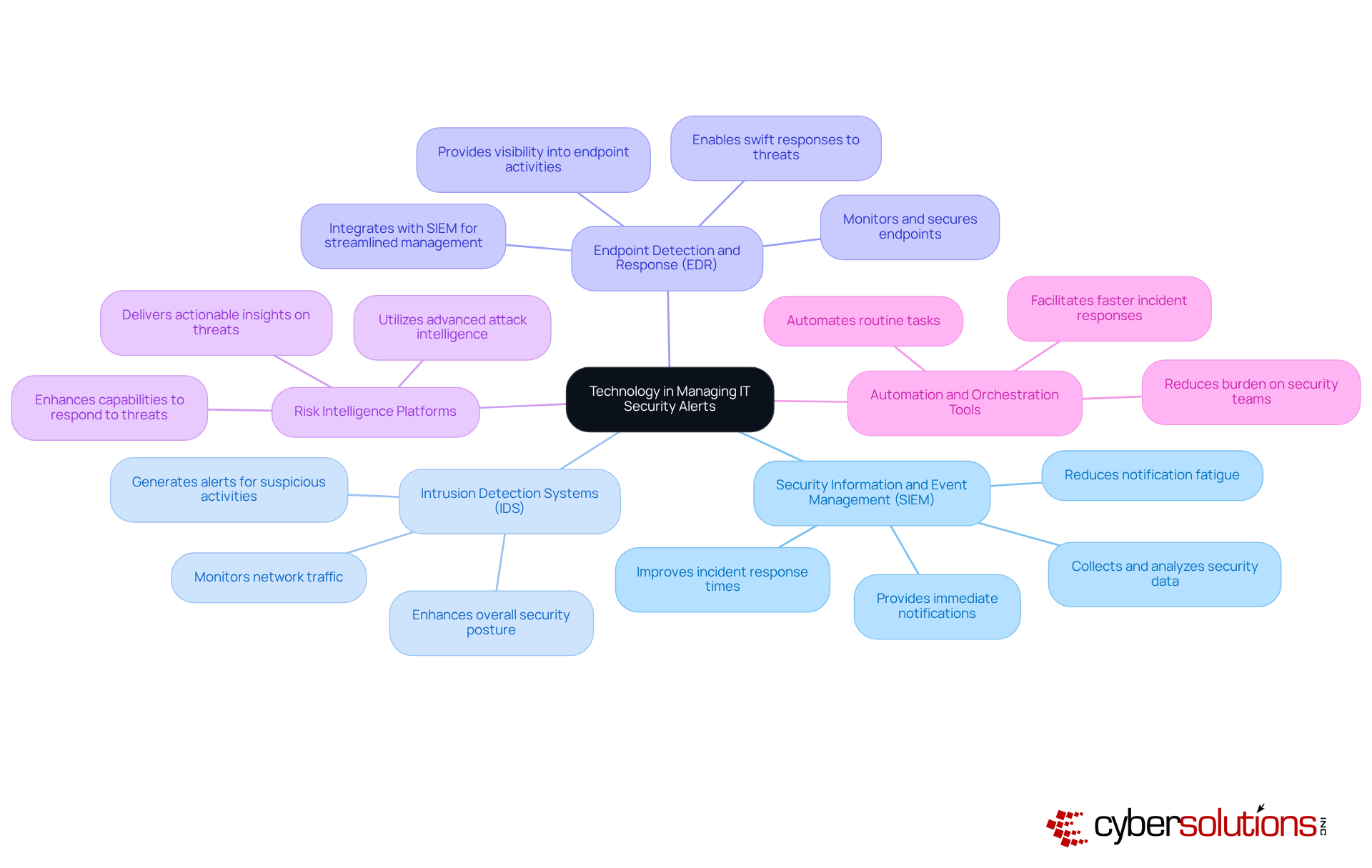
- SIEM solutions play a vital role by collecting and analyzing security data across the organization. They provide immediate notifications and insights into potential risks, including IT security alerts, which enable security teams to correlate events and identify patterns indicative of security incidents. Adoption rates of SIEM solutions have surged as organizations recognize their effectiveness in managing IT security alerts, with many reporting improved response times and a decrease in notification fatigue.
- IDS continuously monitor network traffic for suspicious activities, generating alerts when potential threats are detected. These systems empower organizations to identify and respond to IT security alerts in real-time, thereby enhancing their overall security posture. Cyber Solutions offers 24/7 monitoring of your network to detect anomalies and vulnerabilities, ensuring that questionable actions are intercepted before they escalate into threats.
- EDR solutions focus on monitoring and securing endpoints, such as laptops and servers. They provide comprehensive visibility into endpoint activities and generate IT security alerts for unusual behavior, enabling swift responses to potential threats. The integration of EDR with SIEM solutions has proven effective in streamlining the management of IT security alerts.
- Threat intelligence platforms deliver actionable insights regarding emerging threats. By incorporating risk intelligence into notification management and leveraging IT security alerts, organizations can enhance their capabilities to identify and respond to sophisticated threats, ensuring they stay ahead of cybercriminals. Cyber Solutions utilizes advanced attack intelligence to protect businesses from ransomware, phishing, and other malware attacks.
- Automation tools streamline the response process by automating routine tasks, such as triaging notifications and incident reporting. This reduces the burden on security teams, enabling them to concentrate on addressing more complex issues. Recent advancements in automation technologies have significantly improved the efficiency of notification management for IT security alerts, facilitating faster and more accurate responses.
As Jim Peterson, an expert in IT and cybersecurity, notes, 'SIEM solutions enhance compliance by providing detailed reporting and audit trails, ensuring that security measures align with regulations.' By leveraging these technologies, alongside the comprehensive firewall and network protection solutions offered by Cyber Solutions, C-suite leaders can bolster their organizations' capabilities in effectively managing IT security alerts. This proactive approach to cybersecurity is essential in today's threat landscape. Furthermore, case studies like "Enhancing Threat Detection with Behavioral Analysis" demonstrate how organizations have successfully implemented these technologies to strengthen their security posture.
Conclusion
IT security alerts are not merely notifications; they serve as critical indicators of potential threats that necessitate immediate attention from C-suite leaders. Understanding and managing these alerts is essential for safeguarding an organization's digital assets and ensuring operational resilience. By prioritizing IT security alerts, executives can bolster their organizations' defenses against cyber threats, thereby reinforcing their commitment to a secure business environment.
Throughout this article, key insights have been shared regarding the significance of IT security alerts, their various types, and best practices for effective response. The necessity of establishing a structured incident response plan, along with leveraging advanced technologies such as SIEM and automation tools, underscores the importance of a proactive approach in managing these alerts. Furthermore, the correlation between prioritizing IT security alerts and reducing the risk of cyber incidents highlights the strategic advantage that organizations can gain through diligent alert management.
Ultimately, the landscape of cybersecurity is continually evolving, and the role of IT security alerts in risk management cannot be understated. C-suite leaders are encouraged to cultivate a culture of awareness and responsiveness within their organizations, ensuring they are equipped to tackle the complexities of modern cyber threats. By embracing these insights and implementing robust alert management strategies, organizations can not only protect their assets but also enhance their overall governance and compliance frameworks.
Frequently Asked Questions
What are IT security alerts?
IT security alerts are messages generated by security systems to indicate potential security incidents or vulnerabilities within an entity's IT infrastructure.
Where do IT security alerts originate from?
IT security alerts can originate from various sources, including intrusion detection systems, firewalls, and endpoint protection solutions.
Why are IT security alerts important?
IT security alerts are crucial as they represent the first line of defense against cyber threats, allowing organizations to respond swiftly to incidents that could lead to data breaches, financial losses, or reputational damage.
What recent statistics highlight the need for effective incident management?
Recent statistics indicate that 84% of C-suite leaders have reported experiencing a cybersecurity incident in the past three years, emphasizing the urgent need for effective incident management.
How do organizations benefit from prioritizing IT security alerts?
Organizations that prioritize IT security alerts can significantly reduce their risk exposure, with 57% of Chief Information Security Officers (CISOs) acknowledging a decrease in incidents associated with cybercriminals when robust IT security alert systems are in place.
Are IT security alerts reactive or proactive tools?
IT security alerts are considered vital components of a proactive risk management strategy, not merely reactive tools.
How can executives enhance their organizations' resilience against threats?
Executives can enhance their organizations' resilience by fostering a culture of safety awareness and ensuring timely responses to IT security alerts.
What additional benefits come from managing IT security alerts effectively?
Effective management of IT security alerts aids in compliance with regulatory requirements and strengthens the overall defense posture of the organization.
List of Sources
- Define IT Security Alerts and Their Importance
- ey.com (https://ey.com/en_us/newsroom/2025/04/c-suite-disconnect-on-cybersecurity-threatens-business-value-and-resilience-ey-study-finds)
- cisa.gov (https://cisa.gov/news-events/cybersecurity-advisories)
- activu.com (https://activu.com/the-rising-threats-facing-ceos-and-c-suite-executives-a-holistic-approach-to-security)
- talkerresearch.com (https://talkerresearch.com/cyberattacks-top-list-of-concerns-for-u-s-tech-executive)
- cisa.gov (https://cisa.gov/topics/cyber-threats-and-advisories)
- Categorize Types of IT Security Alerts
- microsoft.com (https://microsoft.com/en-us/security/blog/2025/09/24/retail-at-risk-how-one-alert-uncovered-a-persistent-cyberthreat)
- The Hacker News | #1 Trusted Source for Cybersecurity News (https://thehackernews.com)
- socmasters.in (https://socmasters.in/types-of-security-alerts)
- cisa.gov (https://cisa.gov/news-events/cybersecurity-advisories)
- mindpointgroup.com (https://mindpointgroup.com/blog/what-types-of-alerts-could-i-receive-from-a-soc)
- Best Practices for Responding to IT Security Alerts
- hyperproof.io (https://hyperproof.io/resource/cybersecurity-incident-response-plan)
- Cyber Security Best Practices for 2026 (https://sentinelone.com/cybersecurity-101/cybersecurity/cyber-security-best-practices)
- cisa.gov (https://cisa.gov/news-events/cybersecurity-advisories/aa25-266a)
- cisa.gov (https://cisa.gov/news-events/alerts/2025/09/23/cisa-releases-advisory-lessons-learned-incident-response-engagement)
- Incident Response Statistics to Know in 2025 (https://jumpcloud.com/blog/incident-response-statistics)
- The Role of Technology in Managing IT Security Alerts
- bleepingcomputer.com (https://bleepingcomputer.com/news/security/the-role-of-artificial-intelligence-in-todays-cybersecurity-landscape)
- technologyreview.com (https://technologyreview.com/2025/07/11/1119370/cybersecurity-alarm-system-breaking-down)
- connectwise.com (https://connectwise.com/blog/best-siem-software-solutions)
- watchguard.com (https://watchguard.com/wgrd-news/blog/alert-fatigue-manage-alerts-ai-and-cybersecurity-experts)
- digitalisationworld.com (https://digitalisationworld.com/blog/58324/less-routine-more-automation-how-ai-powered-siem-is-revolutionizing-threat-detection-and-response)
