

Introduction
Understanding hourly IT support rates is crucial for businesses aiming to effectively manage their technology needs. These rates can vary significantly based on factors like provider expertise and geographical location. Not only do they influence immediate budgeting, but they also play a vital role in long-term financial planning. As organizations consider the benefits of hourly versus alternative pricing models, a pressing question arises: how can businesses ensure they make the most cost-effective decisions while securing the necessary support to thrive in a rapidly evolving digital landscape?
In today’s fast-paced environment, the stakes are high. Companies must navigate a complex web of technology demands, and understanding the nuances of IT support rates is essential. By grasping these rates, businesses can better allocate resources and plan for future needs. This understanding not only aids in budgeting but also empowers organizations to make informed choices that align with their strategic goals.
Ultimately, the right IT support can be a game-changer. It’s not just about cost; it’s about value and ensuring that your organization is equipped to face the challenges of a digital world. So, how can you ensure that your decisions are both financially sound and strategically beneficial? The answer lies in a thorough understanding of the market and a proactive approach to IT support.
Define Hourly IT Support Rates and Their Importance
Understanding hourly IT support rates is crucial for businesses as they navigate the complexities of technology support. The rates, which can range from $75 to $250 per hour in 2025, reflect the varying levels of service and expertise available. Companies that grasp these figures can budget their IT spending more accurately, avoiding unexpected expenses that could jeopardize financial stability.
Moreover, businesses should consider alternative pricing models. This approach simplifies budgeting. With a flat fee, organizations receive a comprehensive package that covers everything from email licenses to software updates, ensuring consistency and facilitating better decision-making.
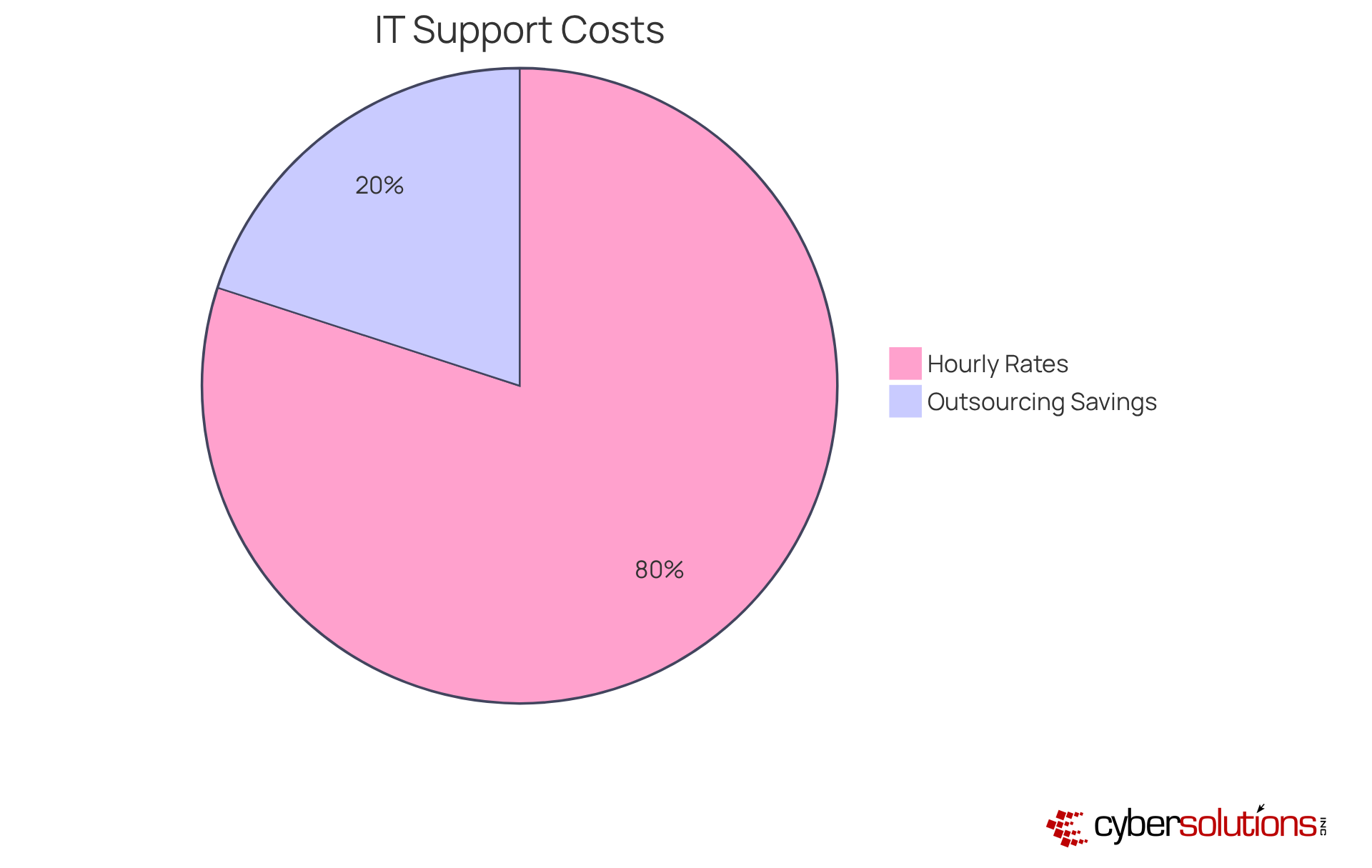
The choice between hiring in-house IT staff and managed service providers (MSPs) is often influenced by the overall cost. Outsourcing can prove more cost-effective when factoring in the total cost of ownership, which includes salaries, benefits, and overhead for in-house teams. Real-world examples show that companies utilizing MSPs can reduce their annual IT budgets by as much as 25%, according to a CompTIA survey. This underscores the importance of understanding pricing structures, which is essential not just for immediate budgeting, but also for long-term strategic planning and operational efficiency.
Identify Key Factors Influencing Hourly IT Support Rates
Understanding the factors that influence hourly IT support rates is essential for businesses aiming to optimize their IT expenditures.
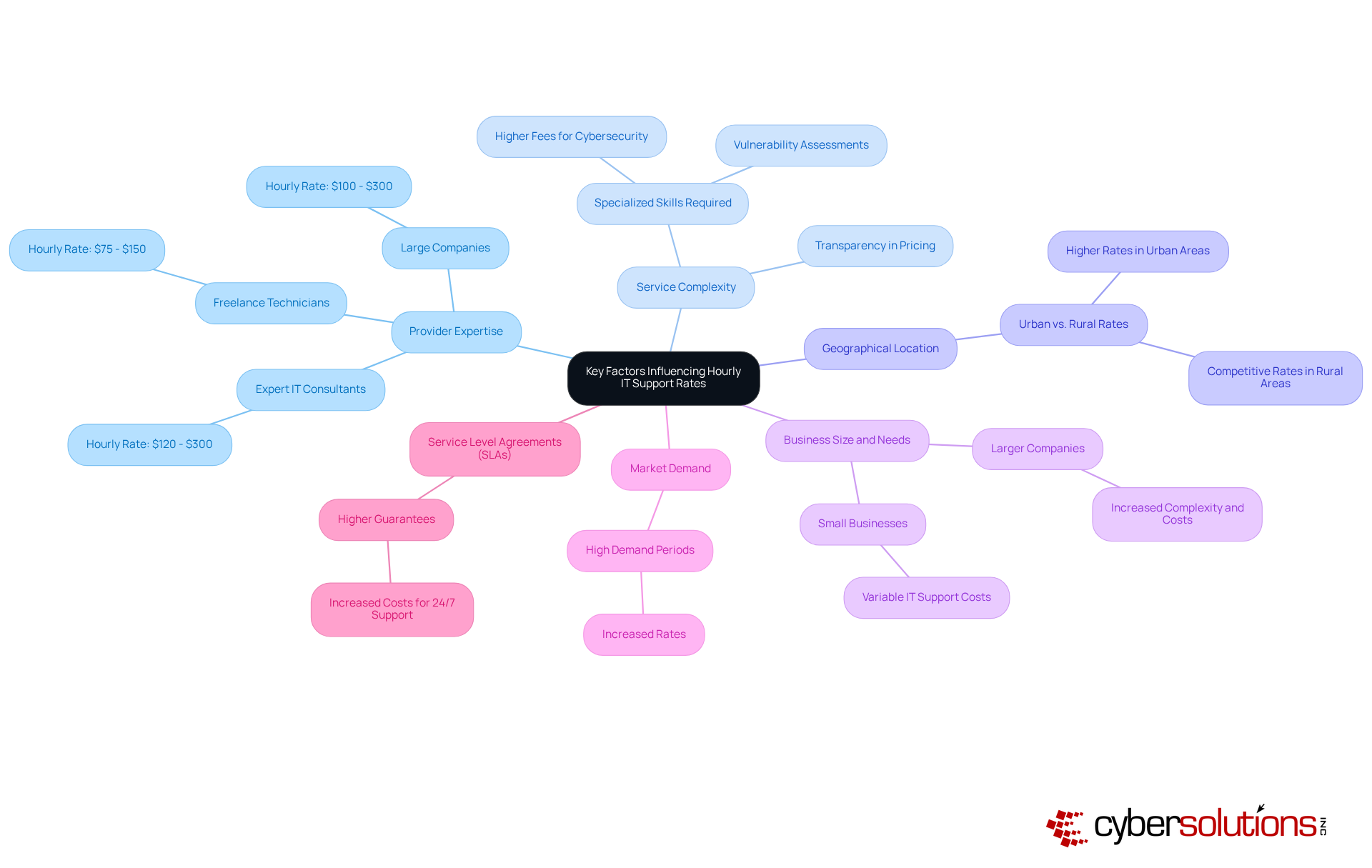
- Technician Experience: Technicians with extensive experience and specialized skills typically command higher rates. For instance, expert IT consultants may have rates that range from $120 to $300 per hour, reflecting their advanced knowledge and ability to handle complex issues efficiently. Freelance technicians generally charge between $75 and $150, while larger companies may have rates ranging from $100 to $300.
- Service Complexity: Tasks that require specialized skills or advanced technology often incur higher fees. Managing networks or conducting cybersecurity assessments necessitates a higher level of expertise, significantly impacting pricing. Transparency is crucial when evaluating providers, as there is no standardization in service agreements.
- Geographical Location: Rates can fluctuate considerably depending on the cost of living in various areas. Urban regions, where operational expenses are greater, frequently observe increased rates compared to rural areas. Companies in cities may encounter higher managed services expenses due to increased salaries and operational costs, making it essential for firms to consider their geographical context when planning for IT support.
- Company Size: Larger companies with intricate IT systems usually face elevated costs due to the heightened need for assistance. The complexities of managing multiple systems and devices require more resources and expertise, leading to increased expenses.
- Demand Fluctuations: During periods of high demand for IT assistance, rates may rise as providers respond to the urgent need for support. This fluctuation can significantly influence budgeting and planning for businesses that rely heavily on IT support.
- Service Level Agreements: Contracts that guarantee specific response times and service levels can also affect pricing. Higher guarantees often come with increased costs, as providers must allocate more resources to meet these commitments. For instance, 24/7 assistance with quick response times usually involves an additional cost, highlighting the value of prompt help in urgent situations.
By comprehending these elements, companies can make informed choices when selecting IT assistance, ensuring they obtain the expertise and responsiveness required to meet their operational demands.
Compare Hourly Rates with Alternative IT Support Pricing Models
When evaluating IT support options, businesses must recognize the significance of comparing hourly rates with alternative pricing models, each presenting unique benefits and challenges:
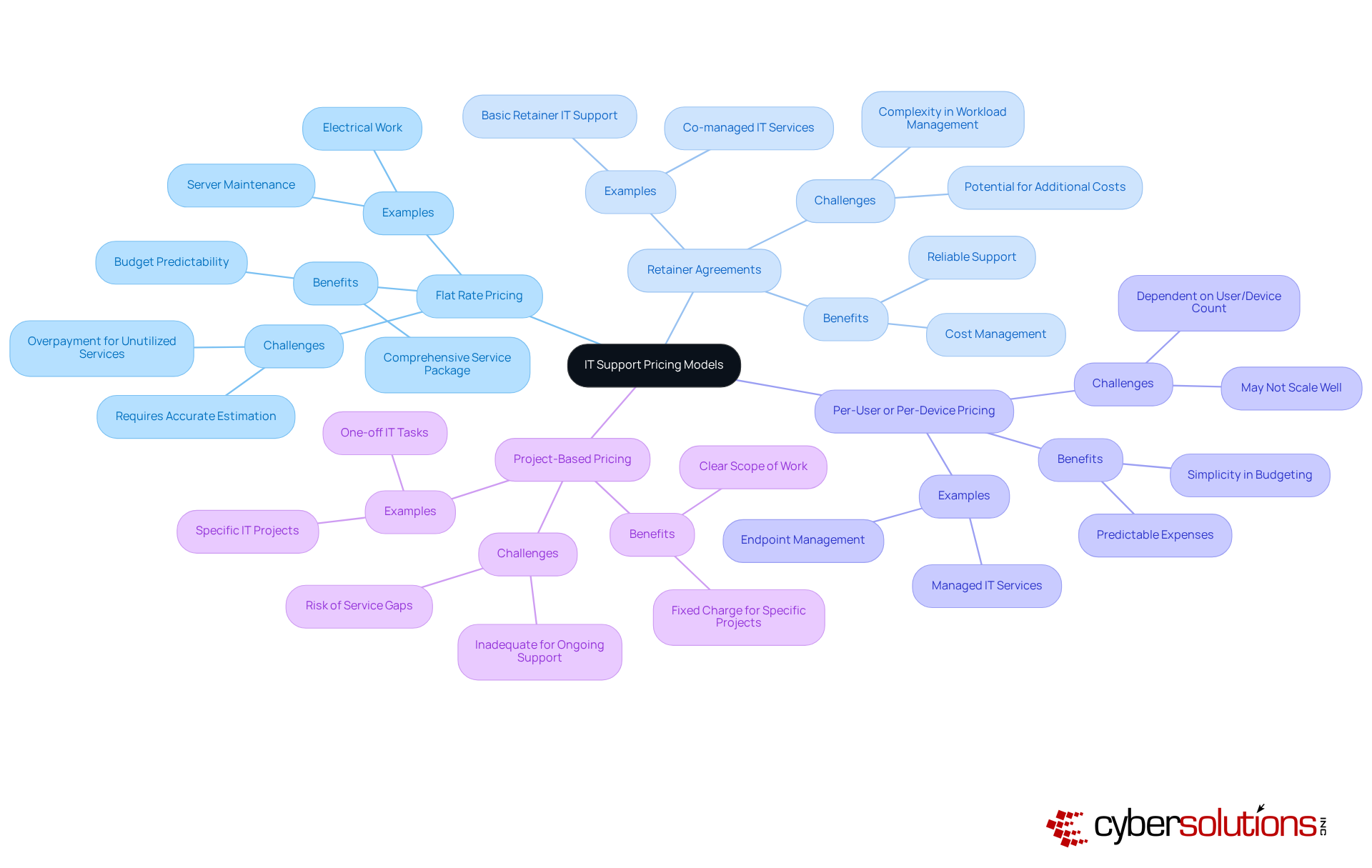
- Fixed Fee Model: This model offers a fixed fee for a specified range of services, ensuring budget predictability and streamlining financial planning. With Cyber Solutions' services, organizations can eliminate unexpected IT expenses and surprises, guaranteeing predictable monthly costs. This approach encompasses everything from email licenses to advanced security measures, providing businesses with peace of mind in one comprehensive package. However, it may not be economical for organizations with varying IT needs, as it can lead to overpayment for unutilized services.
- Monthly Subscription Model: A monthly charge secures a set number of hours or assistance, striking a balance between flexibility and expense management. This model is particularly advantageous for companies that require reliable support while efficiently managing costs. For example, services typically cost around $75 per user per month, resulting in an annual expenditure of approximately $86,000 for a 40-person company. This is significantly lower than the overall cost of internal IT support, which can reach about $192,600 each year, translating to roughly $402 per user monthly. Such comparisons underscore the importance of pricing models and their role in enhancing operational efficiency.
- Per User or Device Model: Charges are based on the number of users or devices supported, simplifying budgeting for organizations with a stable user base. This model can be beneficial for companies aiming to maintain predictable expenses while ensuring adequate support.
- Project-Based Model: This approach entails a fixed charge for specific projects, making it suitable for one-off tasks. However, it may not adequately address ongoing support needs, potentially resulting in service gaps.
While alternative models offer flexibility, they may result in unpredictable expenses if not managed properly. For instance, the total cost of in-house IT support for a 40-person company can approach approximately $192,600 each year, equating to about $402 per user monthly. This highlights the importance of considering the nature of the work and the organization's financial strategies when selecting a pricing model. Monthly subscription models, in particular, can enhance financial stability and operational efficiency, making them a preferred choice for many companies navigating the complexities of IT support. Furthermore, planning and communicating the transition when switching pricing models is essential to ensure stakeholder alignment and address any concerns.
Calculate and Set Your Hourly IT Support Rate
Calculating your hourly rate is crucial for establishing a sustainable business model. Here’s how to do it effectively:
-
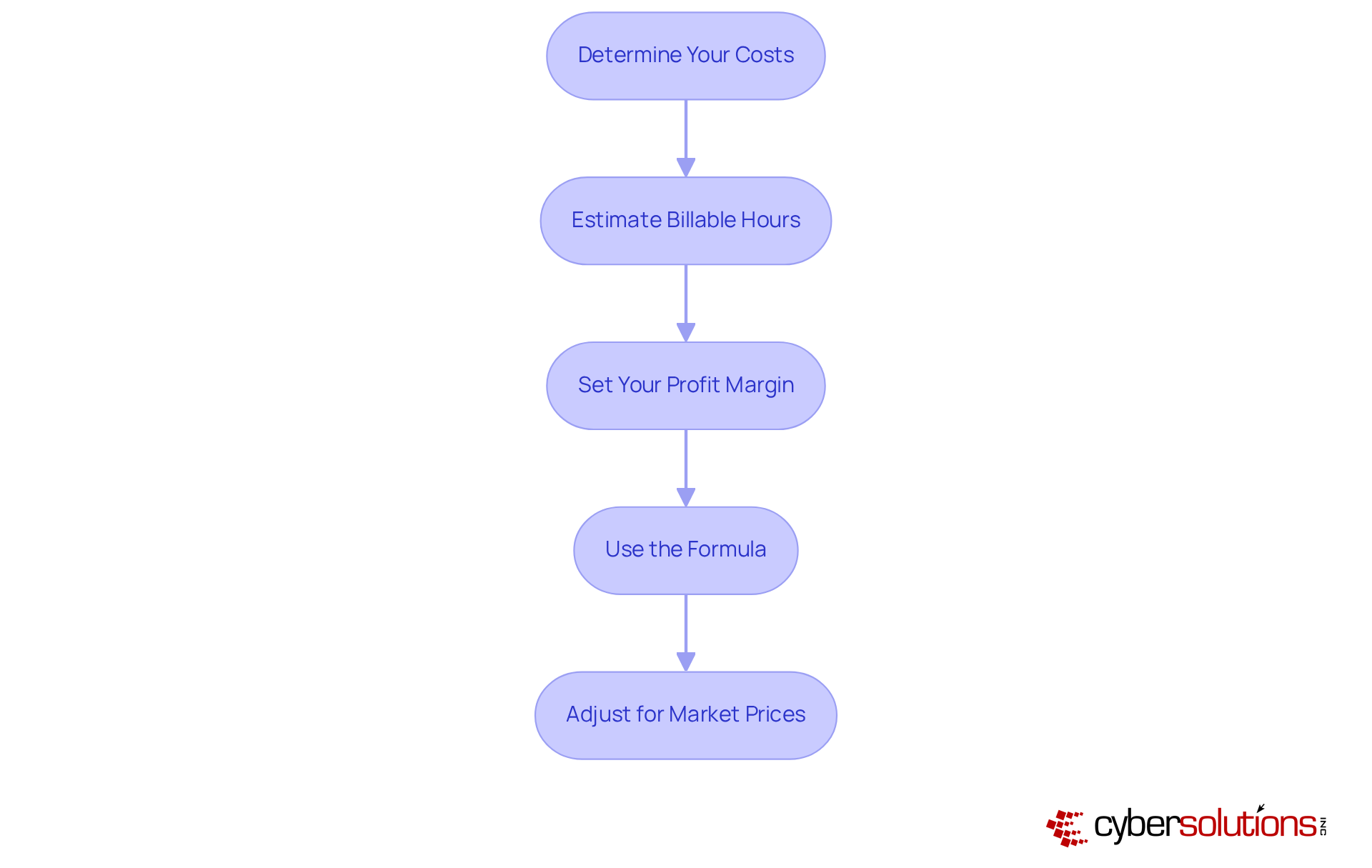
Determine Your Costs: Start by calculating all expenses related to providing IT support. This includes salaries, benefits, overhead expenses, and equipment.
-
Estimate Billable Hours: Assess the number of hours you can realistically bill in a year. Don’t forget to account for non-billable time, such as administrative tasks and training.
-
Set Your Profit Margin: Establish a profit margin that aligns with your business objectives and reflects market standards. Typically, profit margins range from 20% to 30%.
-
Use the Formula: Apply this formula to determine your hourly rate:
Hourly Rate = (Total Costs / Billable Hours) + Desired Profit Margin
For example, if your total costs are $50,000 and you anticipate billing 1,000 hours, with a desired profit margin of 20%, your calculation would be:Hourly Rate = ($50,000 / 1,000) + ($50,000 / 1,000 * 0.20) = $50 + $10 = $60/hour
-
Adjust for Market Prices: Finally, compare your calculated figure against industry standards to ensure competitiveness. Hourly rates for consultants can vary significantly based on experience and specialization, typically ranging from $70 to $250. Adjust your rates as necessary based on your expertise and the specific services you offer, ensuring it reflects the value you provide to clients. Additionally, consider the substantial demand, which can exceed $300,000 per hour for small and medium-sized enterprises. This underscores the necessity of establishing suitable charges. Geographic location also influences pricing; for instance, cities like Calgary may offer more cost-effective options. Lastly, remember that the experience level of consultants impacts hourly rates, with entry-level consultants charging less than their more experienced counterparts.
Conclusion
Understanding hourly IT support rates is crucial for businesses striving to navigate the complex landscape of technology services effectively. By grasping the nuances of these rates, organizations can make informed decisions that not only enhance their budgeting processes but also bolster their overall financial health. This knowledge aids in immediate financial planning and contributes to long-term operational efficiency.
Several key factors influence hourly IT support rates, including:
- Provider expertise
- Service complexity
- Geographical location
- Market demand
It's essential to compare these hourly rates with alternative pricing models such as:
- Flat-rate pricing
- Retainer agreements
- Project-based pricing
Each model presents distinct advantages and challenges that can significantly impact a company's financial strategy and the effectiveness of its IT support.
Ultimately, understanding hourly IT support rates goes beyond mere cost considerations. It prompts businesses to evaluate their unique needs and operational contexts, ensuring they select the most suitable pricing model for their circumstances. By taking proactive steps in budgeting and planning, organizations can secure the IT support they require while maintaining financial stability and fostering growth in an increasingly technology-driven world.
Frequently Asked Questions
What are hourly IT support rates and why are they important?
Hourly IT support rates are the charges businesses incur for technology support services, ranging from $75 to $250 per hour in 2025. Understanding these rates is crucial for businesses to budget their IT spending accurately and avoid unexpected expenses that could threaten financial stability.
What are the benefits of flat-rate pricing models for IT support?
Flat-rate pricing models simplify budgeting by providing a comprehensive package of services for a set fee, eliminating surprise costs. This approach helps organizations manage predictable monthly expenses and facilitates better financial planning.
How do hourly IT support rates influence the decision to hire in-house staff versus outsourcing to managed service providers (MSPs)?
The choice between hiring in-house IT staff and outsourcing to MSPs is often influenced by hourly IT support rates. Outsourcing can be more cost-effective when considering the total cost of ownership, which includes salaries, benefits, and overhead for in-house teams.
What potential savings can businesses achieve by using managed service providers (MSPs)?
Companies that utilize MSPs can reduce their annual IT budgets by as much as 25%, according to a CompTIA survey, highlighting the financial benefits of understanding and managing hourly IT support rates.
How does understanding hourly IT support rates contribute to long-term financial planning?
Understanding hourly IT support rates is essential not only for immediate budgeting but also for long-term financial planning and operational efficiency, as it enables businesses to make informed decisions about their IT expenditures.
List of Sources
- Define Hourly IT Support Rates and Their Importance
- netgainit.com (https://netgainit.com/blogs/cost-of-it-support-for-small-business)
- calgaryappdeveloper.ca (https://calgaryappdeveloper.ca/blog/it-consulting-hourly-rates)
- entremt.com (https://entremt.com/budgeting-for-success-the-average-cost-of-it-support-for-small-business)
- encomputers.com (https://encomputers.com/2024/05/how-much-does-it-support-cost)
- blog.etech7.com (https://blog.etech7.com/cost-of-it-support-for-small-business?utm_source=MSPdatabase.com&utm_medium=referral)
- Identify Key Factors Influencing Hourly IT Support Rates
- wpglob.com (https://wpglob.com/it-support-costs-for-small-businesses-guide-for-2025)
- 2026 Managed IT Services Cost and Pricing Guide | VC3 (https://vc3.com/guide/managed-it-services-cost-pricing)
- andromeda-tech-solutions.com (https://andromeda-tech-solutions.com/itblog/10-factors-that-influence-managed-itservices-cost)
- clockify.me (https://clockify.me/average-hourly-rates)
- morsoftware.com (https://morsoftware.com/blog/it-consulting-rates)
- Compare Hourly Rates with Alternative IT Support Pricing Models
- avaza.com (https://avaza.com/software-for-managing-retainer-subscription-invoicing-challenges-and-benefits)
- encomputers.com (https://encomputers.com/2024/05/how-much-does-it-support-cost)
- fieldnation.com (https://fieldnation.com/learn/flat-rate-vs-hourly-pricing)
- Calculate and Set Your Hourly IT Support Rate
- encomputers.com (https://encomputers.com/2024/05/how-much-does-it-support-cost)
- calgaryappdeveloper.ca (https://calgaryappdeveloper.ca/blog/it-consulting-hourly-rates)
- morsoftware.com (https://morsoftware.com/blog/it-consulting-rates)
