

Introduction
Understanding the complexities of IT support costs is crucial for organizations navigating the challenges of modern technology management. C-suite leaders face a significant opportunity to optimize their budgets and enhance operational efficiency by comprehending the various components that influence IT support pricing.
With factors such as business size, service offerings, and compliance requirements in play, how can executives ensure they make informed financial decisions that align with their strategic goals? This understanding not only aids in budget management but also positions organizations to respond effectively to the evolving technological landscape.
Define IT Support Cost Structure
Understanding the cost structure is crucial for organizations aiming to optimize their budgets and enhance operational efficiency. The components that influence overall pricing are multifaceted and require careful consideration.
- Labor Costs: Salaries, benefits, and training for IT personnel can vary significantly based on expertise and location. In 2026, many organizations are realizing that hiring full-time IT staff can be more expensive than leveraging external support, especially when factoring in benefits and training. For very small businesses, employing a full-time IT staff member often proves costlier than a managed service plan, particularly when considering coverage gaps during vacations or after hours.
- Technology Expenses: These expenses encompass hardware, software licenses, and subscriptions for IT management tools. As technology demands escalate, businesses are reevaluating their IT strategies and budgeting for essential tools that enhance operational efficiency. Companies that rushed to the cloud during the pandemic may find themselves overspending on underutilized offerings, highlighting the need for a thorough assessment of IT expenses.
- Service Level Agreements: SLAs define the range of services provided and their associated costs. The level of support required can greatly impact the pricing, with more comprehensive plans typically commanding higher fees.
- Operational Costs: Ongoing costs such as utilities, office space, and maintenance of IT infrastructure contribute to the overall financial picture. Companies must account for these expenses to gain a complete understanding of their IT expenditures.
- Compliance Costs: Investments needed to meet regulatory requirements are particularly significant in sectors like healthcare and finance. As compliance expectations tighten, organizations must allocate budgets for audits and compliance tools to avoid penalties and disruptions. Strategic investments in cybersecurity are essential for protecting data and meeting industry-specific requirements, ensuring that entities remain compliant and secure.
By grasping these components, organizations can gain valuable insights into their IT spending, enabling them to pinpoint potential areas for savings or necessary investments.

Explore Factors Influencing IT Support Pricing
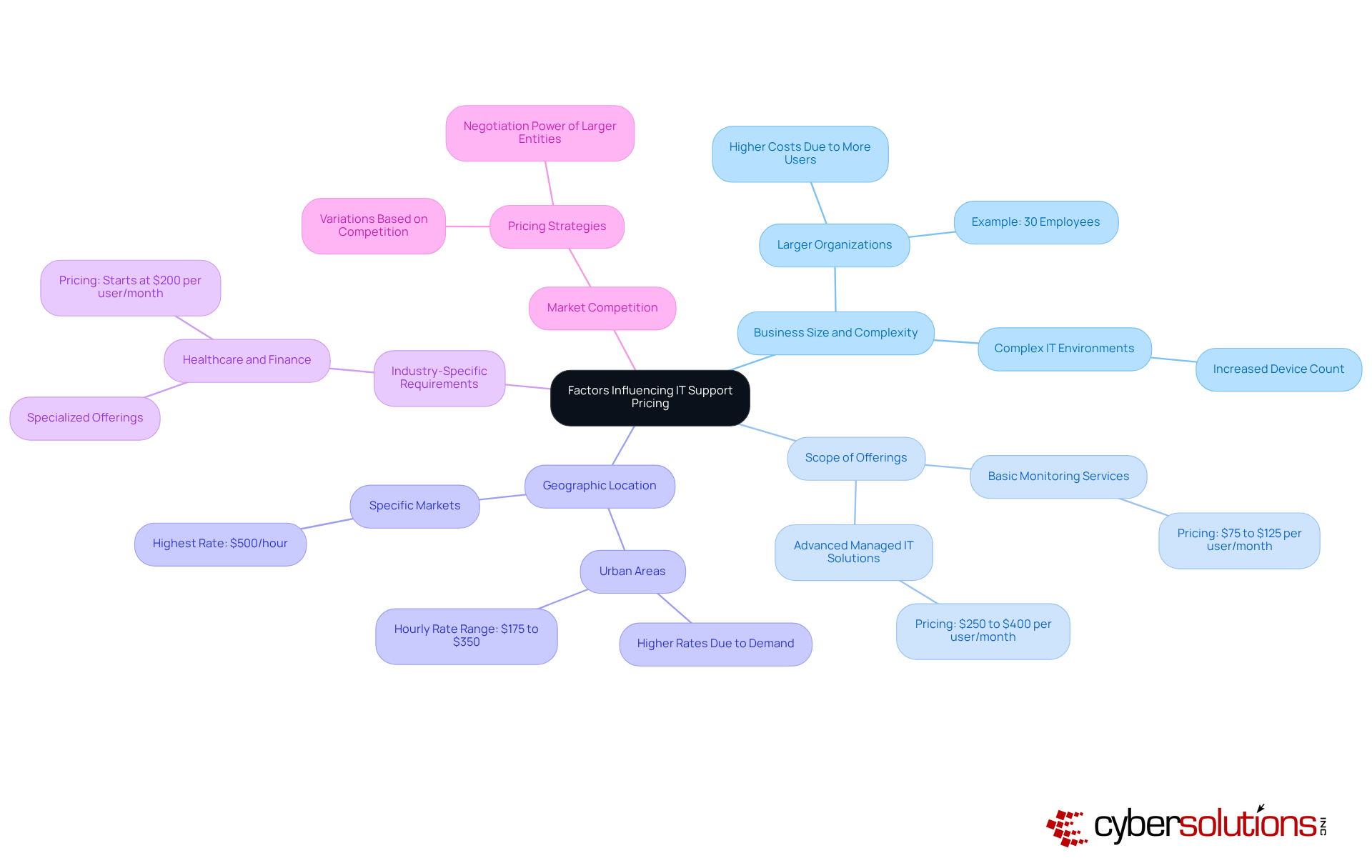
Understanding the intricacies of IT support pricing is crucial for organizations aiming to optimize their budgets and operational efficiency. Several key factors significantly influence these costs:
- Organization size: Larger organizations or those with intricate IT environments typically incur higher costs due to the increased number of users and devices. For instance, a company with 30 employees utilizing IT devices will cover costs in line with the typical per-user pricing structure among managed providers (MSPs).
- Service variety: The variety of services included in the IT support package, such as cybersecurity, cloud solutions, and help desk assistance, can greatly impact pricing. Managed IT solutions can range from basic monitoring at around $75 to $125 to more extensive plans that may vary between $250 and $400 per user monthly, depending on the necessary offerings.
- Geographic Location: Costs can fluctuate based on the region, with urban areas often experiencing higher rates due to increased demand for skilled IT professionals. For example, the average cost can range from $175 to $350, with some providers charging as much as $500 in specific markets.
- Industry-Specific Requirements: Certain sectors, like healthcare and finance, may require specialized offerings that elevate expenses due to regulatory compliance. Advanced managed IT solutions tailored for regulated sectors typically start at approximately $200 per user, reflecting the specialized assistance needed to meet stringent requirements.
- Competition level: The level of competition among IT service providers in a specific region can influence pricing strategies, leading to variations in costs. Larger entities often possess greater purchasing power, allowing them to negotiate reduced per-user pricing, which can significantly aid in cost management.
Recognizing these factors is essential for organizations as they evaluate their IT support needs and strive to align their budgets with operational requirements.
Estimate Your IT Support Budget
To effectively estimate your IT support budget, it’s crucial to follow a structured approach that addresses both current needs and future growth.
- Assessment: Begin by reviewing your existing systems, software, and support requirements. This assessment should include an inventory of hardware, software licenses, and ongoing maintenance needs, alongside a review of past IT issues that could inform future requirements.
- Service Definition: Clearly define the specific IT services necessary for your organization’s goals and operational demands. This may involve evaluating the level of support needed, such as remote support, on-site support, or help desk services.
- Research Market Rates: Investigate market rates, which typically range from $110 to $400 per user per month, depending on service complexity and geographical location. For example, larger enterprises may allocate 6% to 7% of their revenue to IT if digital transformation is a priority, while mid-sized companies generally allocate 4% to 6%. This aligns with the industry benchmark suggesting optimal IT spending.
- Include Contingency Funds: It’s wise to set aside a percentage of your budget for unexpected expenses, typically around 10-15% of the total budget. This buffer can help manage unforeseen costs associated with IT disruptions or compliance issues, which can average $2.7 million annually for large enterprises in Europe.
- Ongoing Review: Regularly revisit and adjust your budget to reflect changes in business needs, technology advancements, or market conditions. This ongoing review process ensures that your IT budget remains aligned with organizational priorities and can adapt to evolving challenges.
As John-David Lovelock emphasizes, viewing managed IT pricing as a means to mitigate risks and stabilize operations is essential for effective budgeting. By following these steps, organizations can develop a robust IT support budget that not only meets current needs but also prepares for future growth and technological advancements.

Assess ROI of IT Support Services
To effectively assess the ROI of IT support services, it’s crucial to follow these steps:
- Define Metrics: Establish metrics that evaluate the effectiveness of IT assistance, such as downtime reduction, user satisfaction, and response times. In 2026, user feedback is particularly vital, as it reflects the overall experience and effectiveness of IT offerings. With the worldwide competition, the importance of efficient IT assistance services in a competitive landscape cannot be overstated.
- Calculate Total Costs: Consider all expenses associated with IT assistance, including the software, labor, technology investments, and operational costs. Understanding the full financial picture is essential for an accurate assessment.
- Measure Benefits: Quantify the advantages derived from IT assistance, such as increased productivity, minimized downtime, and improved service quality. These benefits directly enhance the organization’s operational efficiency and risk mitigation.
- Calculate ROI: Use the formula:
ROI = (Net Benefits - Total Costs) / Total Costs x 100. This calculation yields a percentage that signifies the return on investment, providing a clear metric for evaluating the effectiveness of IT assistance. - Communicate Findings: Present the ROI analysis to stakeholders, emphasizing the value of IT assistance services. This communication is crucial for justifying ongoing or increased investment in IT resources, ensuring alignment with organizational goals, and demonstrating measurable business outcomes.
Moreover, it’s important to recognize that relying on outdated IT support tools in 2026 can lead to delays, slower connectivity, financial issues, and user dissatisfaction. This further underscores the necessity for modern solutions. Incorporating insights from industry experts can also bolster the credibility of your findings. For example, Lord Tim Clement-Jones has highlighted that the rapid pace of AI evolution complicates governance, emphasizing the need to align IT strategies with ethical norms and robust protocols.

Conclusion
Understanding IT support costs is crucial for organizations striving to boost operational efficiency and manage their budgets effectively. By comprehending the various components that contribute to the IT support cost per hour, C-suite leaders can make informed decisions that align with their organizational goals and financial strategies.
Key factors influencing IT support pricing include:
- Labor costs
- Technology expenses
- Service level agreements
- Operational costs
- Compliance requirements
Each of these elements plays a vital role in shaping the overall financial landscape of IT support services. Moreover, grasping market dynamics such as business size, geographic location, and industry-specific needs enables organizations to tailor their IT strategies, optimizing spending and resource allocation.
Ultimately, adopting a strategic approach to budgeting and assessing the ROI of IT support services not only protects against unforeseen costs but also positions organizations for growth and success in an ever-evolving technological landscape. By prioritizing a thorough understanding of IT support costs, leaders can ensure their organizations remain competitive and resilient in the face of ongoing challenges and opportunities.
Frequently Asked Questions
Why is understanding IT support cost per hour important for organizations?
Understanding IT support cost per hour is crucial for organizations to optimize their budgets and enhance operational efficiency.
What are the main components that influence IT support costs?
The main components influencing IT support costs include labor costs, technology costs, service level agreements (SLAs), operational expenses, and compliance costs.
How do labor costs affect IT support expenses?
Labor costs, which include salaries, benefits, and training for IT personnel, can vary significantly based on expertise and location. Organizations may find that hiring full-time IT staff can be more expensive than managed solutions, especially for very small businesses.
What technology costs should organizations consider?
Technology costs encompass hardware, software licenses, and subscriptions for IT management tools. Businesses need to budget for essential tools that enhance operational efficiency and assess their IT expenses to avoid overspending.
What role do Service Level Agreements (SLAs) play in IT support costs?
SLAs define the range of services provided and their associated costs. The level of support required can significantly impact the IT support cost per hour, with more comprehensive plans usually commanding higher fees.
What are operational expenses in relation to IT support?
Operational expenses include ongoing costs such as utilities, office space, and maintenance of IT infrastructure, which contribute to the overall financial picture of IT expenditures.
How do compliance costs affect IT budgeting?
Compliance costs are investments needed to meet regulatory requirements, particularly in sectors like healthcare and finance. Organizations must allocate budgets for audits and compliance tools to avoid penalties and ensure data protection.
How can C-suite leaders benefit from understanding IT support cost structures?
By grasping the components of IT support costs, C-suite leaders can gain insights into their IT budget allocations, allowing them to identify potential areas for savings or necessary investments.
List of Sources
- Define IT Support Cost Structure
- axxys.com (https://axxys.com/blog/it-budgeting-for-2026-where-to-cut-where-to-invest)
- Ultimate 2026 Guide To Managed IT Services Pricing (https://solutionbuilders.com/technology/2026-guide-to-managed-it-services-pricing)
- keystonecorp.com (https://keystonecorp.com/case-studies/case-studies-using-managed-it-services-allowed-busy-exec-to-focus)
- mytekrescue.com (https://mytekrescue.com/what-does-managed-it-support-cost-per-month-for-a-small-business-in-2026)
- Explore Factors Influencing IT Support Pricing
- 2026 Managed IT Services Cost and Pricing Guide | VC3 (https://vc3.com/guide/managed-it-services-cost-pricing)
- Ultimate 2026 Guide To Managed IT Services Pricing (https://solutionbuilders.com/technology/2026-guide-to-managed-it-services-pricing)
- mytekrescue.com (https://mytekrescue.com/what-does-managed-it-support-cost-per-month-for-a-small-business-in-2026)
- Estimate Your IT Support Budget
- clutch.co (https://clutch.co/resources/how-to-create-an-it-budget)
- Ultimate 2026 Guide To Managed IT Services Pricing (https://solutionbuilders.com/technology/2026-guide-to-managed-it-services-pricing)
- Data Transformation Challenge Statistics — 50 Statistics Every Technology Leader Should Know in 2026 (https://integrate.io/blog/data-transformation-challenge-statistics)
- mytekrescue.com (https://mytekrescue.com/what-does-managed-it-support-cost-per-month-for-a-small-business-in-2026)
- gartner.com (https://gartner.com/en/newsroom/press-releases/2026-02-03-gartner-forecasts-worldwide-it-spending-to-grow-10-point-8-percent-in-2026-totaling-6-point-15-trillion-dollars)
- Assess ROI of IT Support Services
- worksent.com (https://worksent.com/blog/itsm-trends)
- linkedin.com (https://linkedin.com/pulse/15-great-performance-measurement-quotes-lee-bennett)
