
Introduction
In today's landscape, where digital threats have evolved into sophisticated challenges, the urgency for robust security measures is undeniable. Multi-factor authentication (MFA) tools stand out as essential safeguards, offering an extra layer of protection that goes beyond traditional passwords. This article explores best practices for selecting the right MFA solutions, highlighting how organizations can bolster their cybersecurity posture while navigating the complexities of user experience, cost, and regulatory compliance. As businesses strive to protect sensitive information, the pressing question is: how can they effectively choose MFA tools that not only secure their assets but also encourage user adoption and satisfaction?
Understand Multi-Factor Authentication and Its Importance
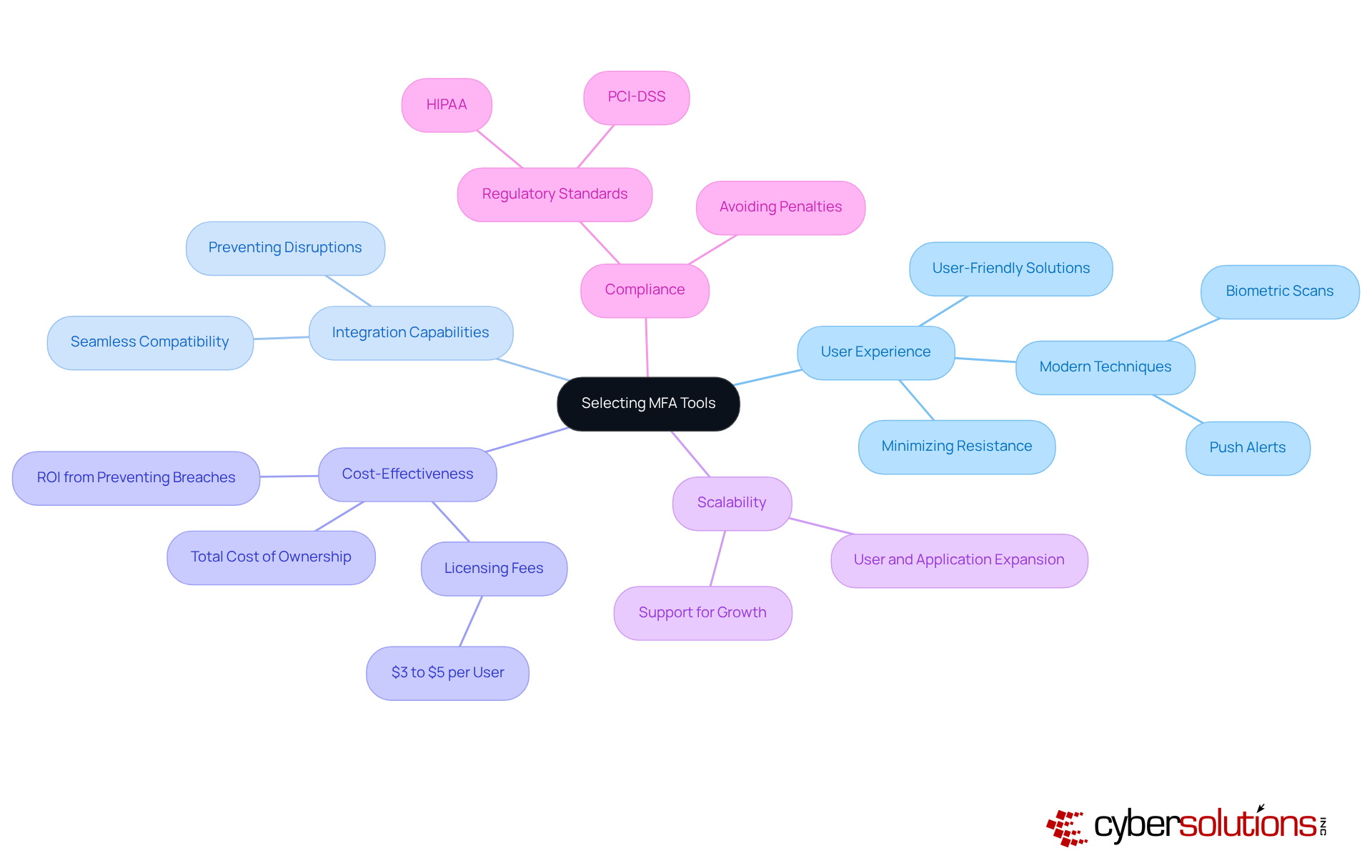
Multi-Factor Authentication tools serve as a critical line of defense in today’s digital landscape, requiring individuals to present two or more verification factors to access applications or online accounts. This approach significantly bolsters security by incorporating methods that provide protection beyond just a username and password. In a time when cyber threats are rampant, the importance of MFA cannot be overstated. Microsoft highlights that using MFA can thwart up to 99.9% of automated account attacks, underscoring their effectiveness in preventing unauthorized access.
Organizations like the City University of New York (CUNY) are set to adopt MFA across their digital platforms by July 2025, a move expected to greatly enhance their defenses against cyberattacks. This system will mandate users to provide additional verification factors, such as a one-time code, alongside their password, thereby safeguarding sensitive information and ensuring data privacy.
Recent statistics further illuminate the necessity of MFA. The FBI has reported a staggering increase in cybercrime since the COVID-19 pandemic began, with the average cost of a data breach soaring to $4.88 million in 2024. Given these alarming figures, organizations that have implemented MFA have reported a notable decline in security incidents, with 49% of breaches involving stolen credentials, as indicated by the 2023 Verizon Data Breach Investigations Report.
Experts in cybersecurity advocate for MFA as a cornerstone of modern security strategies. They emphasize that MFA not only mitigates risks linked to compromised passwords but also addresses vulnerabilities inherent in traditional authentication methods. However, it’s crucial for organizations to consider potential user fatigue associated with MFA, as some individuals may perceive the additional steps as cumbersome. By requiring multiple forms of verification, organizations can effectively diminish the risk of data breaches and uphold the integrity of their sensitive data.
Explore Different Types of Multi-Factor Authentication Methods
In today’s digital landscape, the importance of robust cybersecurity cannot be overstated, especially in healthcare. Multi-factor authentication tools are essential in safeguarding sensitive information, yet they vary significantly in security, usability, and cost. Here’s a breakdown of the most common types:
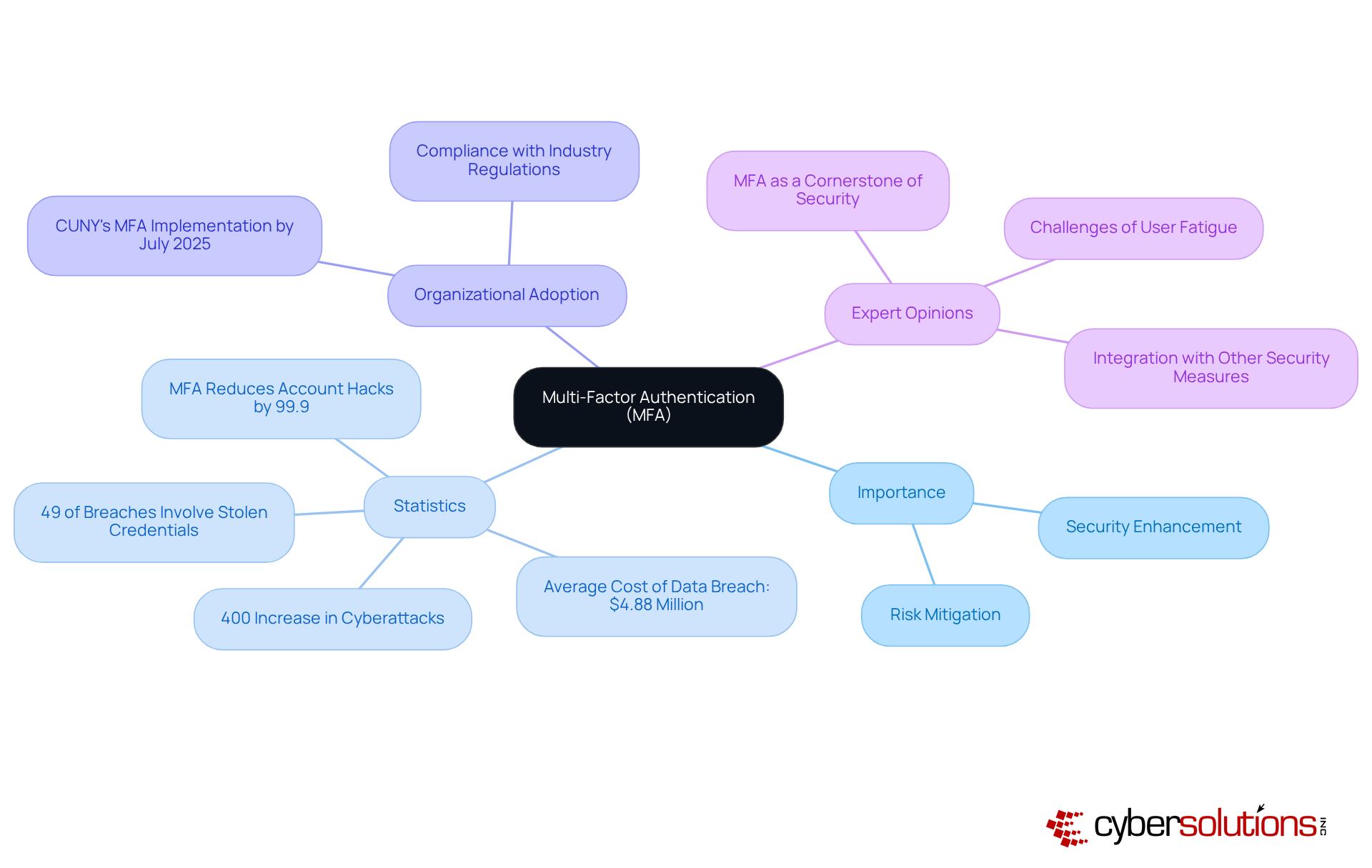
- SMS authentication: Users receive a one-time code via SMS or email, which they must enter to gain access. While convenient, this method is highly vulnerable to phishing and SIM-swap attacks, making it less secure in today's threat landscape. CISA warns organizations to avoid using SMS codes as a second factor due to these vulnerabilities.
- Time-based one-time passwords: Applications like Google Authenticator or Authy generate time-based one-time passwords (TOTPs) that refresh every 30 seconds. Although more secure than SMS codes, they are still susceptible to phishing attacks and malware, which can compromise user credentials.
- Biometric authentication: Utilizing unique biological traits such as fingerprints or facial recognition, biometric authentication provides a strong protective layer. However, it raises privacy concerns and may not be suitable for all environments. Organizations such as financial institutions have effectively adopted biometric systems to improve safety while ensuring adherence to regulations.
- Security keys: These physical devices generate codes or connect via USB, providing a strong layer of security. Security keys, in particular, are considered the strongest MFA method available today, utilizing public-key cryptography to bind authentication to the device and domain. While they are resistant to phishing and man-in-the-middle attacks, their cost ranges from $20 to $70 each, which can be a barrier for some organizations.
- Push notifications: This method sends a prompt to individuals' mobile devices, allowing them to approve or deny access. While it merges convenience with protection, push notifications can be susceptible to push fatigue attacks if not implemented with additional safeguards.
When selecting MFA tools, organizations must consider their specific protection needs, the demographics of individuals, and the potential risks involved. A layered approach that combines various methods can enhance overall security while addressing potential vulnerabilities. Furthermore, understanding the client experience and cost implications of each method is essential for effective implementation.
Select Appropriate MFA Tools Based on Organizational Needs
When it comes to safeguarding sensitive information, the importance of multi-factor authentication cannot be overstated. Organizations must prioritize several critical factors to ensure effective implementation and user adoption:
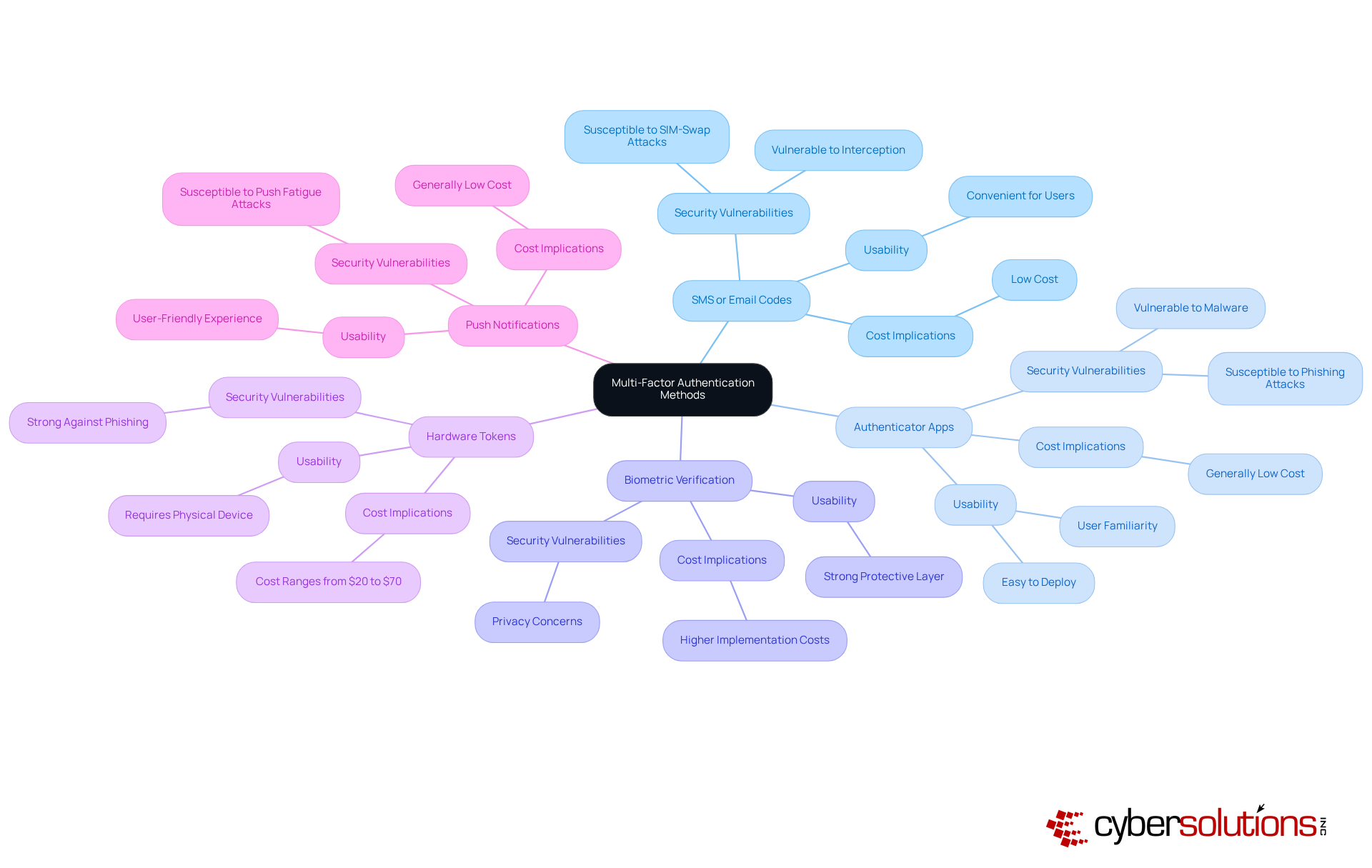
- User Experience: A user-friendly solution is essential for encouraging adoption and minimizing resistance among employees. Contemporary MFA techniques, like push alerts and biometric scans, offer smooth verification while ensuring safety, rendering them favorable for improving user experience. If implementing multi-factor authentication creates excessive friction, individuals may oppose adoption or search for alternatives.
- Integration: The chosen tools must integrate seamlessly with existing systems and applications. This compatibility aids in preventing disruptions and guarantees that protective measures do not obstruct operational efficiency.
- Cost-Effectiveness: Organizations should evaluate the total cost of ownership, which includes licensing fees, implementation, and ongoing maintenance costs. With MFA licensing usually varying from $3 to $5 per individual each month, it is essential to ensure that the solution fits within budget limitations while providing strong protection. Furthermore, MFA participants are often satisfied, emphasizing its efficiency as a budget-friendly protective strategy.
- Scalability: Choosing tools that can expand alongside the company is essential. As companies grow, their MFA solutions should support a rising number of users and applications without jeopardizing safety.
- Compliance: It is essential that the selected tools comply with industry regulations, such as GDPR or HIPAA. MFA is increasingly mandated by various regulatory frameworks, making compliance not only a necessity for protecting sensitive data but also for avoiding potential penalties associated with non-compliance.
By thoroughly assessing these elements, entities can select MFA tools that enhance protection and align with their overall business goals. This strategic approach ultimately results in a more robust cybersecurity stance.
Implement Multi-Factor Authentication Effectively
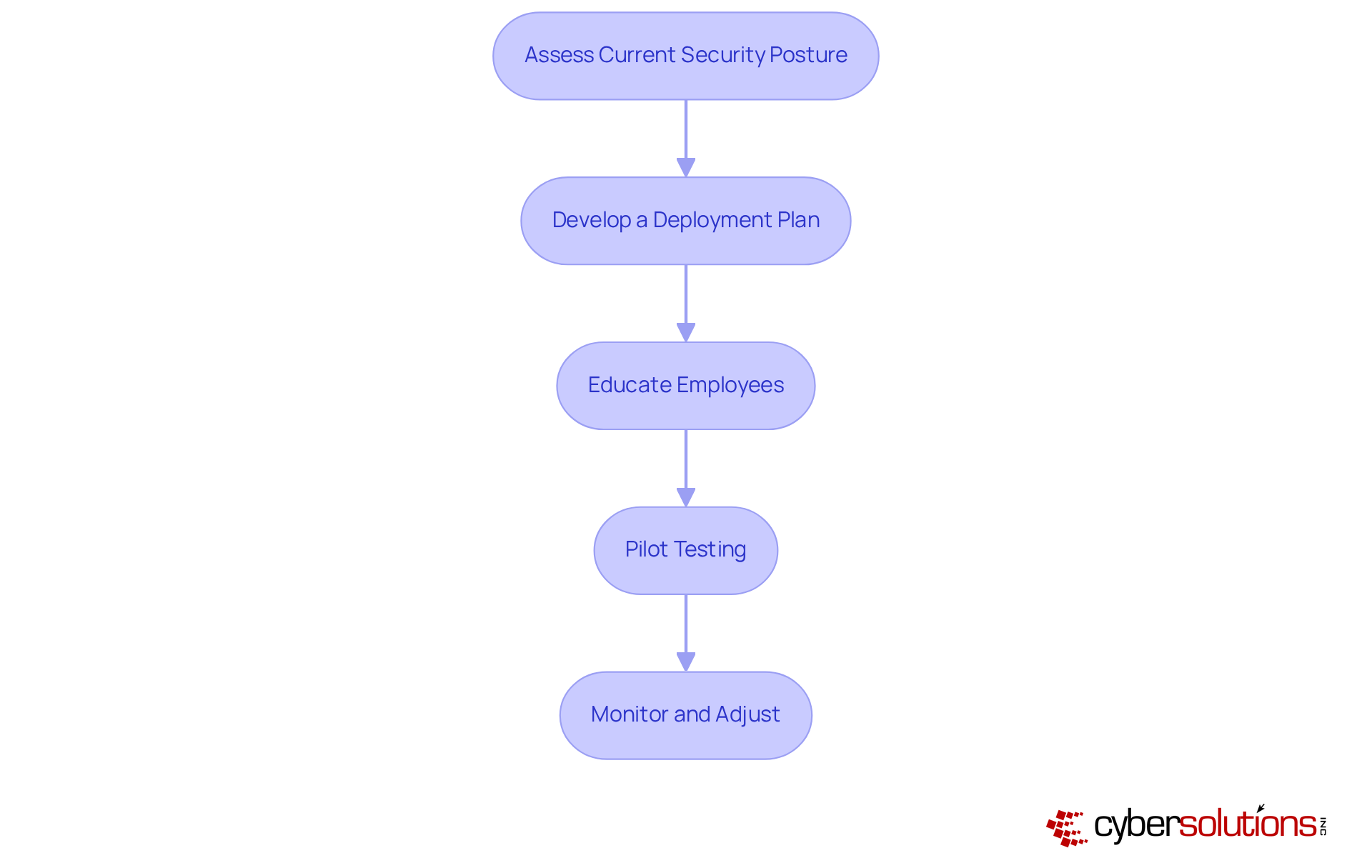
To implement multi-factor authentication effectively, organizations must prioritize cybersecurity, especially in the environment where sensitive data is at stake. Here’s how to ensure a successful implementation:
- Assessment: Begin by evaluating existing security measures. Identify areas where MFA can bolster protection against evolving threats.
- Planning: Craft a comprehensive plan that outlines the implementation timeline, required resources, and key stakeholders involved in the process.
- Training: Conduct training sessions to emphasize the importance of MFA. Equip employees with the knowledge to navigate the new system confidently.
- Pilot Testing: Implement a pilot test with a select group of participants. This step is crucial for identifying potential issues and gathering valuable feedback before a full rollout.
- Monitor and Adjust: Post-implementation, continuously evaluate the system. Solicit feedback from users to make necessary adjustments and enhancements.
By following these steps, organizations can achieve a successful MFA implementation that not only enhances security but also maintains user satisfaction. This proactive approach is essential in navigating the complex landscape of cybersecurity.
Manage and Evaluate MFA Systems Continuously
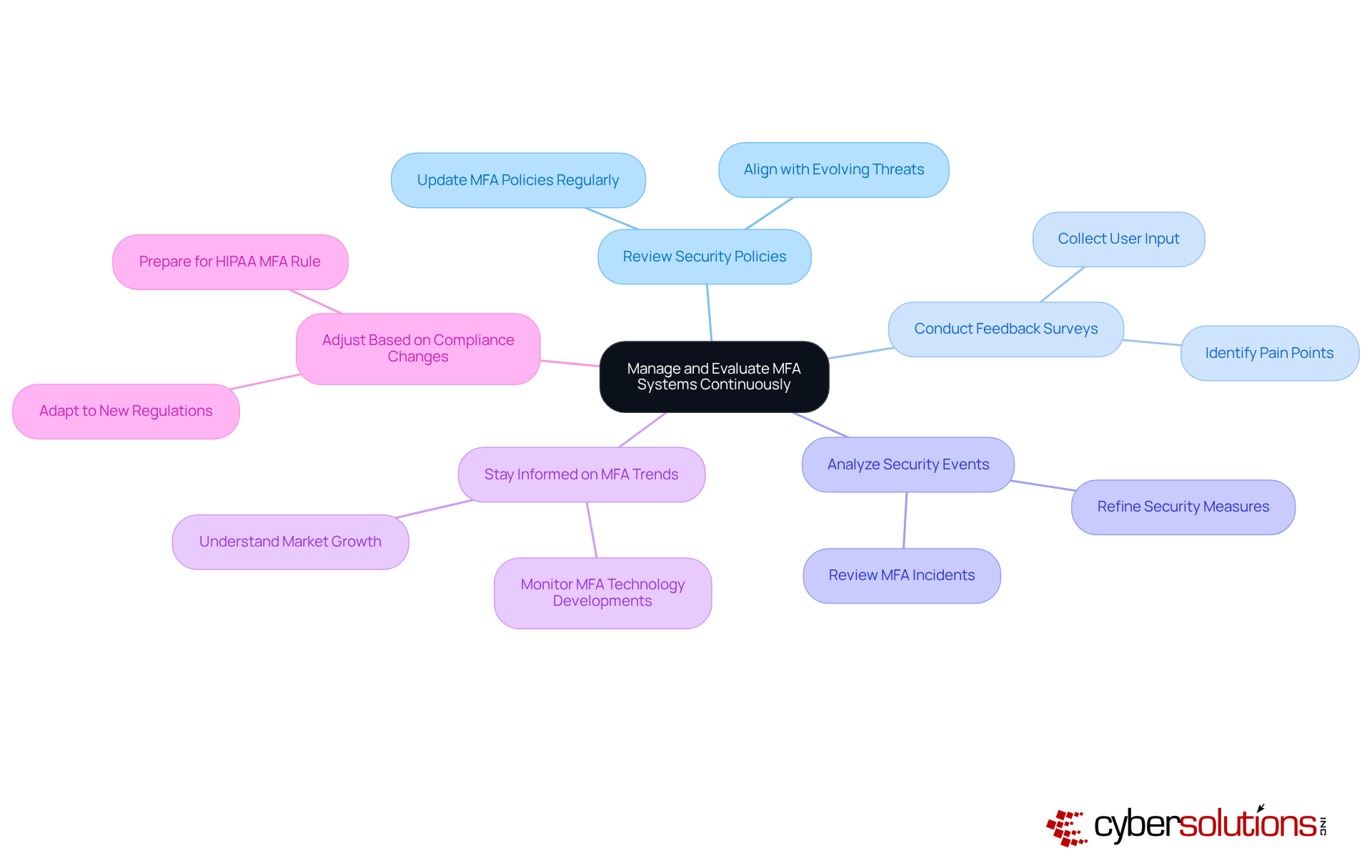
In today's digital landscape, the importance of robust cybersecurity measures, especially multi-factor authentication, cannot be overstated. As organizations strive to protect their assets, the ongoing management and evaluation of MFA systems are essential to ensure their effectiveness. Here are some best practices:
- Regularly Review Security Policies: Continuously update MFA policies to align with the evolving threat landscape and the specific needs of the organization. This proactive approach helps mitigate risks associated with emerging cyber threats through the use of advanced technologies.
- Conduct Feedback Surveys: Actively collect input from users to pinpoint pain points and identify areas for enhancement within the MFA process. Involving users can lead to improved satisfaction and adherence to protective measures.
- Analyze Security Events: Thoroughly review any incidents related to MFA to uncover vulnerabilities and refine the system. Identify weaknesses and strengthen defenses by implementing necessary changes.
- Stay Informed on MFA Trends: Keep abreast of the latest developments in MFA technologies and best practices. For instance, innovations driven by the increasing demand for security solutions across various sectors.
- Adjust Based on Regulations: Update policies or standards as they emerge. With the impending regulation on November 1, 2025, entities must prepare to implement effective solutions that align with regulatory expectations.
By adopting a continuous management approach, organizations can maintain a robust system of multi-factor authentication that effectively protects against unauthorized access, ensuring compliance and enhancing overall security. Notably, these practices underscore their critical role in cybersecurity.
Conclusion
Multi-factor authentication (MFA) is not just a trend; it’s a crucial strategy for bolstering cybersecurity in our digital age. By mandating multiple forms of verification, organizations can drastically lower the risk of unauthorized access and safeguard sensitive information. As cyber threats continue to escalate, the evolution of security protocols, particularly MFA, becomes imperative.
This article has explored essential insights into selecting and implementing MFA tools. From the various authentication methods - like SMS codes, authenticator apps, biometric verification, hardware tokens, and push notifications - to the significance of user experience, integration capabilities, cost-effectiveness, scalability, and compliance with regulatory standards, each element is vital in crafting a robust MFA strategy. Furthermore, ongoing management and evaluation of these systems are critical for adapting to emerging threats and ensuring user satisfaction.
Ultimately, adopting multi-factor authentication tools transcends mere defense; it’s a fundamental aspect of a proactive cybersecurity framework. Organizations must prioritize MFA in their security strategies, remaining vigilant and adaptable against evolving cyber threats. By doing so, they not only protect their assets but also cultivate a culture of security awareness that can significantly reduce risks associated with data breaches and identity theft.
Frequently Asked Questions
What is multi-factor authentication (MFA) and why is it important?
Multi-factor authentication (MFA) requires individuals to present two or more verification factors to access applications or online accounts, significantly enhancing security beyond just a username and password. It is crucial in preventing unauthorized access, especially in the face of sophisticated cyber threats.
How effective is MFA in preventing cyberattacks?
MFA can thwart up to 99.9% of automated account attacks, making it highly effective in protecting against unauthorized access.
What are some organizations implementing MFA?
The City University of New York (CUNY) is set to adopt MFA across its digital platforms by July 2025 to enhance defenses against cyberattacks.
What are the statistics regarding cyberattacks and data breaches?
The FBI reported a 400% increase in cyberattacks since the COVID-19 pandemic began, with the average cost of a data breach reaching $4.88 million in 2024. Additionally, 49% of breaches involve stolen credentials, highlighting the necessity of MFA.
What types of multi-factor authentication methods are available?
Common types of MFA methods include: - SMS or Email Codes: One-time codes sent via SMS or email, but vulnerable to interception. - Authenticator Apps: Generate time-based one-time passwords, more secure than SMS but still susceptible to phishing. - Biometric Verification: Uses unique biological traits for authentication, raising privacy concerns. - Hardware Tokens: Physical devices that generate codes, considered very secure but can be costly. - Push Notifications: Sends prompts to mobile devices for access approval, but can be susceptible to push fatigue attacks.
What should organizations consider when selecting MFA tools?
Organizations should consider their specific protection needs, the demographics of users, regulatory requirements, and the cost implications of each method. A layered approach combining various methods can enhance overall security.
List of Sources
- Understand Multi-Factor Authentication and Its Importance
- csacyber.com (https://csacyber.com/blog/the-importance-of-multi-factor-authentication-mfa)
- theknightnews.com (https://theknightnews.com/2025/12/03/cuny-implements-multi-factor-authentication-mfa-to-protect-student-accounts)
- securityboulevard.com (https://securityboulevard.com/2025/12/security-by-design-why-multi-factor-authentication-matters-more-than-ever)
- ssojet.com (https://ssojet.com/news/future-trends-in-multi-factor-authentication-and-ai-integration)
- isaca.org (https://isaca.org/resources/news-and-trends/industry-news/2025/will-mfa-redefine-cyberdefense-in-the-21st-century)
- Explore Different Types of Multi-Factor Authentication Methods
- osibeyond.com (https://osibeyond.com/blog/beyond-passwords-embracing-phishing-resistant-mfa-in-2025)
- securityboulevard.com (https://securityboulevard.com/2025/12/push-authentication-which-mfa-method-is-strongest)
- news.vt.edu (https://news.vt.edu/notices/2025/12/it-text-phone-authentication-phasing-out.html)
- today.marquette.edu (https://today.marquette.edu/2025/10/upcoming-changes-to-multifactor-authentication-oct-29)
- Push features we built in 2025 to stop browser-based attacks (https://pushsecurity.com/blog/taking-the-fight-to-attackers-top-features-of-2025)
- Select Appropriate MFA Tools Based on Organizational Needs
- einnews.com (https://einnews.com/pr_news/867938906/multi-factor-authentication-market-to-hit-40-bn-by-2030-at-18-cagr-driven-by-cybersecurity-needs)
- cyberreadinessinstitute.org (https://cyberreadinessinstitute.org/news-and-events/new-study-underscores-slow-adoption-of-multifactor-authenification)
- teamviewer.com (https://teamviewer.com/en-us/insights/secure-remote-access-with-mfa-best-practices-for-2025)
- trustedtechteam.com (https://trustedtechteam.com/blogs/security/the-cost-roi-of-multi-factor-authentication?srsltid=AfmBOoo6-avWg1akyEKDj_LYy5kXVNVUL7ps0c9hpxNj_K5SnuIdfV7S)
- jumpcloud.com (https://jumpcloud.com/blog/multi-factor-authentication-statistics)
- Implement Multi-Factor Authentication Effectively
- cadeproject.org (https://cadeproject.org/updates/nist-pushes-longer-passphrases-and-mfa-over-strict-rules)
- sandia.gov (https://sandia.gov/labnews/2025/07/24/two-factor-authentication-just-got-easier)
- cnbc.com (https://cnbc.com/2025/11/23/passwords-corporate-cybersecurity-employee-authentication.html)
- cyberreadinessinstitute.org (https://cyberreadinessinstitute.org/news-and-events/new-study-underscores-slow-adoption-of-multifactor-authenification)
- njda.org (https://njda.org/news-information/news-details/2025/11/25/multi-factor-authentication-(mfa)-statistics-you-need-to-know-in-2025---dental-technologies)
- Manage and Evaluate MFA Systems Continuously
- jumpcloud.com (https://jumpcloud.com/blog/multi-factor-authentication-statistics)
- gtlaw.com (https://gtlaw.com/en/insights/2025/11/nydfs-final-cybersecurity-rules-mfa-asset-inventory-and-third-party-risk)
- pushsecurity.com (https://pushsecurity.com/blog/how-cyber-breaches-are-driving-tighter-mfa-requirements-and-enforcement)
- electroiq.com (https://electroiq.com/stats/multifactor-authentication-statistics)
- twosense.ai (https://twosense.ai/blog/hipaas-new-mfa-rule-is-about-to-hit-hospitals-hard)
