

Introduction
In today’s digital landscape, where flexibility and efficiency reign supreme, organizations must prioritize cybersecurity to protect their sensitive information. Desktop-as-a-Service (DaaS) emerges as a powerful solution, offering virtual workspaces that enable employees to work from anywhere. However, this cloud-based model also brings significant challenges, particularly concerning data protection amid rising digital threats.
As businesses increasingly adopt DaaS, they must confront pressing questions about how to safeguard their data. What strategies can organizations implement to harness the benefits of DaaS while ensuring robust cybersecurity? The implications for organizations are profound, as the stakes have never been higher.
To navigate these challenges effectively, organizations need to adopt comprehensive cybersecurity measures tailored to the unique demands of a remote workforce. By doing so, they can not only protect their data but also enhance their operational efficiency and reduce costs. The time to act is now - organizations must embrace innovative solutions that prioritize both flexibility and security.
Define Desktop-as-a-Service (DaaS)
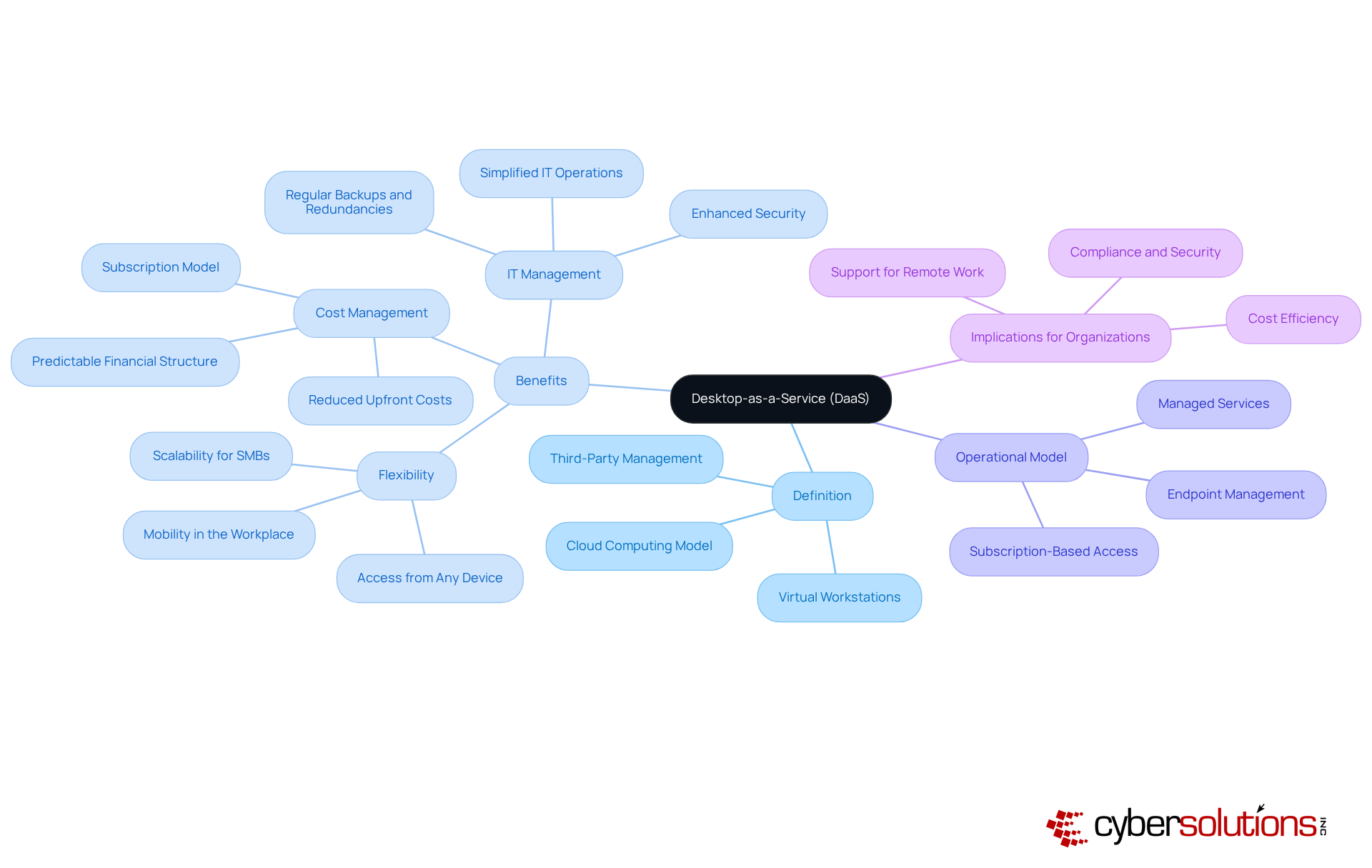
Desktop-as-a-Service (DaaS) represents a pivotal shift in how organizations approach their IT infrastructure. This service delivers virtual desktops to users via the internet, managed by a third-party service provider. By overseeing the operating system, applications, and data on their servers, these providers empower users to access their virtual workspaces from any device with internet connectivity. This model not only enhances user experience but also aligns with the demands of a modern workforce.
Moreover, DaaS offers cost savings, enabling companies to manage their expenses more effectively compared to traditional computing setups. Conventional arrangements often entail hefty upfront costs for hardware and software, whereas DaaS offers a more predictable financial structure. This model simplifies IT management and enhances productivity, making desktop-as-a-service an appealing option for businesses striving to adapt to the ever-evolving work environment.
In conclusion, as organizations seek to optimize their operations and embrace flexibility, desktop-as-a-service emerges as a strategic solution. Its ability to provide scalable resources positions it as a vital component in the future of workplace technology.
Contextualize DaaS in Modern IT Strategy
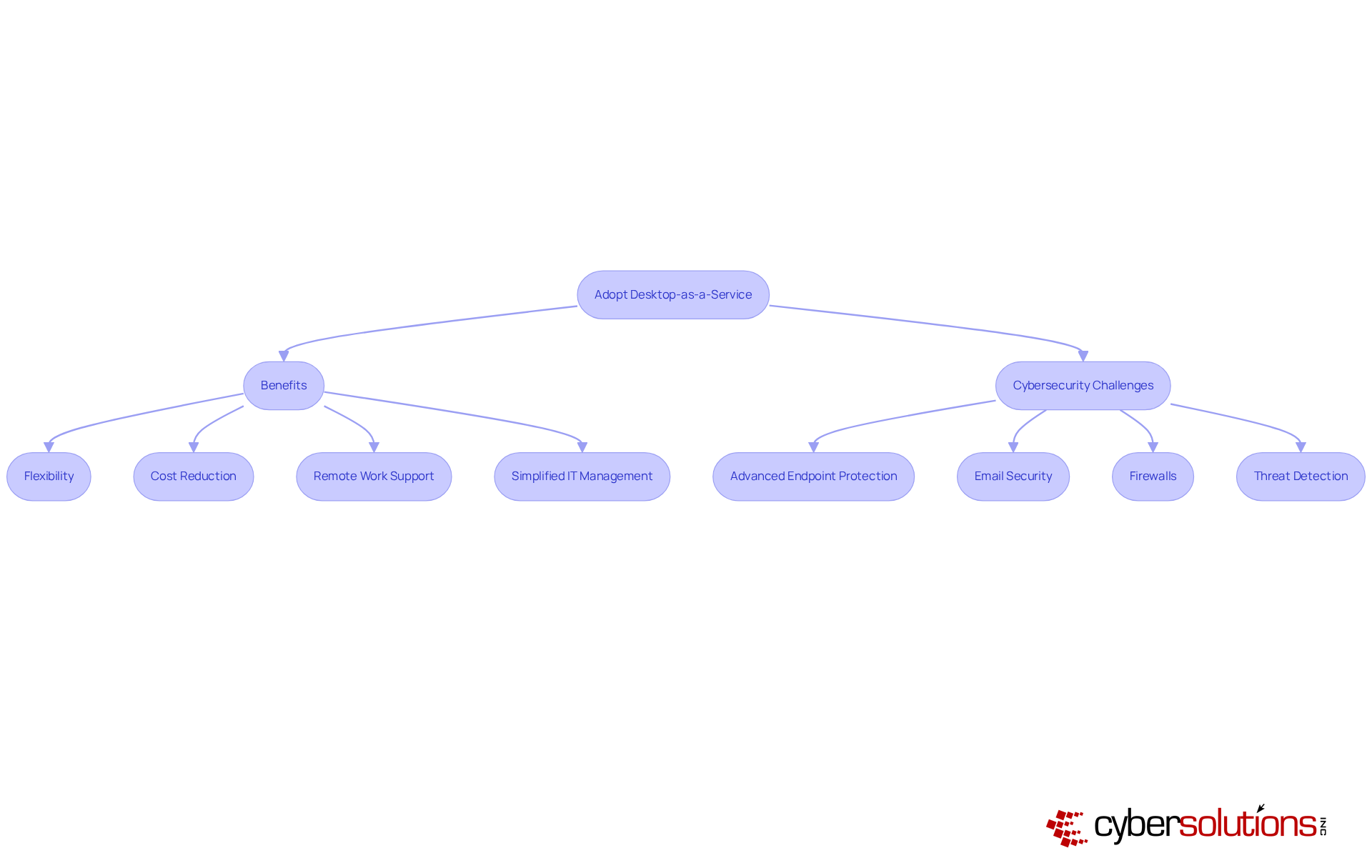
In the rapidly evolving digital landscape, cybersecurity has never been more critical. Organizations are increasingly adopting desktop-as-a-service to enhance flexibility and reduce costs. This model not only supports remote work-an essential need in the wake of the COVID-19 pandemic-but also allows employees to access their workspaces from anywhere, ensuring productivity. As companies strive for digital transformation, leveraging technology to enhance efficiency and agility becomes paramount. By incorporating desktop-as-a-service, organizations can simplify IT management, reduce reliance on hardware, and enhance security.
However, with these advancements come new challenges. Cyber Solutions addresses these challenges head-on by providing comprehensive cybersecurity services. Their offerings include:
- Email security
- Firewalls
- Threat detection
All designed to protect data and mitigate risks. Are your current security measures robust enough to protect against ransomware, phishing, and other malware threats?
Moreover, Cyber Solutions ensures monitoring and alert services, enabling organizations to detect anomalies and potential vulnerabilities in real-time. This proactive approach to cybersecurity is crucial for maintaining safety. By choosing Cyber Solutions, organizations not only gain a flexible solution but also a secure one, allowing them to focus on their core operations while knowing their data is protected.
Explore Key Characteristics and Functionality of DaaS
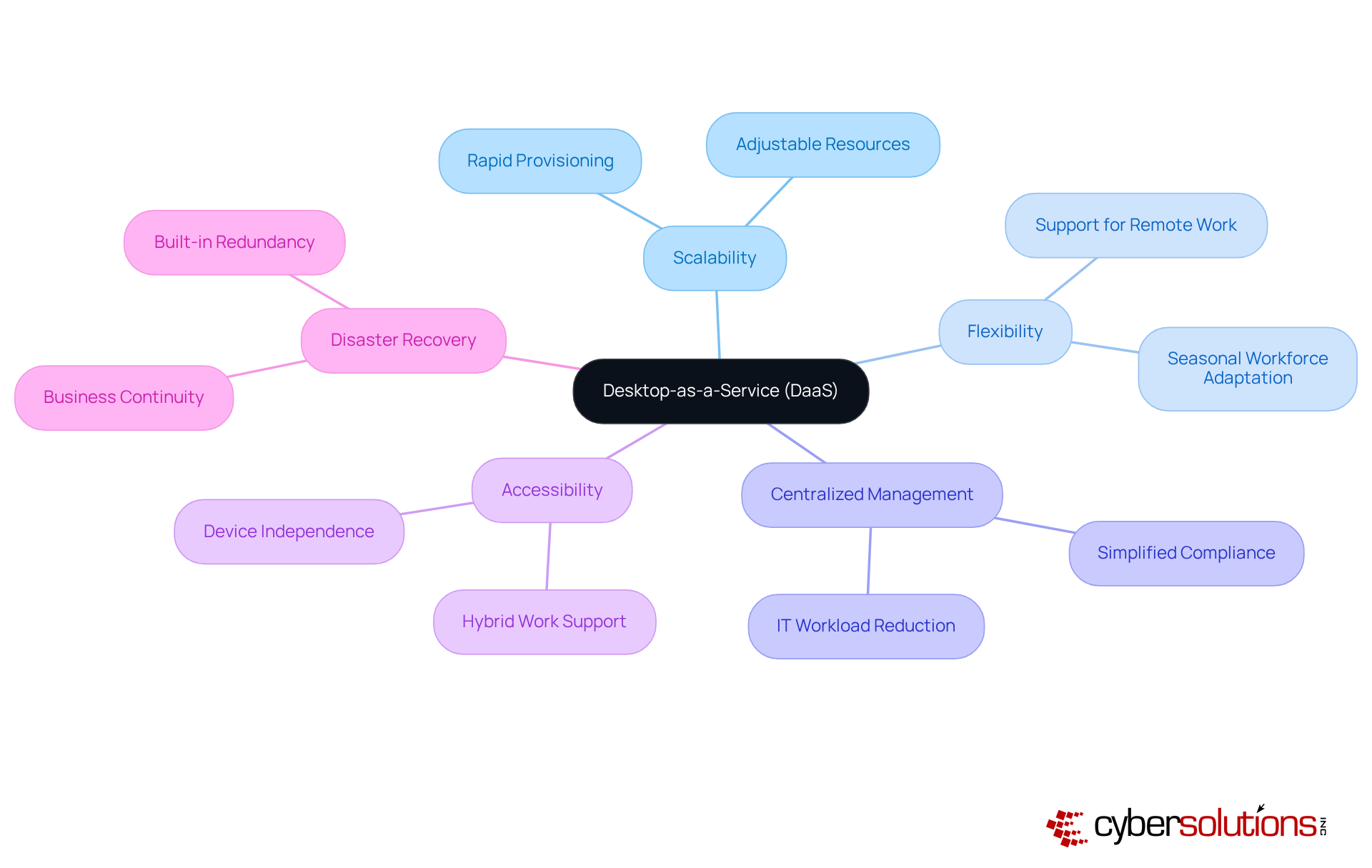
Desktop-as-a-Service (DaaS) emerges as a pivotal solution for organizations navigating the complexities of modern work environments. With its remarkable scalability, flexibility, and capabilities, desktop-as-a-service enables businesses to effortlessly adjust their computing resources in response to fluctuating workforce demands. This adaptability is particularly beneficial for seasonal or project-based operations, enabling rapid provisioning of computing resources. As a result, companies can onboard temporary or contract workers swiftly, all without the burden of extensive hardware investments.
Moreover, desktop-as-a-service enhances accessibility, allowing employees to access their desktops from various devices. This ensures that they can work from their preferred platforms, whether in the office or remotely. Such flexibility is crucial for organizations managing hybrid work environments, as desktop-as-a-service allows for seamless transitions between different work settings.
In addition, desktop-as-a-service providers take on the responsibility of maintenance, updates, and security, which significantly alleviates the workload on internal IT teams. This not only strengthens security but also ensures compliance with industry regulations. For instance, healthcare organizations can centralize patient records in HIPAA-compliant environments, ensuring secure access while adhering to regulatory standards.
Furthermore, DaaS solutions typically include integrated backup systems, which are essential for maintaining operations during system failures or local infrastructure disruptions. This feature enables organizations to sustain operations and minimize downtime, enhancing their resilience against unforeseen challenges.
As Julie Watson, a technology analyst, aptly notes, "DaaS simplifies IT management since the service provider manages infrastructure maintenance, updates, and security." This approach streamlines operations and allows organizations to concentrate on strategic initiatives rather than day-to-day IT concerns. Overall, desktop-as-a-service emerges as a transformative solution that perfectly aligns with the evolving needs of contemporary businesses.
Identify Use Cases and Industry Applications of DaaS
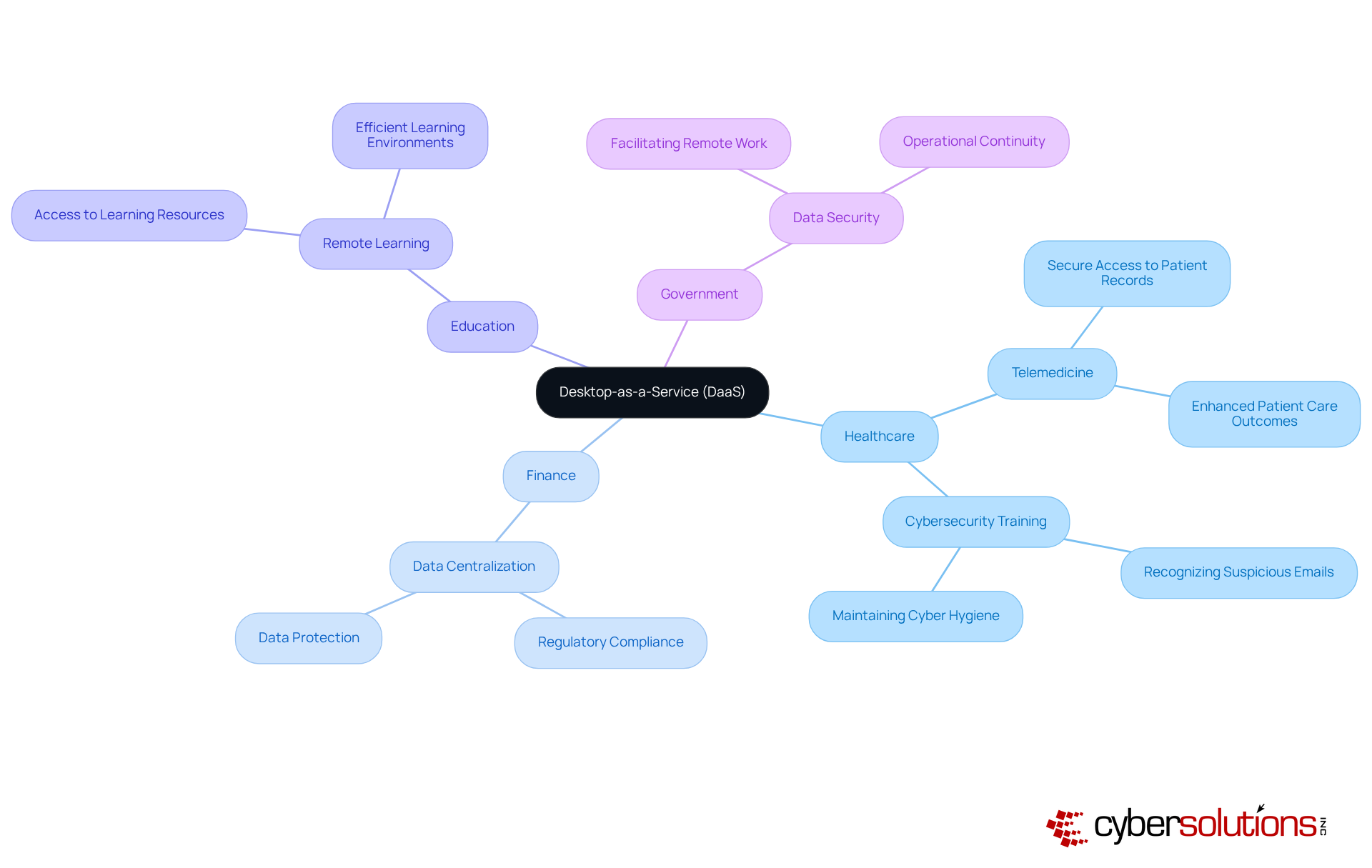
Cybersecurity is paramount in today's landscape, where threats loom large and the stakes are incredibly high. Desktop-as-a-Service (DaaS) is gaining recognition for its versatility across various sectors, especially in healthcare, finance, education, and government. In healthcare, DaaS empowers medical professionals to securely access patient records from any location, significantly enhancing patient care and improving operational efficiency.
Following a ransomware attack, healthcare providers have turned to Cyber Solutions for immediate training on recognizing suspicious emails and maintaining proper cybersecurity practices. This proactive approach ensures minimal operational disruption. Remarkably, the Provider's 4,500 endpoints were restored within just two weeks, showcasing the effectiveness of Cyber Solutions' strategies.
The finance industry also benefits from DaaS by centralizing data administration and protection, which is essential for adhering to regulatory compliance. Educational institutions leverage DaaS to provide students and faculty with effortless access to learning resources and applications from any device, fostering efficient remote learning environments. Furthermore, government agencies utilize DaaS to enhance data security while facilitating communication, ensuring operational continuity during crises.
These diverse applications underscore the versatility of Desktop-as-a-Service in addressing the unique challenges faced by various sectors, establishing Desktop-as-a-Service as an essential component of modern IT infrastructure. Additionally, the implementation of security measures by Cyber Solutions further strengthens cybersecurity by preventing unauthorized software execution. This measure not only reduces vulnerabilities but also ensures compliance with regulations like HIPAA and GDPR.
Conclusion
Desktop-as-a-Service (DaaS) stands as a pivotal advancement in how organizations manage their computing needs, fostering a more adaptable and efficient work environment. By delivering virtual desktops through the cloud, DaaS not only enhances mobility but also streamlines IT management. This makes it an appealing choice for businesses striving to excel in a competitive landscape.
Key insights have surfaced regarding the advantages of DaaS, such as:
- Cost-effectiveness
- Scalability
- Centralized management capabilities
This model supports a variety of industries - from healthcare to finance - by providing secure, remote access to essential data and applications. Moreover, the integration of robust cybersecurity measures empowers organizations to navigate the complexities of modern threats while ensuring compliance with industry regulations.
As organizations increasingly embrace digital transformation, the importance of adopting Desktop-as-a-Service cannot be overstated. Leveraging this innovative solution allows businesses to enhance operational efficiency, support remote work, and protect sensitive information. The future of workplace technology is undeniably linked to DaaS, compelling executives to view its implementation as a strategic imperative for sustained growth and resilience in an ever-evolving digital landscape.
Frequently Asked Questions
What is Desktop-as-a-Service (DaaS)?
Desktop-as-a-Service (DaaS) is a cloud computing model that delivers virtual workstations to users via the internet, managed by a third-party service provider.
How does DaaS benefit users?
DaaS allows users to access their virtual workspaces from any device with internet connectivity, providing flexibility and mobility in the workplace.
What financial advantages does DaaS offer compared to traditional computing setups?
DaaS typically operates on a subscription model, which helps companies manage expenses more effectively and offers a more predictable financial structure compared to traditional setups that require hefty upfront costs for hardware and software.
How does DaaS impact IT management?
DaaS simplifies IT management by having the service provider oversee the operating system, applications, and data on their servers, enhancing operational efficiency for businesses.
Why is DaaS considered a strategic solution for organizations?
DaaS is seen as a strategic solution because it helps organizations optimize their operations, embrace flexibility, streamline costs, and improve accessibility in the evolving work environment.
List of Sources
- Define Desktop-as-a-Service (DaaS)
- cubework.com (https://cubework.com/glossary/desktop-as-a-service-daas)
- theitvortex.com (https://theitvortex.com/case_studies/leading-global-real-estate-firm-used-cloud-services-to-scale-from-100-to-1000-team-members-worldwide)
- bcainc.com (https://bcainc.com/blog/desktop-as-a-service-daas-can-help-smbs-achieve-growth)
- statista.com (https://statista.com/outlook/tmo/public-cloud/desktop-as-a-service/worldwide?srsltid=AfmBOoqfuoA6c-neWMooFu5_OUGP2NtXg-cvMaxDuSBVacrKrnjEFbNv)
- Contextualize DaaS in Modern IT Strategy
- cloudzero.com (https://cloudzero.com/blog/cloud-computing-statistics)
- columbiaadvisory.com (https://columbiaadvisory.com/case_studies/embracing-the-future-tarleton-state-universitys-data-driven-transformation)
- pelanor.io (https://pelanor.io/learning-center/learn-cloud-computing-statistics)
- n2ws.com (https://n2ws.com/blog/cloud-computing-statistics)
- flowlu.com (https://flowlu.com/blog/productivity/remote-work-statistics)
- Explore Key Characteristics and Functionality of DaaS
- 15 quotes and stats to help boost your data and analytics savvy | MIT Sloan (https://mitsloan.mit.edu/ideas-made-to-matter/15-quotes-and-stats-to-help-boost-your-data-and-analytics-savvy)
- island.io (https://island.io/blog/decoding-desktop-as-a-service)
- acecloudhosting.com (https://acecloudhosting.com/blog/stats-about-vdi-daas)
- Identify Use Cases and Industry Applications of DaaS
- Overheard this week: 6 notable quotes on healthcare AI (https://healthexec.com/topics/patient-care/overheard-week-6-notable-quotes-healthcare-ai)
- acecloudhosting.com (https://acecloudhosting.com/blog/stats-about-vdi-daas)
- klara.com (https://klara.com/blog/12-best-quotes-on-the-future-of-healthcare)
- financialit.net (https://financialit.net/blog/data/data-service-discovering-value-financial-services-data-silos)
- deliberatedirections.com (https://deliberatedirections.com/quotes-future-of-healthcare)
