

Introduction
In an era where data breaches and cyber threats are more prevalent than ever, the significance of robust data backup strategies is paramount. For C-suite leaders, the challenge extends beyond merely recognizing the critical nature of data preservation; it encompasses the implementation of effective solutions that guarantee operational continuity and adherence to regulatory standards. As organizations confront the staggering financial consequences of data loss, one pressing question emerges: how can leaders construct a resilient data backup framework that not only safeguards their assets but also prepares them for unexpected disruptions?
Define Data Backup: Importance and Fundamentals
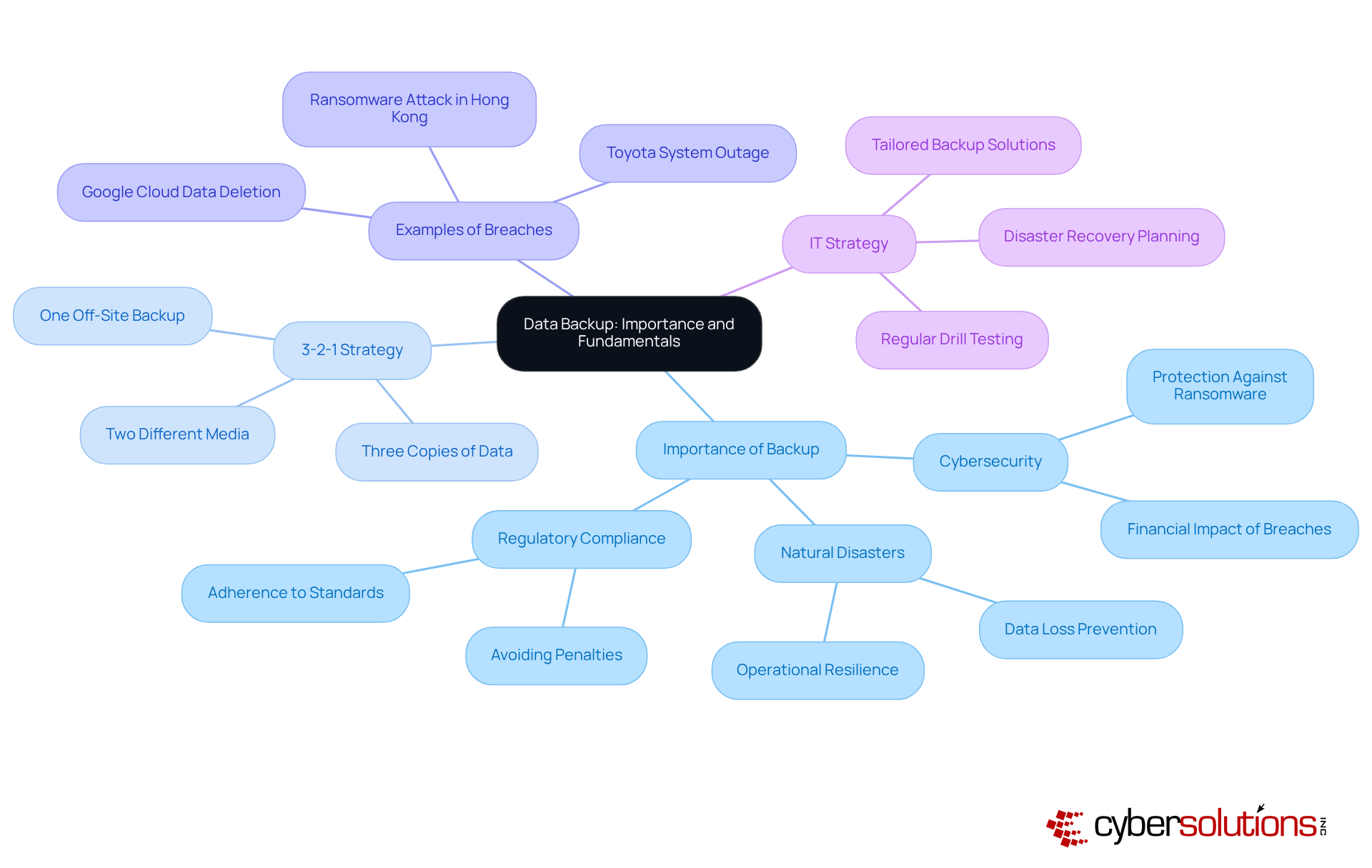
Information duplication is a critical process that involves creating copies of information to ensure its availability in the event of loss, corruption, or disaster. For businesses, understanding the significance of backup is not just beneficial—it's essential. This practice of data backup safeguards against the loss of information due to cyberattacks, hardware failures, or natural disasters, while also ensuring data integrity. In 2023, the global average cost of a breach was a staggering $4.45 million, underscoring the importance of effective data protection.
Efficient methods, such as the widely adopted 3-2-1 strategy—maintaining three copies of information on two different media with one stored off-site—can significantly reduce restoration time and costs. This approach is not merely a precaution; it is a fundamental component of an organization's risk management framework. By safeguarding against data loss, it enhances operational resilience, enabling businesses to maintain continuity even in adverse conditions. A notable example is the prolonged recovery of a company in Hong Kong from a ransomware attack, which highlighted the critical need for a robust backup plan to ensure business continuity. Additionally, the disruption of the Toyota production system for over 36 hours in August 2023 serves as a stark reminder of the consequences of insufficient recovery plans.
Leaders must prioritize data backup as a cornerstone of their overall IT strategy, recognizing its vital role in protecting both financial and operational integrity. As Chad Quarles, a CISO/Security Advisor, aptly states, 'Data backup refers to the procedure of generating and preserving copies of information that can be utilized to safeguard organizations against information loss.' Furthermore, organizations need to select the most suitable restoration and recovery methods tailored to their specific needs, as a variety of approaches are available. By investing in comprehensive recovery solutions and regularly conducting drill tests, organizations can enhance their preparedness for potential data loss, ensuring they possess a strategy that adapts to their evolving requirements.
Implement Effective Data Backup Strategies: Best Practices
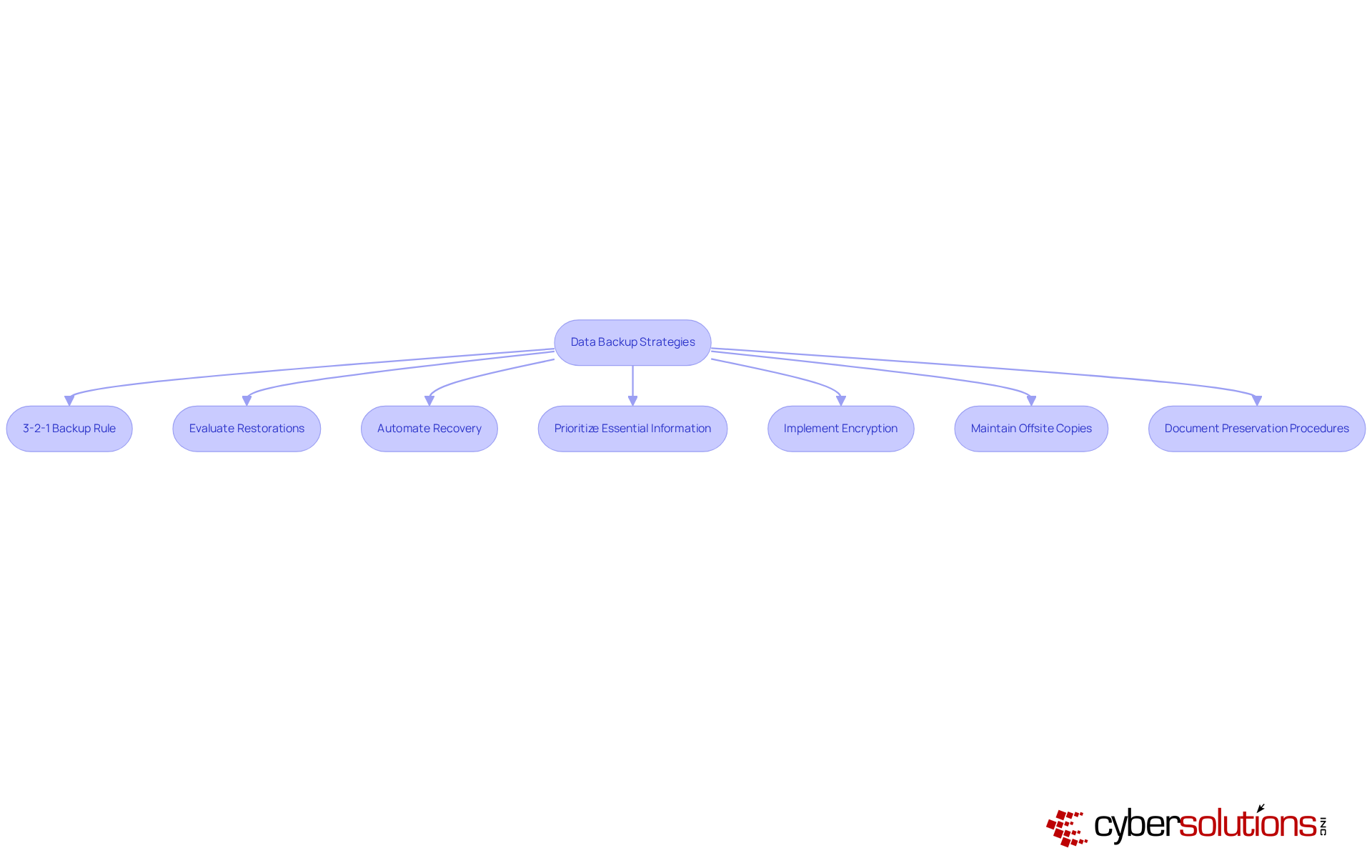
To implement effective strategies, C-suite leaders must recognize the critical importance of data backup. Consider the following best practices but also ensure operational continuity in the face of potential threats:
- Adopt the 3-2-1 Backup Rule: Maintain three copies of your data—one primary and two backups on different devices. This approach significantly reduces the risk of information loss and aligns with expert recommendations highlighting the necessity of redundancy as a means of ensuring redundancy in information protection. As Rob T. Lee states, 'The classic 3-2-1 principle of maintaining three copies of information on two distinct media, with one copy stored off-site for emergency restoration, should be adhered to as a method of backup, but it is no replacement for a strong disaster recovery plan.'
- Consistently Evaluate Restorations: Regular assessments of recovery systems are essential to ensure information can be retrieved swiftly and accurately. Alarmingly, statistics reveal that only 30% of organizations test their backups regularly, underscoring the critical need for consistent testing to avert failures during recovery efforts.
- Automate Recovery Procedures: Implement automation to guarantee that information is consistently preserved without manual intervention. Automation significantly diminishes the likelihood of human errors and ensures that backups are executed reliably, addressing the concerning fact that 20% of users seldom secure their information.
- Prioritize Essential Information: It is vital to identify and prioritize the most critical information for backup. This strategy ensures that essential data is prioritized, protecting essential data first and facilitating quicker recovery in emergencies. Surveys indicate that many users back up all their information indiscriminately, potentially detracting focus from essential assets.
- Implement Encryption: Protect stored information with encryption to safeguard against unauthorized access. This measure is particularly crucial for sensitive data subject to regulatory compliance, as 62% of users neglect encryption on their external drives, exposing them to significant security risks.
- Maintain Offsite Copies: Store copies in a secure location to shield against local disasters. This practice ensures data redundancy, guaranteeing information availability even in catastrophic situations. Notably, 50% of users do not utilize physical copies for information stored in cloud storage, highlighting the importance of a comprehensive backup strategy to bolster business continuity.
- Document Preservation Procedures: Develop and document restoration plans. This ensures that all team members understand their roles in information recovery efforts, which is essential for maintaining operational resilience during incidents.
Ensure Compliance: Align Data Backup with Regulatory Standards
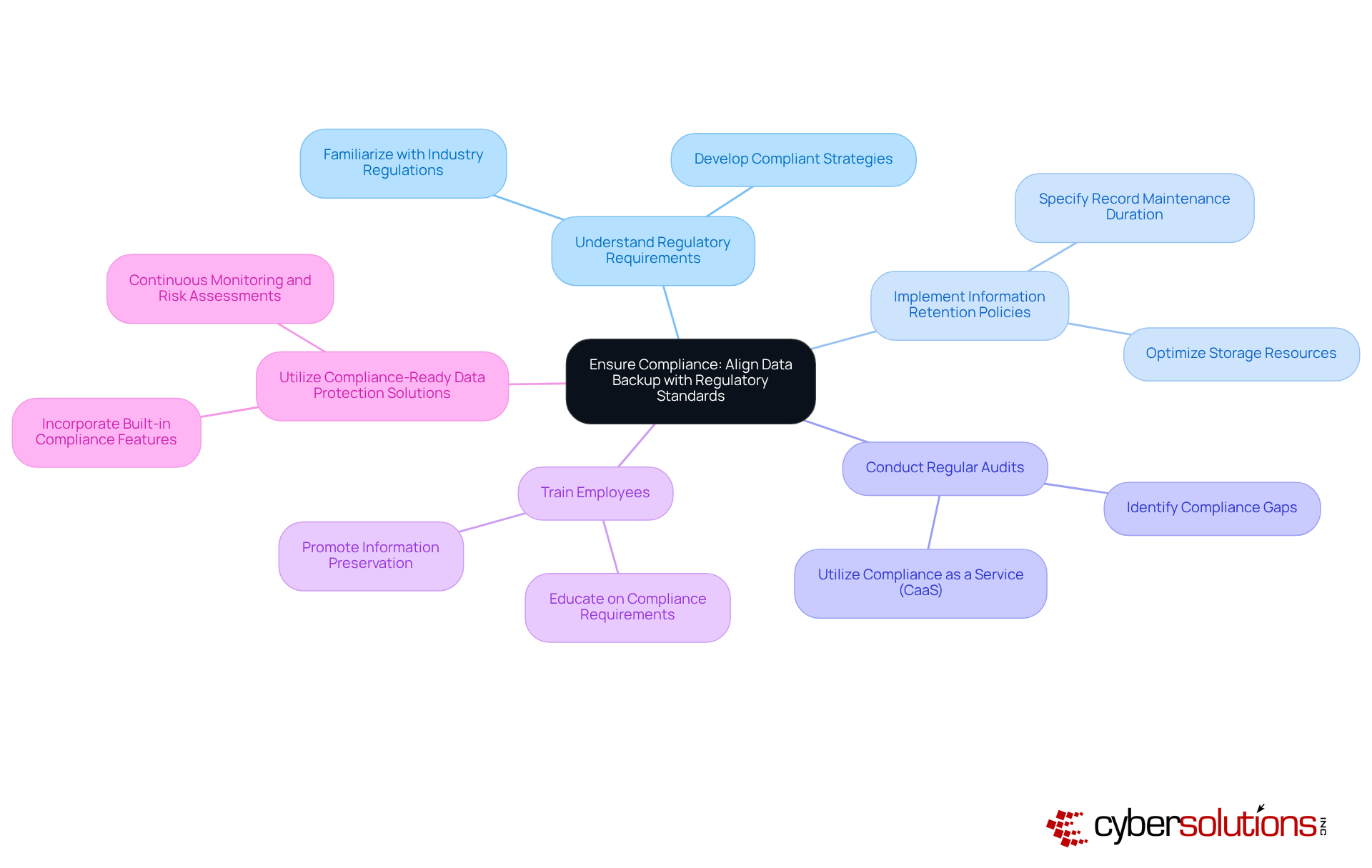
C-suite executives must ensure that their organizations adhere to critical regulatory benchmarks, including GDPR, HIPAA, and PCI-DSS. Compliance is not merely a legal obligation; it cultivates trust with customers and stakeholders, which is essential for business sustainability. Consider the following key aspects:
- Understand Regulatory Requirements: Familiarize yourself with the specific regulations relevant to your industry. This foundational knowledge is vital for developing compliant strategies that mitigate risks associated with non-compliance.
- Implement Retention Policies: Establish clear guidelines that specify how long records should be maintained and when they should be disposed of. This practice not only aids in adhering to regulations that mandate information minimization but also optimizes storage resources.
- Conduct Regular Audits: Routine audits of storage processes are crucial to ensure compliance with regulatory standards. This proactive approach helps identify gaps and areas for improvement, enabling organizations to stay ahead of regulatory changes. Utilizing Compliance as a Service (CaaS) can significantly enhance audit preparation, providing the necessary documentation and expert guidance for successful outcomes. CaaS is particularly advantageous for small and medium-sized businesses (SMBs) as it grants access to enterprise-level compliance expertise without the substantial costs of in-house staff.
- Train Employees: Providing thorough training for staff on compliance requirements and the significance of information preservation is imperative. An informed workforce plays a key role in maintaining compliance and protecting sensitive information from breaches.
- Utilize Compliance-Ready Data Protection Solutions: Choose data protection solutions that feature built-in compliance capabilities, such as encryption and access controls. These tools streamline adherence to regulatory standards and bolster the overall security posture of the organization. CaaS solutions can further support this by offering continuous monitoring and proactive risk assessments to keep your systems aligned with current and future regulatory requirements.
In 2023, 62% of organizations reported significant improvements in their information safeguarding practices after implementing compliance-compliant recovery solutions, underscoring the effectiveness of aligning recovery practices with regulatory obligations. Moreover, 80% of companies prioritize compliance, reflecting the increasing focus on safety in information management. As we move toward 2025, understanding and integrating these regulatory standards into information recovery strategies will be crucial for organizational resilience and trust.
Leverage Technology: Tools for Optimizing Data Backup
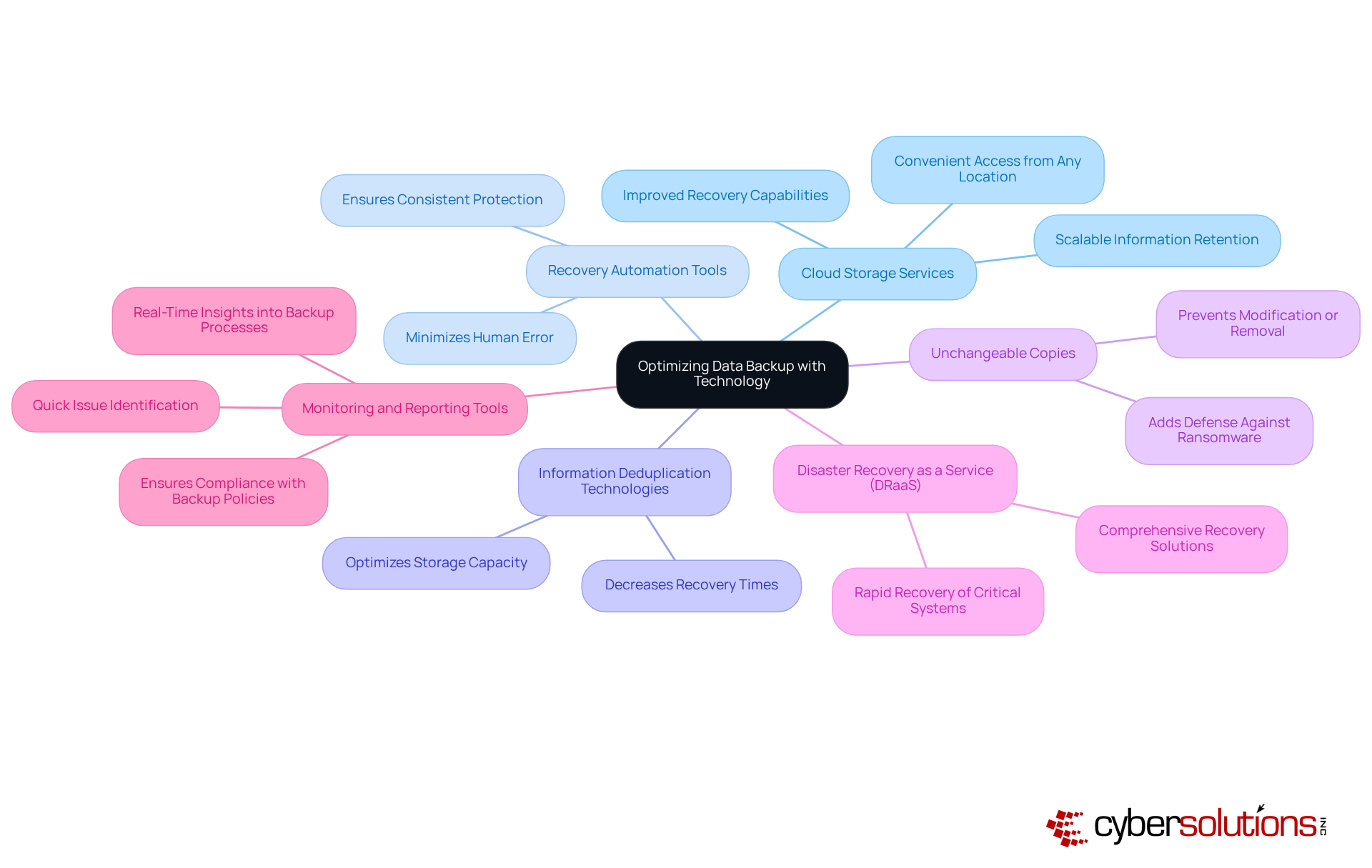
To optimize business processes, C-suite leaders must recognize the critical role of leveraging advanced technologies. The following solutions are essential for enhancing data protection and security:
- Cloud Storage Services: By utilizing cloud storage, organizations can achieve scalable and flexible information retention. These solutions not only provide automatic storage but also enable convenient access to information from any location, significantly improving productivity.
- Backup Automation: Implementing tools that automate recovery schedules and processes minimizes the risk of human error, ensuring consistent information protection and reliability.
- Data Deduplication: Utilizing information deduplication allows for the removal of unnecessary copies of data, optimizing storage capacity and decreasing recovery times.
- Write Once Read Many (WORM) Storage: Exploring options for WORM storage is crucial, as these prevent information from being modified or removed, thereby adding an extra layer of defense against ransomware attacks.
- Disaster Recovery as a Service (DRaaS): Engaging with DRaaS options provides comprehensive disaster recovery solutions, ensuring rapid recovery of critical systems and data in the event of a disaster.
- Monitoring and Reporting Tools: Implementing monitoring tools into backup processes is vital. These tools facilitate quick identification of issues and ensure compliance, enhancing overall data security.
By adopting these technologies, C-suite leaders can fortify their organizations against evolving cybersecurity threats, ensuring robust data protection for business continuity and recovery strategies.
Conclusion
Data backup is an indispensable element for modern businesses, particularly for C-suite leaders tasked with safeguarding their organization's information assets. The necessity of having a robust data backup strategy cannot be overstated; it serves as a shield against data loss stemming from cyber threats, hardware failures, and natural disasters. By prioritizing data backup, organizations not only protect their operational integrity but also enhance their resilience in the face of unexpected challenges.
Key strategies that leaders should implement to ensure effective data backup practices include:
- Adopting the 3-2-1 backup rule
- Automating recovery procedures
- Prioritizing essential information
- Ensuring compliance with regulatory standards
Additionally, leveraging advanced technologies such as cloud storage and disaster recovery services further optimizes data protection and recovery capabilities. Each of these strategies contributes to a comprehensive approach that minimizes risks associated with data loss and enhances business continuity.
Ultimately, the significance of data backup transcends mere compliance; it is a vital investment in the future of any organization. C-suite leaders are urged to take proactive steps in developing and implementing robust data backup strategies that align with regulatory requirements and leverage modern technologies. By doing so, they not only protect their organization's valuable information but also build trust with customers and stakeholders, ensuring long-term success and sustainability in an increasingly data-driven world.
Frequently Asked Questions
What is data backup and why is it important?
Data backup is the process of creating copies of information to ensure its availability in case of loss, corruption, or disaster. It is essential for businesses to safeguard against data loss due to cyberattacks, hardware failures, or natural disasters, and to comply with regulatory requirements.
What is the financial impact of inadequate data protection measures?
In 2023, the global average cost of a data breach was approximately $4.45 million, highlighting the significant financial repercussions of insufficient information protection.
What is the 3-2-1 backup strategy?
The 3-2-1 backup strategy involves maintaining three copies of data on two different media types, with one copy stored off-site. This method helps reduce restoration time and costs associated with data breaches.
How does data backup enhance operational resilience?
By safeguarding against data loss, data backup enhances operational resilience, allowing businesses to maintain continuity during adverse conditions and recover more effectively from incidents.
Can you provide examples of the consequences of poor data recovery plans?
A notable example is a company in Hong Kong that experienced prolonged recovery from a ransomware attack, demonstrating the need for a robust data restoration plan. Additionally, the disruption of the Toyota system for over 36 hours in August 2023 serves as a reminder of the risks associated with insufficient recovery plans.
How should leaders prioritize data backup in their IT strategy?
Leaders must view information preservation as a cornerstone of their overall IT strategy, recognizing its crucial role in protecting both financial and operational integrity.
What should organizations consider when selecting recovery methods?
Organizations need to choose the most suitable restoration and recovery methods based on their specific needs, as various approaches are available. Regularly conducting drill tests can also enhance preparedness for potential information loss events.
List of Sources
- Define Data Backup: Importance and Fundamentals
- hartmanadvisors.com (https://hartmanadvisors.com/data-backup-why-your-small-business-needs-it-and-how-to-get-it)
- llcbuddy.com (https://llcbuddy.com/data/disaster-recovery-statistics)
- isaca.org (https://isaca.org/resources/news-and-trends/industry-news/2024/ensuring-data-security-the-importance-of-cloud-backups-and-drill-testing)
- solutionsreview.com (https://solutionsreview.com/backup-disaster-recovery/world-backup-day-quotes-from-experts-for-2025)
- solutionsreview.com (https://solutionsreview.com/backup-disaster-recovery/addressing-blind-spots-in-your-backup-and-recovery-strategy)
- Implement Effective Data Backup Strategies: Best Practices
- handyrecovery.com (https://handyrecovery.com/data-backup-statistics)
- solutionsreview.com (https://solutionsreview.com/backup-disaster-recovery/world-backup-day-quotes-from-experts-for-2025)
- solutionsreview.com (https://solutionsreview.com/backup-disaster-recovery/world-backup-day-quotes-from-experts-for-2024)
- Ensure Compliance: Align Data Backup with Regulatory Standards
- sprinto.com (https://sprinto.com/blog/ransomware-statistics)
- kjr.com.au (https://kjr.com.au/case_studies/department-of-health-victoria)
- electroiq.com (https://electroiq.com/stats/backup-statistics)
- cobalt.io (https://cobalt.io/blog/cybersecurity-statistics-2024)
- Healthcare Cybersecurity Statistics 2024 (https://ispartnersllc.com/blog/healthcare-cybersecurity-statistics)
- Leverage Technology: Tools for Optimizing Data Backup
- n2ws.com (https://n2ws.com/blog/cloud-computing-statistics)
- backblaze.com (https://backblaze.com/cloud-storage/resources/hard-drive-test-data)
- acecloudhosting.com (https://acecloudhosting.com/blog/cybersecurity-quotes)
- The True Cost of Downtime: 21 Stats You Need to Know (https://trilio.io/resources/cost-of-downtime)
- solutionsreview.com (https://solutionsreview.com/backup-disaster-recovery/world-backup-day-quotes-from-experts-for-2024)
