
Introduction
In today's world, where cyber threats are more sophisticated than ever, C-suite leaders stand at the forefront of protecting their organizations' sensitive communications. Implementing effective email safety practices isn't just a precaution; it's a critical strategy for maintaining data integrity and corporate reputation. But here's the challenge: how can executives ensure their email systems are fortified against relentless attacks while fostering a culture of awareness among their teams? This article delves into essential email safety tips and best practices that leaders must adopt to navigate the complex landscape of email security effectively.
Establish Secure Email Practices
C-suite leaders must prioritize security measures to protect sensitive communications. In today’s digital landscape, where threats are rampant, establishing robust protocols and implementing safeguards is not just advisable; it’s essential. Here are key practices that should be implemented:
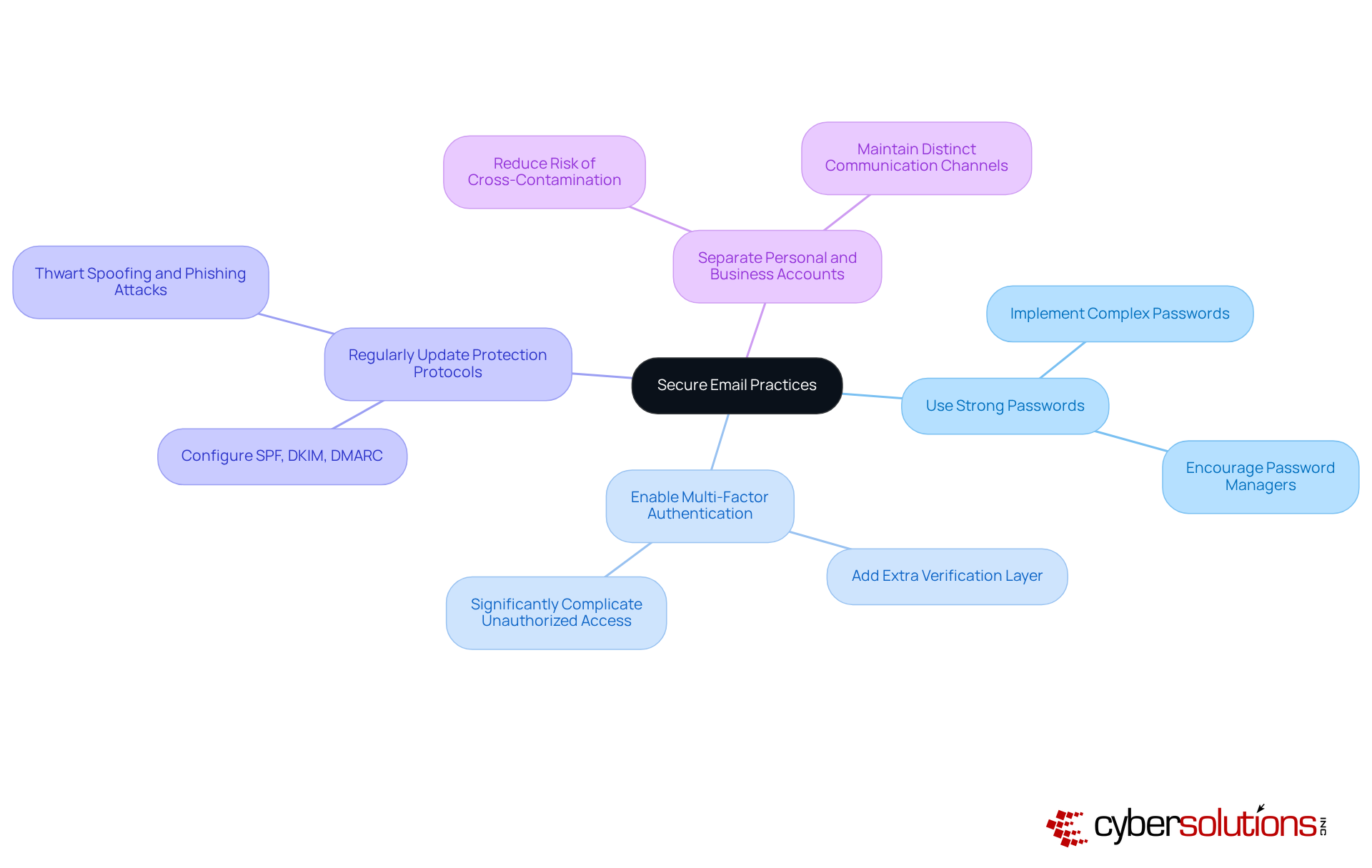
- Use strong passwords: Implement complex passwords unique to each account. Encourage the use of password managers to securely manage these passwords.
- Enable multi-factor authentication: MFA provides an additional layer of security by requiring a second form of verification, significantly complicating unauthorized access.
- Configure email authentication protocols: Ensure that messaging protection protocols, such as SPF, DKIM, and DMARC, are correctly configured to prevent spoofing.
- Separate personal and business accounts: Maintain distinct communication accounts for personal and business use to reduce the risk of cross-contamination from personal breaches.
By implementing these practices, organizations can significantly enhance their cybersecurity posture, but also their reputation and trustworthiness in the industry.
Implement Technical Safeguards for Email Security
To bolster email security, C-suite leaders must prioritize the implementation of essential technical safeguards:
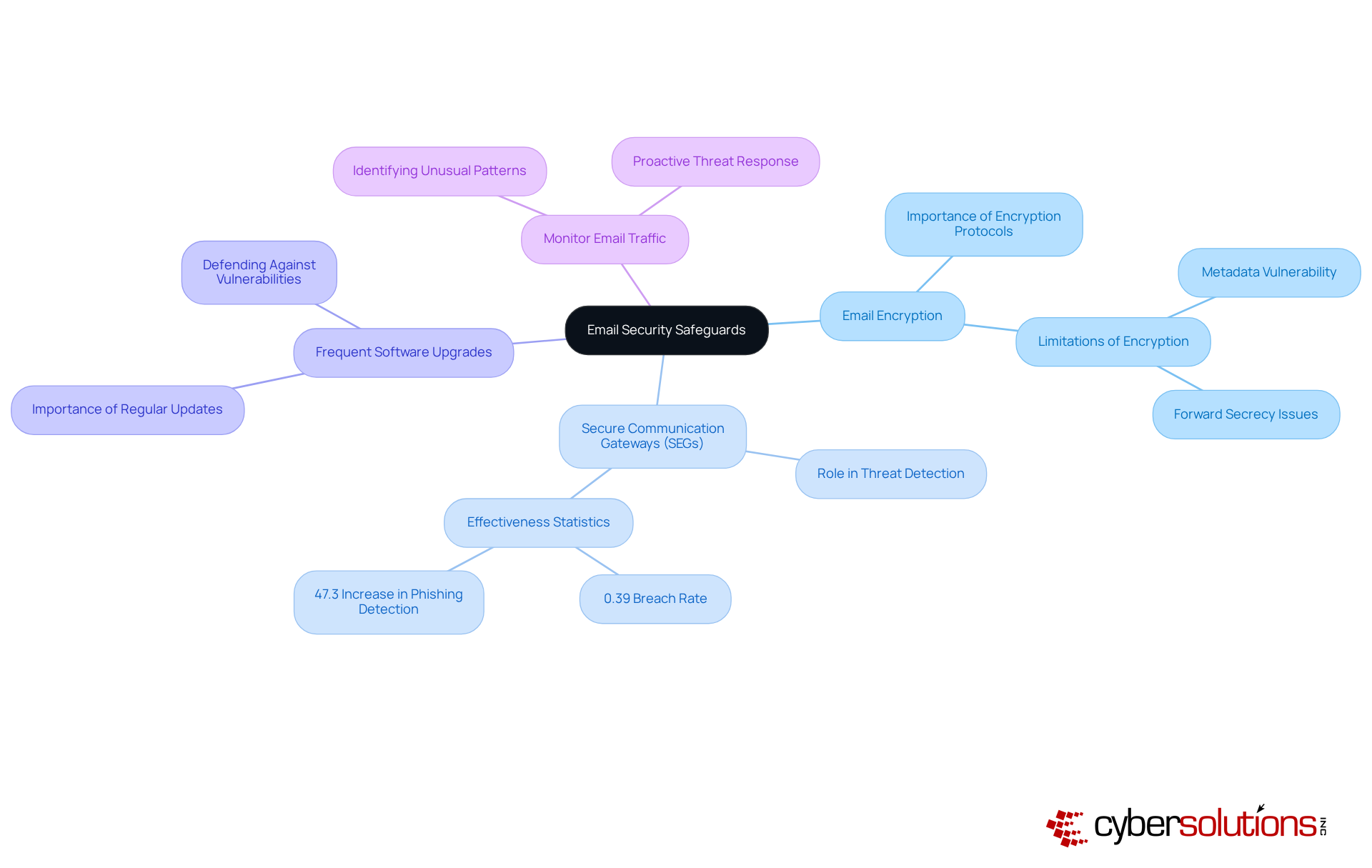
- Utilizing encryption protocols like S/MIME or PGP is vital for securing email content during transmission. This ensures that only intended recipients can access sensitive information. However, it’s crucial to recognize that while these protocols add a layer of security, they may not encrypt critical metadata, which remains vulnerable if the private key is compromised.
- The deployment of secure email gateways is imperative to filter out harmful messages and attachments before they infiltrate inboxes. These gateways play a pivotal role in mitigating the risks of deceptive schemes and malware attacks. Recent studies reveal that secure email gateways can dramatically enhance threat detection, with only 0.39% of harmful messages breaching defenses as of June 2023. Furthermore, organizations employing secure email gateways have reported a remarkable 47.3% increase in the detection of threats that previously evaded traditional defenses.
- It’s essential to ensure that messaging applications and security programs are consistently updated to defend against vulnerabilities that intruders might exploit. Keeping software current is a fundamental practice for maintaining a robust security posture.
- Implementing monitoring tools to scrutinize email traffic for unusual patterns can signal potential security breaches or phishing attempts. This proactive approach empowers organizations to respond swiftly to emerging threats, significantly reducing the likelihood of successful attacks.
By integrating these protective measures, organizations can substantially fortify their defenses against the evolving landscape of email-based risks.
Train Employees on Email Threat Recognition
C-suite executives must prioritize training initiatives that empower employees to effectively identify electronic communication risks. The urgency of this need cannot be overstated, especially in light of the evolving threat landscape. Here are key strategies to consider:
- Conduct comprehensive training sessions that address prevalent threats, spear phishing, and business email compromise (BEC). Utilizing interactive materials can significantly enhance understanding and retention of these threats. According to Barracuda’s Communication Protection Breach Report 2025, these programs are essential, underscoring the critical nature of these training programs.
- Implementing simulated phishing attacks is essential for assessing employees' ability to recognize and report suspicious messages. This practical approach not only reinforces training but has also been shown to improve recognition rates significantly. Research indicates that these exercises are effective, highlighting the immense value of such exercises.
- Cultivating an atmosphere where employees feel comfortable reporting dubious messages without fear of punishment is crucial. This culture of collective responsibility enhances the overall defensive posture and encourages proactive engagement with protective protocols. As Melinda Carter aptly states, "Email isn’t just the lifeblood of business communication - it’s the number one attack vector for cybercriminals," making it vital for organizations to foster this culture.
Provide resources that include guidelines to ensure that employees have easy access to materials detailing how to identify phishing attempts and other messaging threats. Providing these tools equips staff to remain vigilant and informed, ultimately reducing the risk of successful attacks. The case study 'Identifying High-Risk Users' illustrates how organizations can pinpoint high-risk users and implement measures to enhance awareness, further emphasizing the necessity for accessible resources.

Monitor and Prepare for Email Security Incidents
To effectively manage email security, C-suite leaders must prioritize robust practices that safeguard their organizations. In today’s landscape, where threats loom large, it’s crucial to take decisive action.
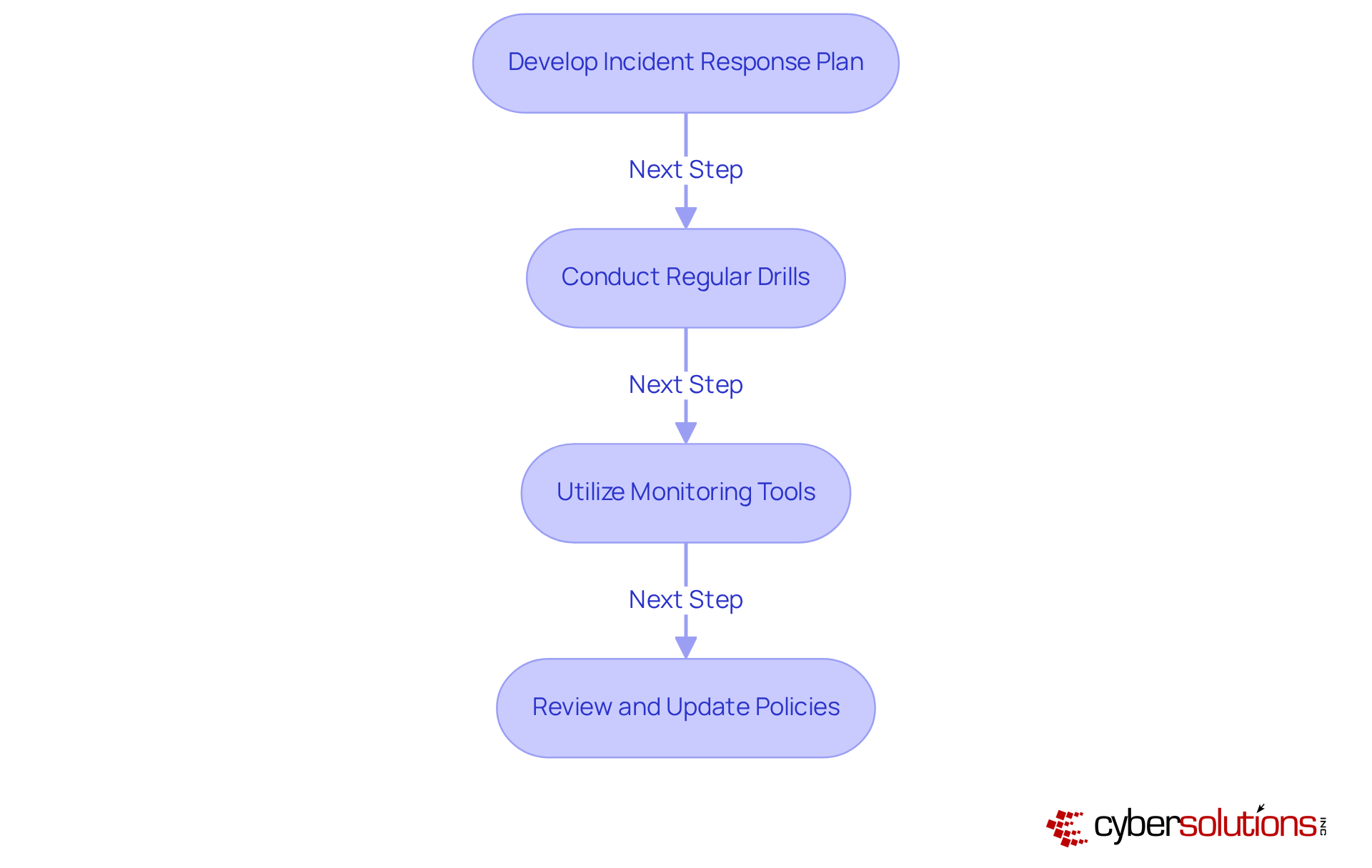
- Develop an incident response plan: Craft a comprehensive strategy that clearly outlines the steps to take during a security breach, detailing roles and responsibilities. This plan should also encompass essential documentation and reporting strategies to ensure compliance during audits, particularly in preparation for regulatory reviews.
- Conduct regular drills: Schedule consistent tabletop exercises to simulate communication security incidents. These drills allow teams to practice their responses and identify areas for improvement, ensuring your organization is fully prepared for official assessments and can effectively address any lingering issues.
- Utilize advanced monitoring tools: Invest in advanced monitoring tools capable of detecting anomalies in communication traffic. These tools alert IT teams to potential risks in real-time, making continuous network monitoring vital to prevent downtime or breaches, especially against ransomware and phishing attacks.
- Review policies and procedures: Regularly assess and revise security policies and protocols, ensuring they include best practices to maintain their effectiveness against evolving risks. This includes adapting access controls and restrictions tailored to your business needs, ensuring that only authorized users have access.
By prioritizing these practices, C-suite leaders can cultivate a culture of security that not only protects sensitive data but also enhances organizational resilience against cyber threats.
Conclusion
C-suite leaders must recognize that safeguarding their organizations against email-based threats is not merely a recommendation; it’s an absolute necessity. In today’s digital landscape, prioritizing email safety is crucial for enhancing cybersecurity posture, protecting sensitive communications, and maintaining a strong organizational reputation amidst fierce competition.
To effectively combat these threats, several key strategies should be implemented:
- Strong passwords and multi-factor authentication are foundational elements.
- Regular updates to protection protocols are essential.
- Technical safeguards like email encryption and secure communication gateways play a vital role.
- Training employees to identify and respond to email threats is necessary.
- Monitoring email traffic and preparing for potential security incidents are critical components of a comprehensive email security strategy.
The importance of robust email security practices cannot be overstated. As cyber threats evolve, C-suite leaders must actively foster a proactive culture that prioritizes email security at every level of the organization. By adopting these best practices and promoting a collective responsibility towards cybersecurity, organizations can not only defend against potential breaches but also build a resilient framework for future challenges. Taking decisive action today will pave the way for a more secure tomorrow for all communications within the business.
Frequently Asked Questions
Why is it important for C-suite leaders to prioritize secure email practices?
It is essential for C-suite leaders to prioritize secure email practices to protect sensitive communications in a digital landscape rife with cybersecurity threats.
What are some key practices for establishing secure email messaging?
Key practices include using strong, unique passwords for each account, enabling multi-factor authentication (MFA), regularly updating protection protocols, and separating personal and business accounts.
How can strong passwords enhance email security?
Implementing complex, unique passwords for each account helps to protect against unauthorized access and reduces the risk of breaches.
What is multi-factor authentication (MFA) and how does it improve security?
MFA is a security measure that requires a second form of verification in addition to a password, significantly complicating unauthorized access.
What are SPF, DKIM, and DMARC, and why are they important?
SPF, DKIM, and DMARC are email protection protocols that help thwart spoofing and phishing attacks by ensuring that emails are legitimately sent from authorized servers.
Why should personal and business email accounts be kept separate?
Maintaining distinct communication accounts for personal and business use reduces the risk of cross-contamination from personal breaches, enhancing overall security.
What overall benefit do email safety tips provide to organizations?
By implementing email safety tips, organizations can significantly enhance their cybersecurity posture, safeguarding their communications and maintaining their reputation and trustworthiness in the industry.
List of Sources
- Establish Secure Email Practices
- blog.knowbe4.com (https://blog.knowbe4.com/warning-new-spear-phishing-campaign-targets-executives)
- guardz.com (https://guardz.com/blog/33-phishing-statistics-every-msp-should-know-about)
- hoxhunt.com (https://hoxhunt.com/blog/business-email-compromise-statistics)
- emailsecurity.checkpoint.com (https://emailsecurity.checkpoint.com/blog/email-security-strategies-for-cisos-and-cybersecurity-leaders-2025)
- its.gmu.edu (https://its.gmu.edu/2025/08/strong-passwords-add-security-to-accounts-and-devices)
- Implement Technical Safeguards for Email Security
- privacyguides.org (https://privacyguides.org/articles/2025/11/15/email-security)
- blog.knowbe4.com (https://blog.knowbe4.com/engineered-to-evade-how-phishing-attacks-are-designed-to-get-through-your-secure-email-gateway)
- proofpoint.com (https://proofpoint.com/us/blog/email-and-cloud-threats/why-legacy-email-gateways-dont-stop-todays-threats)
- global.ptsecurity.com (https://global.ptsecurity.com/en/about/news/pt-warns-phishing-attacks-increased-by-one-third-over-the-past-year)
- open-systems.com (https://open-systems.com/blog/business-benefits-secure-email-gateway)
- Train Employees on Email Threat Recognition
- guardz.com (https://guardz.com/blog/40-security-awareness-statistics-msps-cant-ignore-in-2025)
- usatoday.com (https://usatoday.com/story/sponsor-story/barracuda-fbt/2025/12/19/email-under-siege-how-small-businesses-can-stop-phishing-and-ransomware-before-its-too-late/87674199007)
- isaca.org (https://isaca.org/resources/news-and-trends/industry-news/2025/enhancing-security-awareness-to-uplift-security-culture)
- Monitor and Prepare for Email Security Incidents
- immersivelabs.com (https://immersivelabs.com/resources/blog/prove-and-improve-readiness-with-cyber-drills)
- darktrace.com (https://darktrace.com/cyber-ai-glossary/email-incident-response)
- cbia.com (https://cbia.com/news/featured/incident-response-plans-business)
- abnormal.ai (https://abnormal.ai/blog/incident-response-plan-email-attacks)
- beamsec.com (https://beamsec.com/how-to-develop-an-email-security-incident-response-plan)
