

Introduction
USB drop attacks represent a significant and growing threat in the cybersecurity landscape, leveraging human curiosity to infiltrate systems and compromise sensitive data. As organizations grapple with an alarming increase in these low-tech yet highly effective tactics, it becomes crucial to understand the mechanics behind USB drop attacks to protect business integrity. How can companies effectively shield themselves from this insidious method that targets unsuspecting employees and risks devastating financial and reputational damage?
The current landscape of cybersecurity threats is evolving, and USB drop attacks are at the forefront of this challenge. These attacks exploit the natural curiosity of individuals, leading them to unwittingly introduce malware into their organizations. The implications for businesses are severe, as a single compromised device can lead to extensive data breaches and significant financial losses.
To combat these threats, organizations must adopt proactive measures. Implementing comprehensive cybersecurity training for employees is essential, ensuring they recognize the risks associated with unknown USB devices. Additionally, investing in advanced security solutions can help detect and neutralize threats before they escalate. By taking these steps, companies can fortify their defenses against USB drop attacks and safeguard their sensitive information.
Understand USB Drop Attacks: Definition and Mechanism
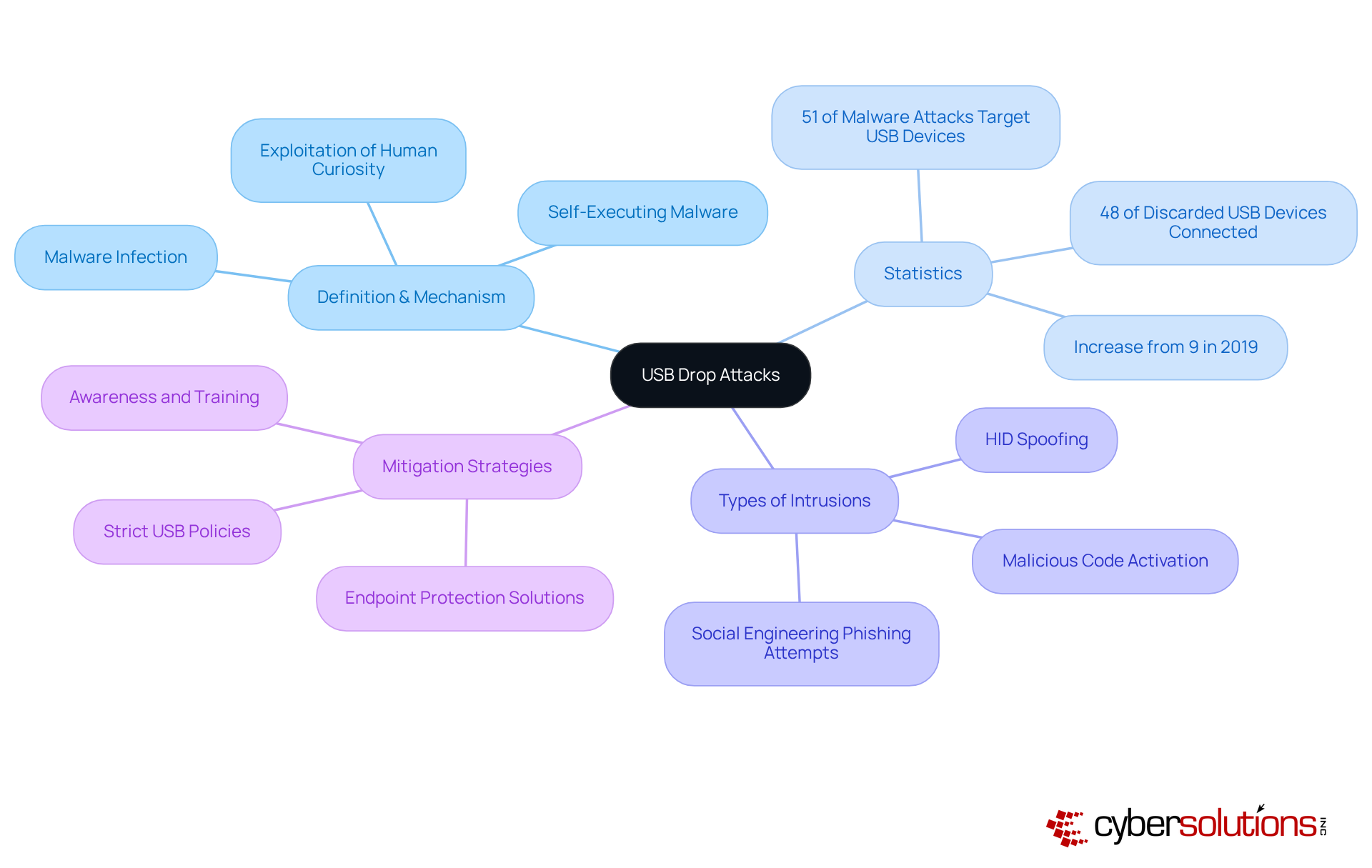
pose a significant threat in the realm of cybersecurity, especially as they take advantage of human curiosity in public spaces. Attackers strategically leave infected USB sticks, and when an unsuspecting individual connects one, harmful software can execute automatically, leading to potential system compromise. This tactic is further enhanced by enticing labels or disguises that make these drives appear legitimate, increasing the likelihood of their use.
Recent statistics reveal a startling trend:
- 2021, a dramatic rise from just 9% in 2019.
- This alarming increase underscores the urgent need for organizations to recognize the risks associated with unknown USB devices.
- For instance, a study from the University of Illinois Urbana-Champaign found that nearly 70% of people would connect an unknown USB device, showcasing the effectiveness of this manipulation tactic.
It is clear that awareness and training are crucial in mitigating these risks. Organizations should implement strict policies regarding USB usage, which have been pre-checked for security. The primary goal of USB drop attacks is to achieve unauthorized access, often through self-executing malware or booby-trapped documents. Additionally, other types of USB drop intrusions include:
- HID spoofing, which can further compromise systems.
In conclusion, proactive security is paramount. By safeguarding sensitive information and maintaining operational integrity, organizations can effectively combat the rising threat of USB drop attacks.
Identify Risks: Consequences of USB Drop Attacks on Businesses
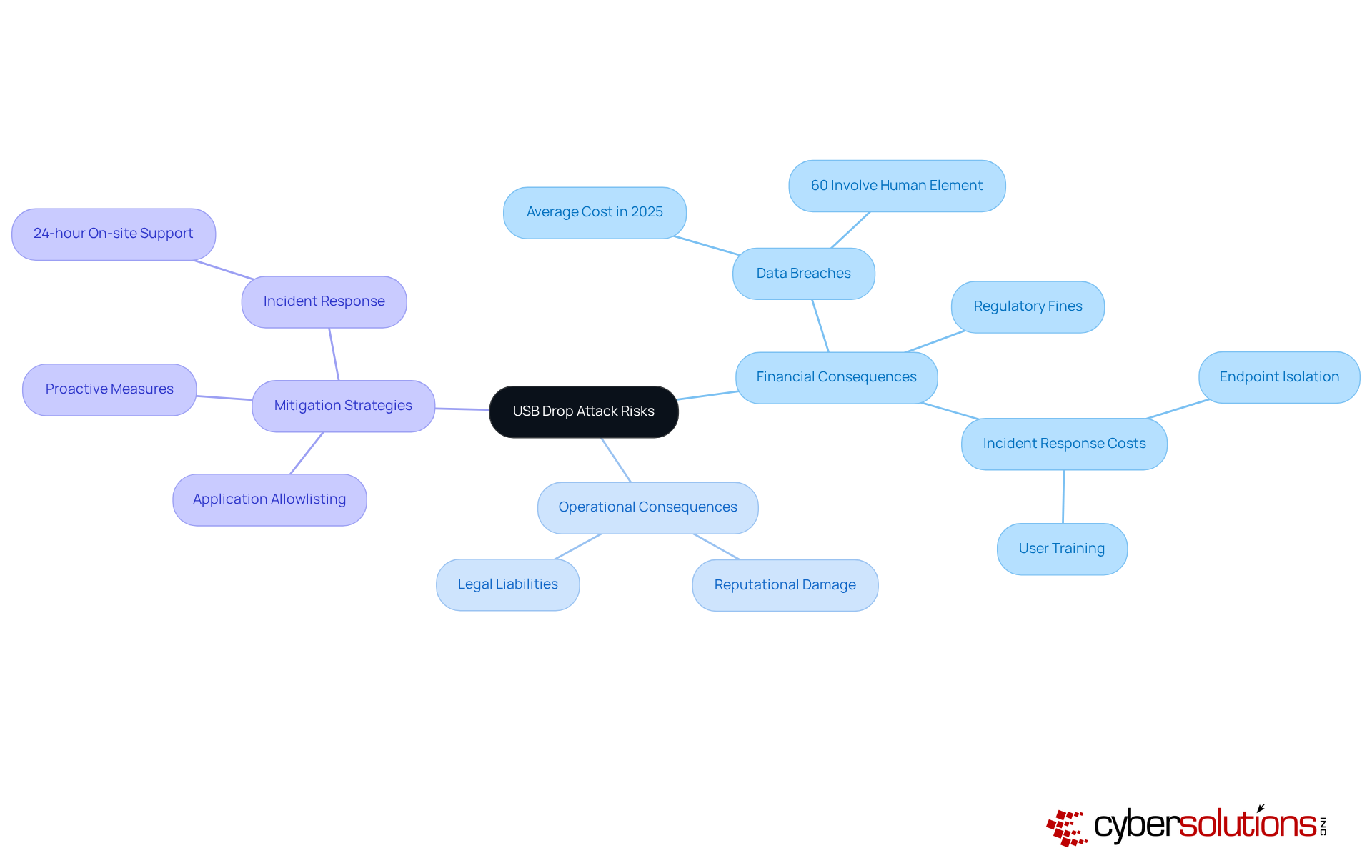
present significant risks to businesses, resulting in severe financial and operational consequences. The immediate threat includes data breaches, where sensitive information can be stolen or compromised. In 2025, the average cost is projected to reach approximately $4.9 million globally, reflecting a 10% increase from the previous year. This financial burden encompasses theft, regulatory fines, and the extensive costs associated with incident response and recovery efforts, including endpoint isolation and user training, which are critical components of a comprehensive security strategy.
Moreover, the reputational damage stemming from a data breach can erode customer trust, resulting in long-term financial impacts. Organizations may also face legal liabilities if they fail to adequately protect sensitive data, further compounding their financial woes. For instance, in 2025, 60% of data breaches are expected to involve a human element, such as malicious insiders or phishing scams, underscoring the critical need for robust security measures.
Cybersecurity analysts emphasize the importance of proactive strategies to mitigate these risks. Philip Törner, a Senior Security Consultant, warns that the simplicity of the attack method makes it particularly effective. He observes that a USB drop attack can occur once a USB device is connected, allowing malware to be installed and granting attackers access to sensitive files and systems. To combat these threats, Cyber Solutions Inc. advocates for a layered approach to cybersecurity, including measures such as employee training, which can help contain threats quickly and effectively. Additionally, implementing application whitelisting can proactively prevent unauthorized software from running, thereby decreasing the vulnerability surface and enhancing overall security.
Alarmingly, 45% of the collected USB devices were connected to computers by inquisitive individuals, emphasizing the need for organizations to prioritize cybersecurity investments and establish strict policies to prevent USB drop attacks and protect against such threats.
Implement Protective Measures: Best Practices Against USB Drop Attacks
To effectively safeguard against USB drop attacks, organizations must prioritize cybersecurity measures that address this growing threat. USB drop attacks pose significant risks, especially in environments where sensitive data is managed. Implementing a series of best practices can dramatically reduce vulnerabilities and enhance overall security.
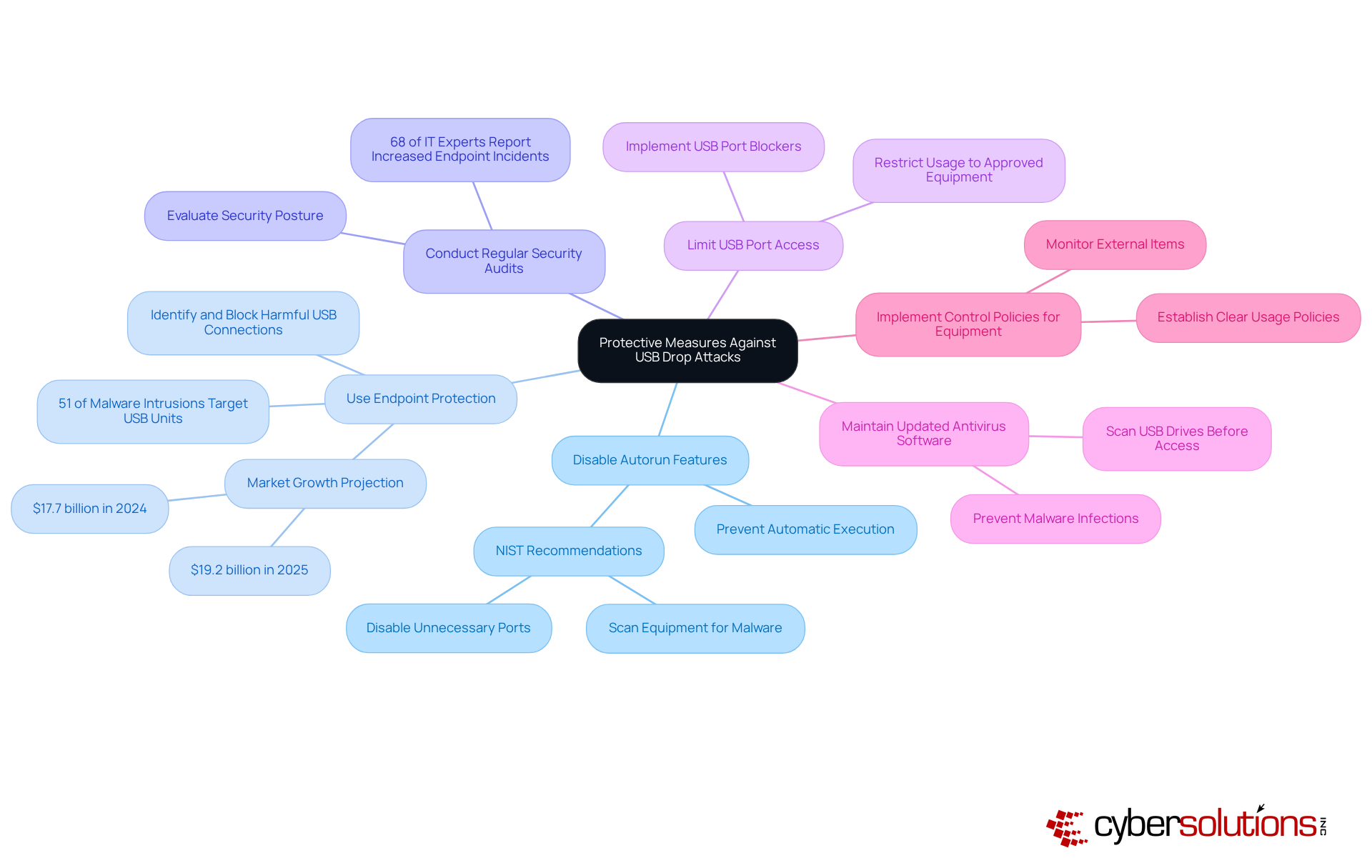
- Prevent the automatic execution of programs when a USB drive is connected. This can be achieved through system settings or group policies, significantly reducing the risk of malware activation upon insertion. According to NIST, disabling unnecessary ports and scanning equipment for malware before and after use are critical steps in reducing risks associated with removable media.
- Advanced solutions are essential for identifying and blocking harmful USB connections and actions. With 51% of malware intrusions aimed at USB units, implementing these solutions is crucial. The market is projected to grow significantly, underscoring the increasing importance of these solutions.
- Regular evaluations of your organization's security posture and timely updates to policies are vital. This proactive approach helps identify vulnerabilities and ensures compliance with evolving cybersecurity standards. Notably, 68% of IT experts have reported a rise in the frequency of endpoint incidents, highlighting the necessity for vigilance.
- Restrict USB port usage to approved equipment only. Implementing USB port blockers can prevent unauthorized access, thereby minimizing potential attack vectors. This aligns with NIST's recommendations for technical controls in managing equipment security.
- Ensure that all systems are equipped with up-to-date antivirus software capable of scanning USB drives before they are accessed. This is vital, as USB drop attacks frequently aim to achieve malware infections.
- Establish clear policies regarding the use of USB equipment, including registration and monitoring of external items. This oversight helps maintain control over removable media, significantly reducing the likelihood of security breaches.
Cultivate Security Awareness: Training and Policies for Employees
To effectively combat USB drop attacks, organizations must foster a robust culture of security awareness. This is not just a recommendation; it’s a necessity in today’s digital landscape. Here are several key strategies to enhance your organization’s defenses:
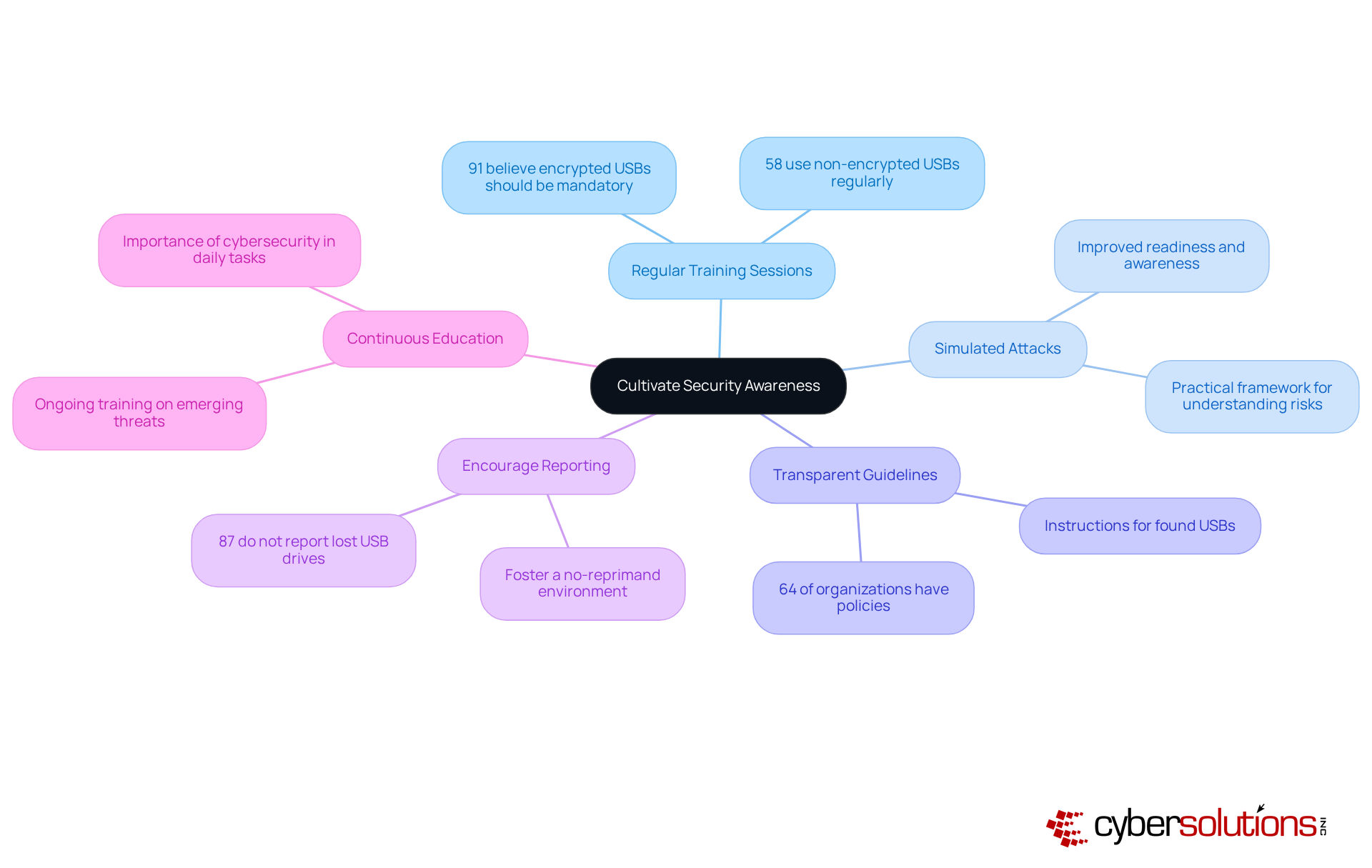
- Regular Training Sessions: Conduct training sessions that educate employees about the risks associated with USB devices, emphasizing how to identify suspicious items. Research from Apricorn reveals that while 91% of employees believe training should be mandatory, a staggering 58% still use non-encrypted devices regularly. This highlights the urgent need for comprehensive education.
- Simulated Attacks: Implement simulations to test employee responses and reinforce training. Organizations that conduct such simulations report improved readiness and awareness. Employees learn to recognize and respond to potential threats effectively. As noted by trainers, "Simulated attacks provide a practical framework for employees to understand the risks and develop appropriate responses."
- Clear Policies: Create and convey clear policies, including specific instructions on what to do if a USB stick is located. Alarmingly, only 64% of organizations currently have policies in place, according to a survey by Apricorn. This indicates a significant opportunity for improvement.
- Open Communication: Foster an environment where employees feel comfortable reporting suspicious devices or activities without fear of reprimand. Alarmingly, 87% of employees admit they do not notify their organizations when they lose their USB drives, which can lead to serious security breaches.
- Continuous Education: Provide ongoing education about emerging threats and the importance of security practices in daily tasks. As USB threats evolve, continuous training ensures that employees remain alert and knowledgeable about the latest dangers and best practices.
By prioritizing these strategies, organizations can significantly enhance their security posture and mitigate the risks associated with a USB drop attack.
Conclusion
Understanding and combating USB drop attacks is not just important; it’s essential for safeguarding business operations and sensitive data. These attacks prey on human curiosity, leading to potentially devastating consequences like data breaches and financial losses. By recognizing the mechanisms behind these threats and implementing effective protective measures, organizations can significantly reduce their vulnerability.
Key strategies include:
- Disabling autorun features
- Utilizing advanced endpoint protection
- Conducting regular security audits
Moreover, fostering a culture of security awareness through employee training and transparent policies is crucial. With statistics highlighting the alarming rise in USB-related malware, it’s clear that proactive measures are not merely advisable but necessary for maintaining cybersecurity integrity.
Ultimately, the fight against USB drop attacks demands a comprehensive approach that combines technology, policy, and human vigilance. Organizations must prioritize cybersecurity investments and cultivate an environment where employees are informed and engaged in protecting their digital assets. Embracing these practices will not only fortify defenses against USB drop attacks but also contribute to a more resilient cybersecurity posture overall.
Frequently Asked Questions
What is a USB drop attack?
A USB drop attack is a cybersecurity threat where attackers leave infected USB sticks in public spaces, exploiting human curiosity. When someone connects the USB to their device, harmful software can execute automatically, potentially compromising the system.
How do attackers make infected USB drives more appealing?
Attackers often use enticing labels or disguises to make infected USB drives appear legitimate, increasing the likelihood that unsuspecting individuals will connect them to their devices.
What are the recent statistics regarding USB attacks?
Recent statistics show that 51% of malware attacks now target USB connections, up from just 9% in 2019, highlighting the growing threat posed by USB drop attacks.
What did the study from the University of Illinois Urbana-Champaign reveal about USB devices?
The study found that nearly 48% of discarded USB devices were connected, demonstrating the effectiveness of the manipulation tactic used in USB drop attacks.
How can organizations mitigate the risks of USB drop attacks?
Organizations can mitigate these risks by raising awareness and providing training, as well as implementing policies that allow only authorized USB drives that have been pre-checked for security.
What is the primary goal of a USB drop attack?
The primary goal of a USB drop attack is to achieve malware infection, often through self-executing malware or booby-trapped documents.
What are some types of USB drop intrusions?
Types of USB drop intrusions include malicious code activation and HID (Human Interface Device) spoofing, which can further compromise systems.
Why is vigilance in cybersecurity practices important?
Vigilance in cybersecurity practices is crucial for safeguarding sensitive information and maintaining operational integrity, which helps organizations effectively combat the rising threat of USB drop attacks.
List of Sources
- Understand USB Drop Attacks: Definition and Mechanism
- honeywell.com (https://honeywell.com/us/en/news/2024/04/cybersecurity-in-2024-usb-devices-continue-to-pose-major-threat)
- it.wisc.edu (https://it.wisc.edu/news/how-to-protect-yourself-from-drop-usb-attacks)
- osibeyond.com (https://osibeyond.com/blog/usb-drop-attacks-cause-cybersecurity-incidents)
- elie.net (https://elie.net/blog/security/concerns-about-usb-security-are-real-48-percent-of-people-do-plug-in-usb-drives-found-in-parking-lots)
- Identify Risks: Consequences of USB Drop Attacks on Businesses
- ibm.com (https://ibm.com/reports/data-breach)
- eu.connect.panasonic.com (https://eu.connect.panasonic.com/gb/en/blog/usb-drop-attacks-low-tech-cybersecurity-threat-businesses-still-ignore)
- honeywell.com (https://honeywell.com/us/en/news/2024/04/cybersecurity-in-2024-usb-devices-continue-to-pose-major-threat)
- secureframe.com (https://secureframe.com/blog/data-breach-statistics)
- 90 Data Breach Trends & Statistics for 2026 | Huntress (https://huntress.com/blog/data-breach-statistics)
- Implement Protective Measures: Best Practices Against USB Drop Attacks
- honeywell.com (https://honeywell.com/us/en/news/2024/04/cybersecurity-in-2024-usb-devices-continue-to-pose-major-threat)
- securityweek.com (https://securityweek.com/nist-publishes-guide-for-protecting-ics-against-usb-borne-threats)
- spyhunter.com (https://spyhunter.com/shm/endpoint-security-statistics)
- linkedin.com (https://linkedin.com/pulse/usb-drop-attacks-continue-cause-cybersecurity-incidents-osibeyond-hbhuf)
- expertinsights.com (https://expertinsights.com/endpoint-security/50-endpoint-security-stats-you-should-know)
- Cultivate Security Awareness: Training and Policies for Employees
- helpnetsecurity.com (https://helpnetsecurity.com/2019/05/15/usb-drive-security-risks)
- darkreading.com (https://darkreading.com/cyberattacks-data-breaches/8-out-of-10-employees-use-unencrypted-usb-devices)
- coro.net (https://coro.net/blog/why-usb-attacks-are-back-and-how-to-prevent-them)
- itpartners.ca (https://itpartners.ca/threats-of-usb-data-loss-and-compromising-risks-for-businesses)
