Introduction
In today’s digital landscape, cybersecurity has become a critical concern, especially in the healthcare sector. With cyber threats on the rise, organizations must prioritize robust security measures to protect sensitive patient data. Multi-Factor Authentication (MFA) stands out as a vital safeguard, enhancing security by requiring multiple forms of verification. This not only fortifies defenses but also meets regulatory demands, making MFA a strategic necessity for healthcare organizations.
Despite its proven effectiveness-reportedly reducing unauthorized access risks by an impressive 99.9%-misconceptions and resistance to MFA implementation remain prevalent. Leaders in healthcare must confront these challenges head-on. How can they successfully integrate MFA into their organizations? What steps can they take to ensure robust protection against the ever-evolving landscape of cyber risks?
By addressing these questions, organizations can navigate the complexities of cybersecurity and safeguard their operations. Embracing MFA is not just about compliance; it’s about fostering trust and ensuring the safety of patient information in an increasingly vulnerable environment.
Understand Multi-Factor Authentication and Its Importance
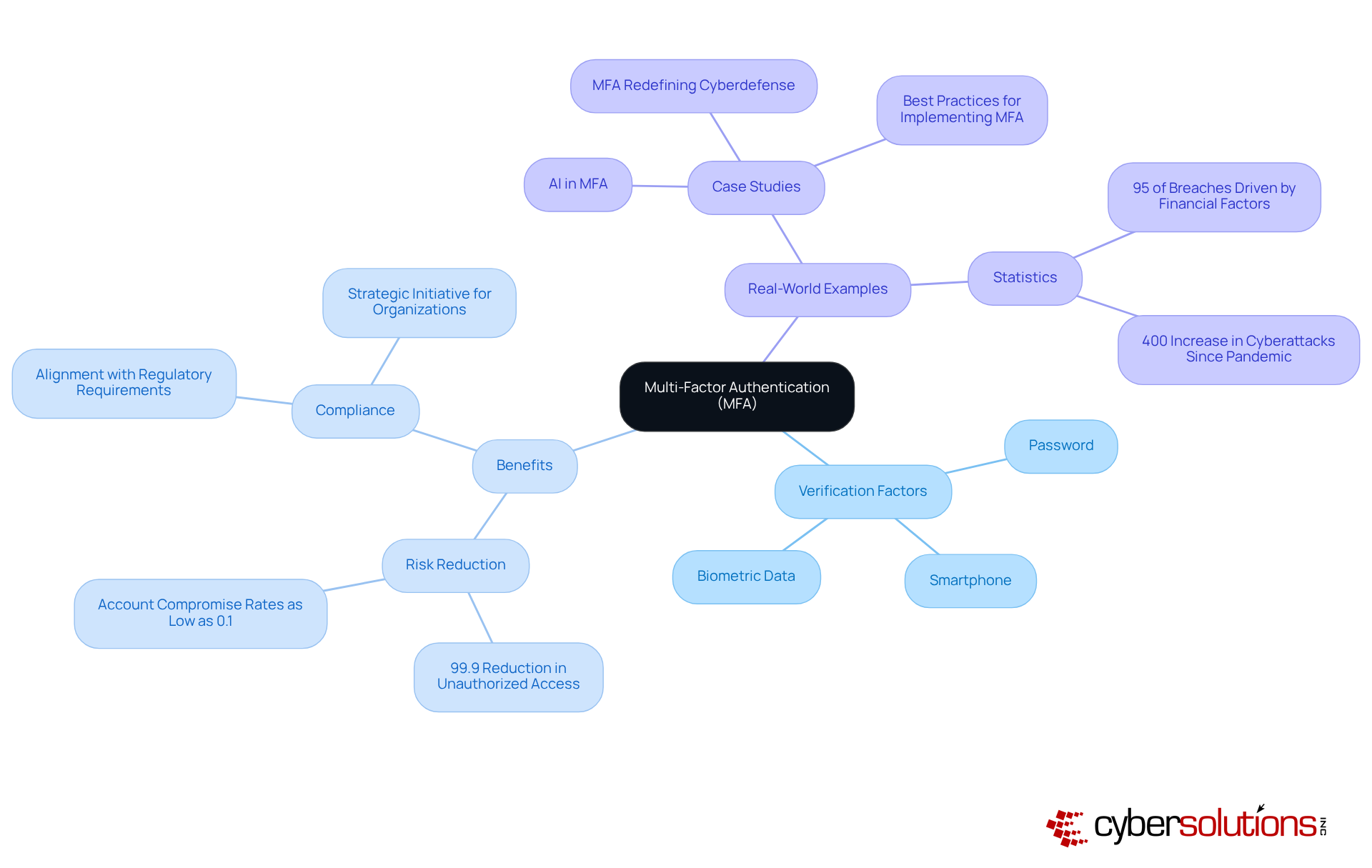
stands as a crucial line of defense in today’s cybersecurity landscape, particularly for healthcare organizations facing escalating threats. By requiring users to provide two or more verification factors - such as a password, a smartphone, or biometric data - MFA enhances security. In an era where cyber threats are increasing, the necessity of MFA cannot be overstated.
Statistics reveal that MFA can reduce the risk of breaches by an astounding 99.9%. This remarkable figure underscores the importance of MFA, which not only fortifies defenses against cyberattacks but also builds user trust. As organizations strive to comply with industry regulations, implementing MFA becomes a strategic initiative rather than just a technical enhancement.
Real-world examples further illustrate the impact of MFA adoption, with many organizations reporting account compromise rates plummeting to as low as 0.1%. Given that financial motivations drive 95% of reported breaches, the integration of MFA is not just beneficial; it is essential for maintaining organizational integrity and security.
In conclusion, as the landscape of cybersecurity continues to evolve, embracing MFA is a proactive step that healthcare organizations must take to ensure robust security and compliance.
Follow Steps to Implement MFA in Your Organization
Assess Your Current Security Infrastructure: Start by evaluating your existing authentication methods. Identify vulnerabilities that could expose your organization to threats. Understanding the risks is crucial in fortifying your defenses.
Choose the Right Solution: Research and select an authentication method that aligns with your organization's specific needs. Consider factors such as user experience, integration capabilities, and cost-effectiveness. The right choice for enhancing your security posture is implementing multi-factor authentication.
Develop a Plan: Create a comprehensive plan detailing how MFA will be implemented. Outline timelines, assign responsibilities, and establish communication strategies to keep everyone informed about the upcoming changes. A well-structured plan is key to ensuring a smooth rollout.
Educate Employees: Conduct training sessions to inform employees about the importance of MFA and how to navigate the new system. Address any concerns they may have to foster acceptance and ensure a seamless transition. Empowering your team is essential for implementing MFA successfully.
Implement MFA: Begin the rollout according to your plan. Start with a pilot group to test the system before full-scale implementation. This approach allows you to identify and resolve any issues early on, ensuring a more effective launch.
Monitor and Adjust: After implementation, continuously gather feedback. Be prepared to make adjustments to enhance user experience and the overall effectiveness of your MFA system. Staying proactive is vital in today’s evolving threat landscape.
Review and Update Policies: Regularly review security policies and update them as necessary to adapt to emerging threats and technological advancements. Keeping your policies current is essential for maintaining security.

Address Common Concerns and Misconceptions About MFA
- Myth: MFA complicates the login process unnecessarily. However, most solutions for enhancing security are designed to be user-friendly while implementing safeguards, ensuring that access is not hindered. As Mary Marshall points out, "You can make it easy for your users," highlighting that user experience can be maintained.
- Myth: While there may be initial costs tied to implementing MFA, the long-term savings from reduced security incidents far exceed these expenses. Studies underscore the potential savings from averting such incidents. Organizations that adopt MFA have reported a dramatic decrease in account compromise rates to just 0.1%, showcasing MFA's effectiveness in protecting sensitive data and mitigating the financial repercussions of breaches.
- Myth: MFA is Only Necessary for High-Risk Accounts: MFA is essential for all accounts, regardless of their perceived risk level. Therefore, implementing MFA across the organization is essential to ensure comprehensive protection. It's crucial to recognize that every account is a potential target.
- Myth: SMS-Based MFA is Sufficient: While SMS-based MFA offers better security than having no MFA at all, it remains vulnerable to interception through tactics like SIM-jacking. As noted, SMS messages can be intercepted. Organizations must bolster their defenses against evolving threats by adopting more secure alternatives, such as implementing app-based authentication.
- Myth: Some employees may perceive that MFA disrupts their workflow. However, with proper training and streamlined processes, MFA can be seamlessly integrated into daily operations without causing significant delays. Organizations that prioritize user education and provide resources can foster a culture where protective measures like MFA are embraced rather than resisted.

Explore Tools and Solutions for Effective MFA Implementation
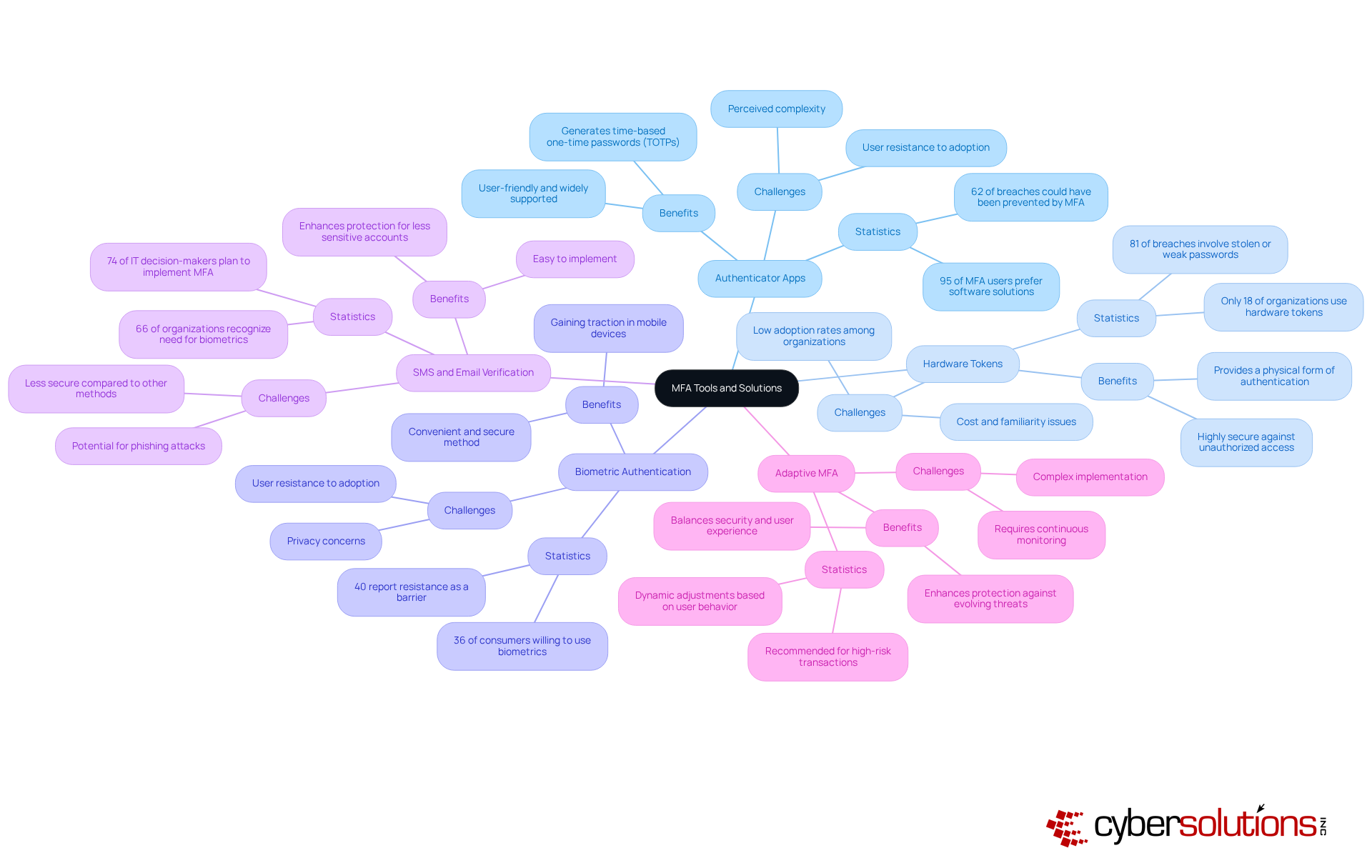
In today's digital landscape, applications like Google Authenticator and Authy are essential for generating time-based one-time passwords (TOTPs), significantly bolstering security. These user-friendly apps are widely supported across various platforms, making them a favored choice among organizations. With a staggering 95% of MFA users opting for software solutions, these tools emerge as a practical option for many businesses. Importantly, 62% of breaches could have been averted through implementing MFA solutions, highlighting the critical role these apps play in protecting sensitive information.
For organizations prioritizing robust security measures, devices like YubiKeys offer a physical form of authentication that is exceptionally secure. These devices provide an additional layer of defense against unauthorized access, yet only 18% of organizations currently utilize them. This statistic suggests a significant opportunity for improvement in protective measures. Furthermore, with increasing cyber threats, the adoption of hardware tokens is vital for a comprehensive security strategy.
Biometric solutions, utilizing fingerprint or facial recognition technology, present a convenient and secure method for individual authentication. This approach is gaining traction, especially in mobile devices, with 36% of consumers expressing a willingness to incorporate biometrics into their MFA strategy. As organizations strive to enhance client experience while ensuring safety, biometrics offer an appealing choice. However, 40% of entities report resistance from individuals as a barrier to MFA adoption, underscoring the need for effective communication and training to foster acceptance.
While not the most secure option, SMS and email can serve as secondary authentication methods for less sensitive accounts. With 66% of organizations recognizing the need for biometrics in authentication, incorporating SMS and email as additional options can enhance protection without overwhelming users. Notably, awareness of MFA solutions is growing, reflecting a growing understanding of its importance in bolstering security.
This advanced solution tailors authentication requirements based on user behavior and risk levels, striking a balance between security and user experience. Organizations should consider implementing adaptive authentication for high-risk transactions, as it allows for dynamic adjustments to security protocols, thereby enhancing overall protection against evolving threats. By incorporating insights from case studies on MFA implementation challenges, organizations can glean valuable lessons on overcoming common obstacles and ensuring successful adoption.
Conclusion
Implementing Multi-Factor Authentication (MFA) is not merely a technical upgrade; it stands as a crucial strategy for organizations aiming to bolster their cybersecurity posture. In a landscape where cyber threats are increasingly sophisticated, requiring multiple forms of verification significantly mitigates the risk of unauthorized access. This makes MFA an essential component of modern security frameworks, particularly in sectors like healthcare, where sensitive data is at stake.
The article outlines critical steps for successfully integrating MFA into an organization. It begins with assessing current security measures and extends to educating employees about the importance of MFA. Key points include:
- Selecting the right MFA solution
- Developing a structured deployment plan
- Addressing common misconceptions that often hinder adoption
Statistics underscore the effectiveness of MFA, such as a staggering 99.9% reduction in unauthorized access risk, reinforcing the necessity of this approach.
As cyber threats continue to evolve, adopting multi-factor authentication emerges as a proactive measure that organizations cannot afford to overlook. Embracing MFA not only protects against potential breaches but also fosters a culture of security awareness among employees. Leaders are urged to take immediate action by implementing these strategies and tools, ensuring their organizations remain resilient against the ever-changing landscape of cyber threats.
Frequently Asked Questions
What is Multi-Factor Authentication (MFA)?
Multi-Factor Authentication (MFA) is a security measure that requires users to provide two or more verification factors, such as a password, a smartphone, or biometric data, to enhance security beyond just a username and password.
Why is MFA important for healthcare organizations?
MFA is crucial for healthcare organizations as it serves as a defense against escalating cyber threats, significantly enhancing security and helping to comply with regulatory requirements for safeguarding sensitive data.
How effective is MFA in reducing unauthorized access?
Statistics show that MFA can reduce the risk of unauthorized access by an astounding 99.9%, highlighting its effectiveness in fortifying defenses against cyberattacks.
What impact has MFA adoption had on account compromise rates?
Many organizations that have adopted MFA report account compromise rates dropping to as low as 0.1%, demonstrating the significant protective benefits of implementing this security measure.
What motivates the majority of reported breaches?
Financial motivations drive 95% of reported breaches, making the integration of MFA essential for maintaining organizational integrity and protecting against unauthorized access.
How does MFA align with regulatory requirements?
Implementing MFA aligns with regulatory requirements essential for safeguarding sensitive data, making it a strategic initiative for organizations striving to comply with industry regulations.
What should organizations do to enhance their cybersecurity?
Organizations, particularly in healthcare, should embrace MFA as a proactive step to ensure robust security and compliance in the evolving landscape of cyber threats.
List of Sources
- Understand Multi-Factor Authentication and Its Importance
- blog.barracuda.com (https://blog.barracuda.com/2025/10/22/cybersecurity-awareness-month--mfa-matters-more-than-ever)
- ssojet.com (https://ssojet.com/news/future-trends-in-multi-factor-authentication-and-ai-integration)
- isaca.org (https://isaca.org/resources/news-and-trends/industry-news/2025/will-mfa-redefine-cyberdefense-in-the-21st-century)
- njda.org (https://njda.org/news-information/news-archive/2025/11/25/multi-factor-authentication-(mfa)-statistics-you-need-to-know-in-2025---dental-technologies)
- csacyber.com (https://csacyber.com/blog/the-importance-of-multi-factor-authentication-mfa)
- Follow Steps to Implement MFA in Your Organization
- cybermaxx.com (https://cybermaxx.com/resources/multi-factor-authentication-the-key-to-stronger-cybersecurity)
- electroiq.com (https://electroiq.com/stats/multifactor-authentication-statistics)
- duo.com (https://duo.com/blog/key-criteria-for-choosing-the-perfect-mfa-solution-for-your-business)
- cyberreadinessinstitute.org (https://cyberreadinessinstitute.org/news-and-events/new-study-underscores-slow-adoption-of-multifactor-authenification)
- jumpcloud.com (https://jumpcloud.com/blog/multi-factor-authentication-statistics)
- Address Common Concerns and Misconceptions About MFA
- metacompliance.com (https://metacompliance.com/blog/cyber-security-awareness/why-mfa-isnt-optional)
- avatier.com (https://avatier.com/blog/the-top-multi-factor-authentication-myths-and-misconceptions-you-need-to-know-about)
- jumpcloud.com (https://jumpcloud.com/blog/multi-factor-authentication-statistics)
- isaca.org (https://isaca.org/resources/news-and-trends/industry-news/2025/will-mfa-redefine-cyberdefense-in-the-21st-century)
- enzoic.com (https://enzoic.com/blog/debunking-mfa-myths)
- Explore Tools and Solutions for Effective MFA Implementation
- electroiq.com (https://electroiq.com/stats/multifactor-authentication-statistics)
- njda.org (https://njda.org/news-information/news-archive/2025/11/25/multi-factor-authentication-(mfa)-statistics-you-need-to-know-in-2025---dental-technologies)
- sandia.gov (https://sandia.gov/labnews/2025/07/24/two-factor-authentication-just-got-easier)
- patentpc.com (https://patentpc.com/blog/multi-factor-authentication-adoption-rates-are-we-doing-enough)
- jumpcloud.com (https://jumpcloud.com/blog/multi-factor-authentication-statistics)