

Introduction
In a world where cyber threats are increasingly sophisticated and prevalent, the stakes have never been higher for C-suite leaders tasked with safeguarding their organizations' sensitive information. This article delves into ten essential safe web browsing tips specifically designed for executives, offering practical strategies that not only enhance security but also foster a culture of vigilance among employees. As cybercriminals constantly adapt their tactics, how can leaders ensure their teams are equipped to navigate these treacherous waters effectively? The following insights will illuminate key practices that can significantly bolster an organization's cybersecurity posture.
Cyber Solutions Inc.: Comprehensive Cybersecurity Services for Safe Browsing
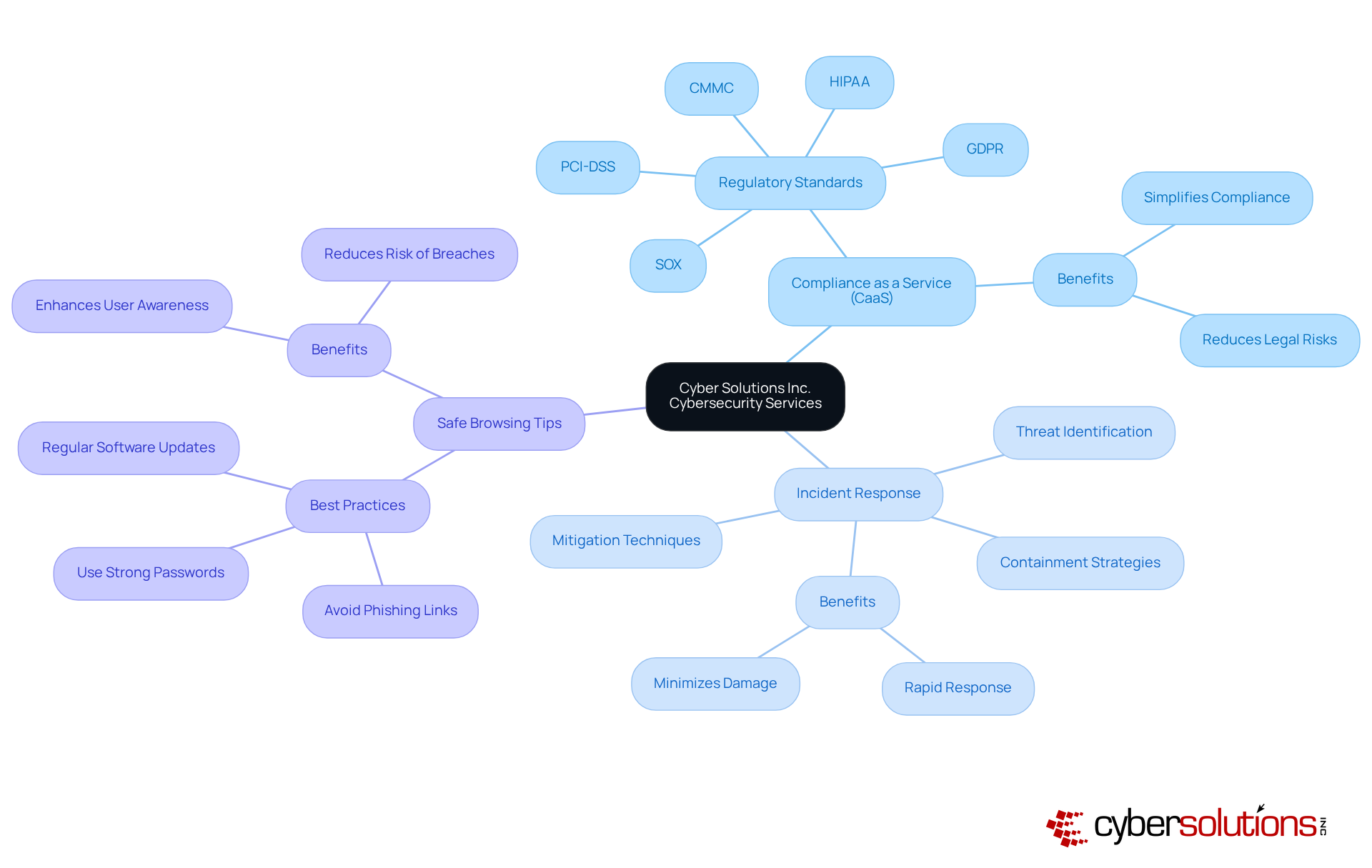
In today's digital landscape, the importance of cybersecurity cannot be overstated. Cyber Solutions Inc. provides a comprehensive range of cybersecurity services designed to offer protection for businesses. With offerings such as risk assessments, which simplifies adherence to regulations, along with tools that rapidly identify, contain, and mitigate threats, organizations can ensure their teams are equipped to navigate these challenges securely.
The current landscape of cybersecurity threats poses significant risks for organizations, particularly in sectors where sensitive information is at stake. By utilizing these thorough services and following best practices, entities can effectively reduce risks linked to web browsing and threats from emerging technologies. This proactive approach not only enhances security but also fosters trust among stakeholders, ultimately supporting compliance and business continuity.
In summary, Cyber Solutions Inc. stands ready to empower businesses with the necessary tools to combat cyber threats, ensuring a secure and compliant operational environment.
Update Your Browser Regularly: Ensure Security with the Latest Versions
Regularly updating your browser is a critical yet straightforward strategy that aligns with best practices to bolster security. This proactive measure is one of the key actions that addresses vulnerabilities that cybercriminals actively seek to exploit. A recent study revealed that over 1,000 vulnerabilities were fixed in the latest version, significantly reducing risks. C-suite leaders must establish and enforce policies mandating that all employees adhere to security protocols by updating their browsers to the latest versions. Implementing updates not only mitigates the risk of attacks but also enhances overall security.
Furthermore, implementing application allowlisting can further strengthen defenses by ensuring that only approved applications run on your network, effectively blocking unauthorized software and malware. Real-world examples, such as the cyber-attack on Suffolk County Council, demonstrate that organizations prioritizing security measures and regular updates have successfully thwarted potential breaches. This reinforces the necessity of these practices in today’s digital landscape. As one expert noted, 'Proactive measures and continuous vigilance are crucial for safeguarding digital assets against evolving threats.'

Use Strong Passwords: Protect Your Accounts with Unique Combinations
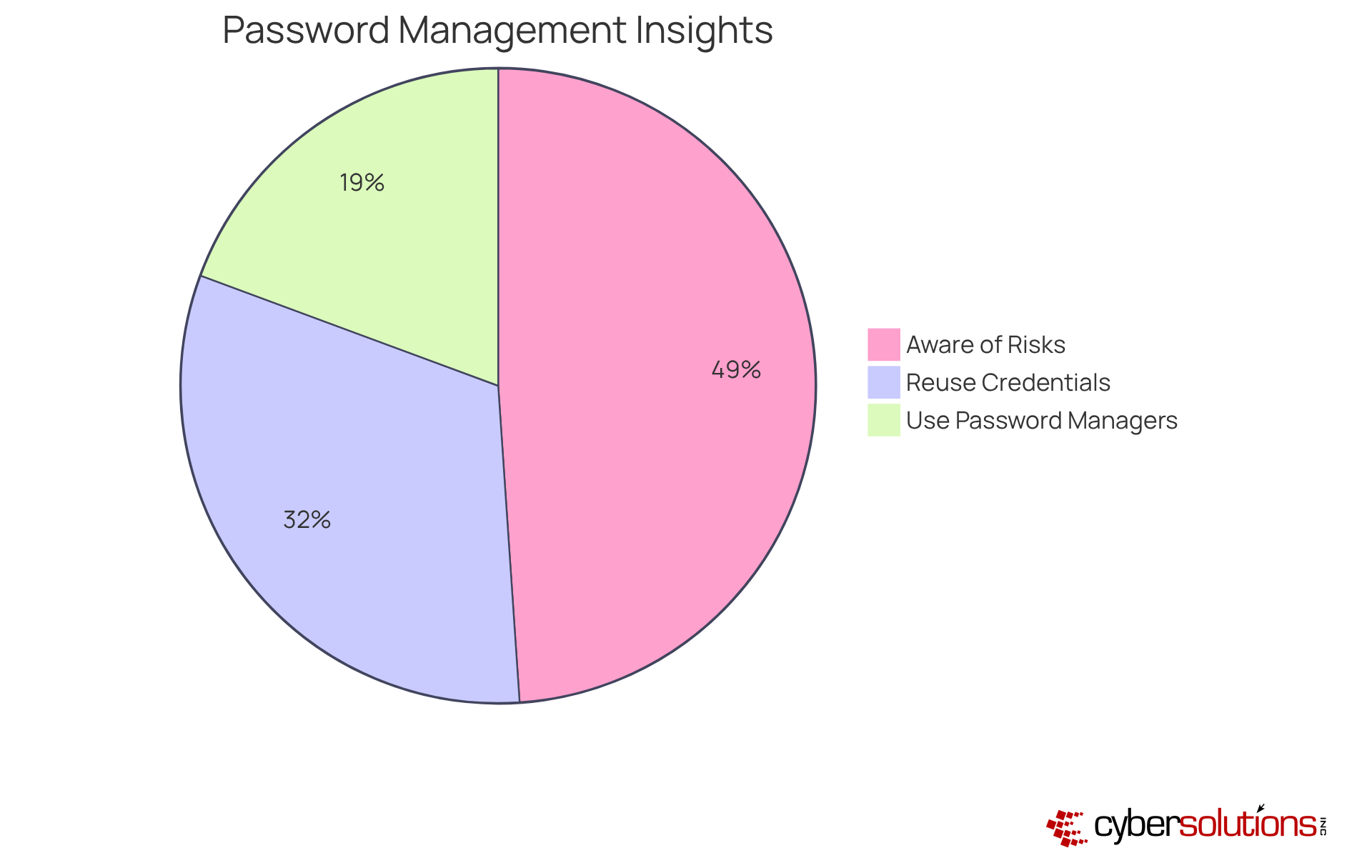
In today's digital landscape, employing robust and distinctive credentials for every account is crucial for protecting sensitive information. C-suite executives must promote the use of password managers, which not only create complex codes but also keep them secure. This practice effectively minimizes the risk of reusing credentials, a significant vulnerability, as many executives are aware of the associated risks. Notably, surveys indicate a concerning gap between understanding and behavior.
Moreover, organizations that adopt strong password policies can enhance their overall security stance. These tools support adherence to best practices, which require specific measures. Currently, 36% of American adults subscribe to password management services, with 30% utilizing these tools to safeguard their access codes, indicating a growing awareness of their significance.
Cybersecurity specialists emphasize that robust and distinct access keys are essential; however, they also stress that once a key is compromised, its strength becomes meaningless. By utilizing security protocols, entities can not only enhance security but also reduce the risks linked to credential theft, which is involved in many data breaches. Furthermore, 81% of hacking-related breaches in corporate environments arise from weak or reused access credentials. This is essential for C-suite executives seeking to safeguard their organizations from evolving threats.
Enable Two-Factor Authentication: Enhance Security for Your Online Accounts
Activating two-factor authentication across all accounts is imperative for security. In a landscape rife with threats, relying solely on passwords is simply insufficient. 2FA introduces a crucial second factor—such as a text message or an authentication app—making unauthorized access significantly more challenging for attackers.
by implementing 2FA, thereby protecting against data breaches. This proactive measure not only enhances security but also instills confidence among stakeholders regarding the organization's commitment to safety.

Avoid Public Wi-Fi: Protect Your Data from Potential Threats
C-suite leaders must strongly advise employees against using public Wi-Fi for accessing sensitive information. In today's digital landscape, statistics reveal that 73% of employees connect to unsecured networks in public spaces. This alarming practice exposes companies to considerable risks, as sensitive data is a frequent target for cybercriminals.
If accessing confidential information is unavoidable, employees should use a VPN or a secure mobile hotspot. Implementing these measures can drastically reduce the likelihood of information interception by malicious actors. Moreover, businesses should proactively instruct their workforce on the dangers of public Wi-Fi and provide training to promote the use of company-sanctioned tools and secure connections. This approach not only enhances security but also fortifies the overall integrity of the organization.

Use a VPN: Secure Your Internet Connection for Safer Browsing
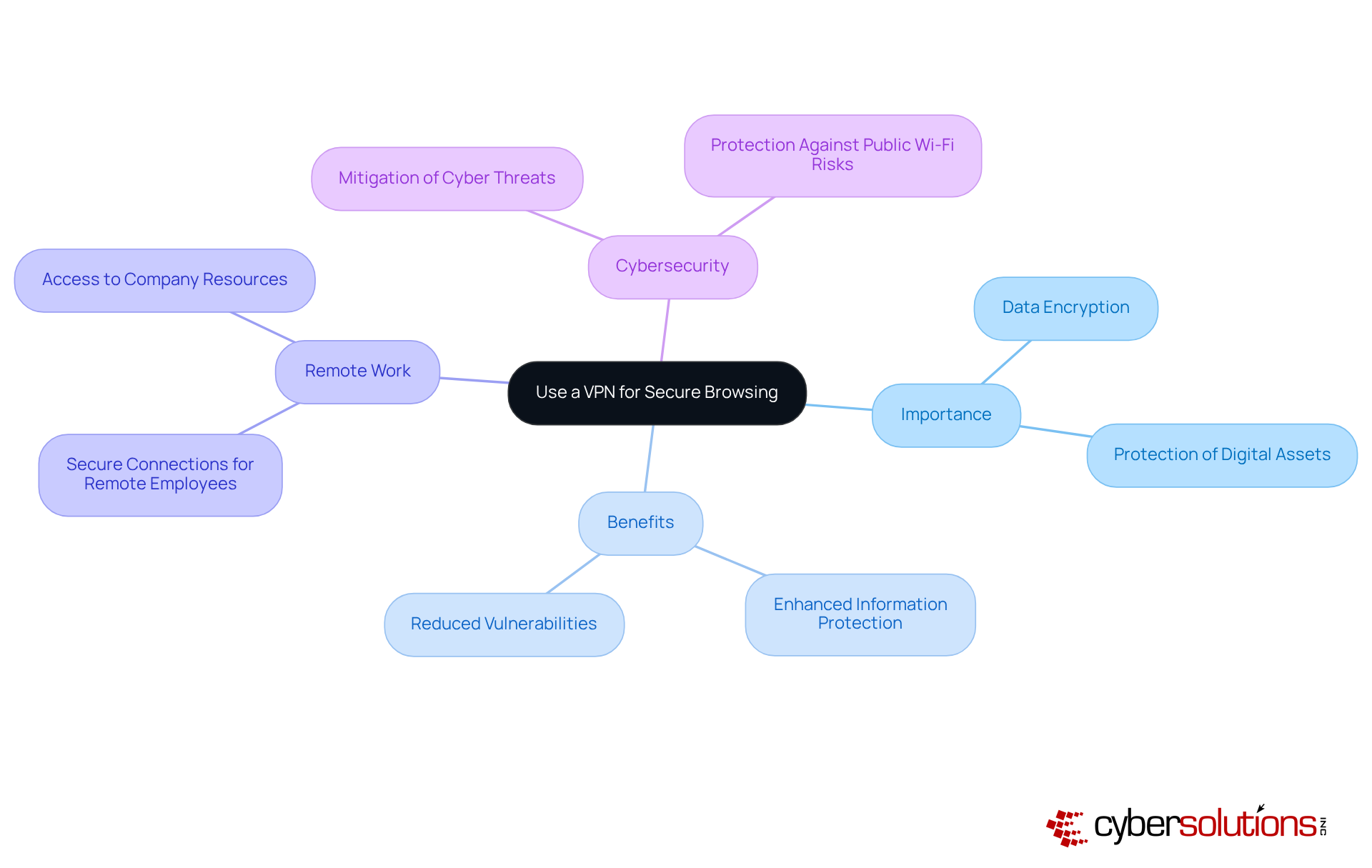
Implementing a VPN is not just a precaution; it is essential for securing internet connections, especially when dealing with sensitive information. In an era where cyber threats are rampant, a VPN provides encryption, significantly reducing the risk of interception by cybercriminals. This makes it an indispensable tool for organizations who prioritize the security of their data.
For organizations with remote employees, VPN solutions do more than just protect; they bolster overall cybersecurity. Numerous success stories illustrate this point, with businesses reporting enhanced information protection and reduced vulnerabilities following the implementation of VPN technology. As remote work becomes increasingly prevalent, the demand for secure connections grows, ensuring that sensitive information remains protected, even on public Wi-Fi networks.
By adopting a VPN, leaders can foster a culture of security, empowering employees to work confidently from any location. This approach not only preserves the integrity of communications and information but also reinforces the organization's commitment to cybersecurity. In a landscape fraught with challenges, the adoption of VPN technology is a proactive step toward safeguarding the future.
Recognize Phishing Attempts: Stay Alert to Suspicious Links and Emails
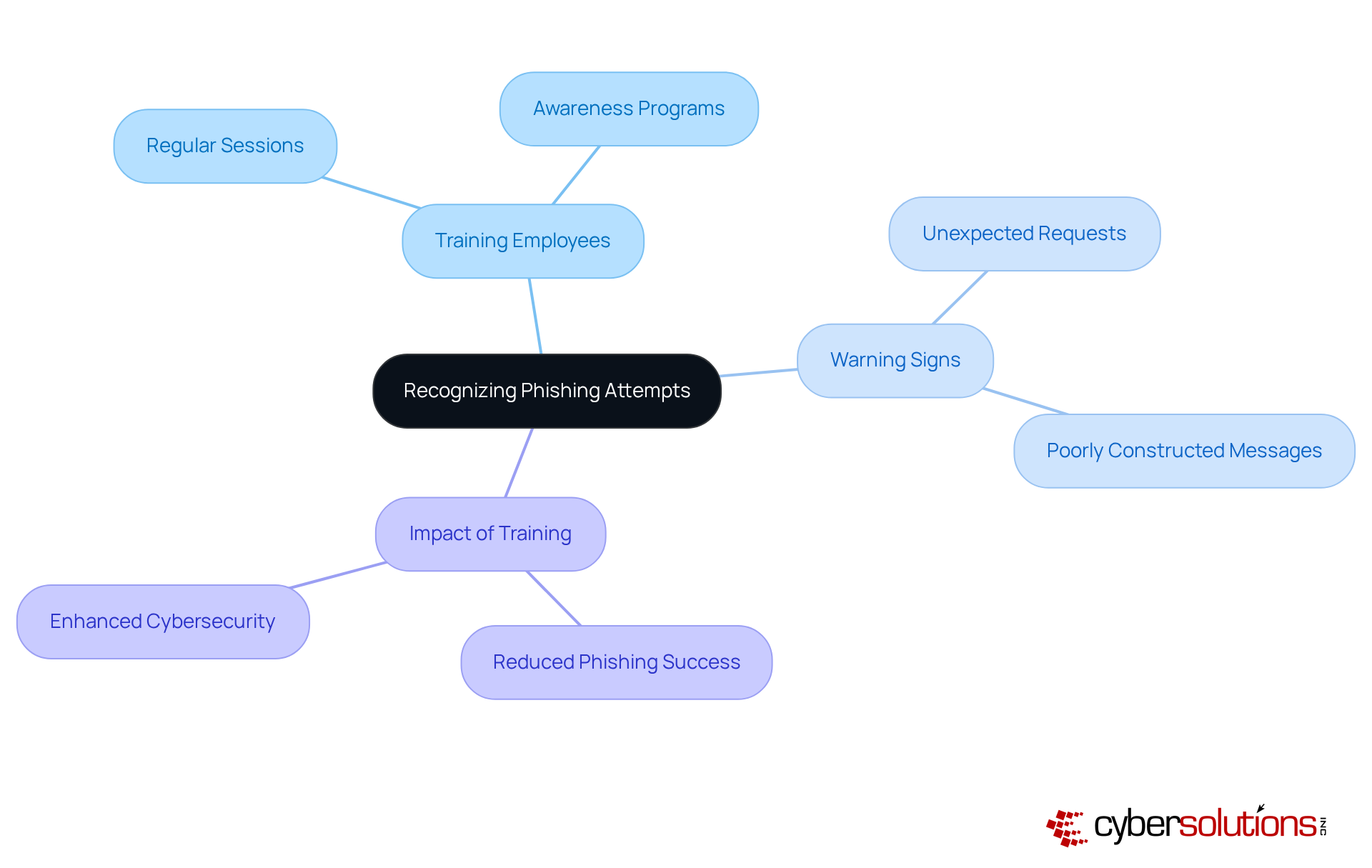
must prioritize training employees to identify phishing attempts, which frequently manifest as suspicious emails or links. In today's digital landscape, where awareness is crucial, equipping employees with the skills to recognize warning signs, such as unexpected requests for sensitive information or poorly constructed messages. This proactive approach is vital in thwarting phishing attacks, particularly when studies indicate that over 15% of employees fall victim to such schemes.
Organizations that have implemented training programs have reported significant reductions in successful phishing attempts. This showcases the effectiveness of these initiatives and underscores the importance of vigilance. By doing so, companies can enhance their overall security posture and protect sensitive data from malicious actors. In an era where the stakes are higher than ever, awareness is a necessity.
Adjust Browser Security Settings: Optimize Your Browsing Experience
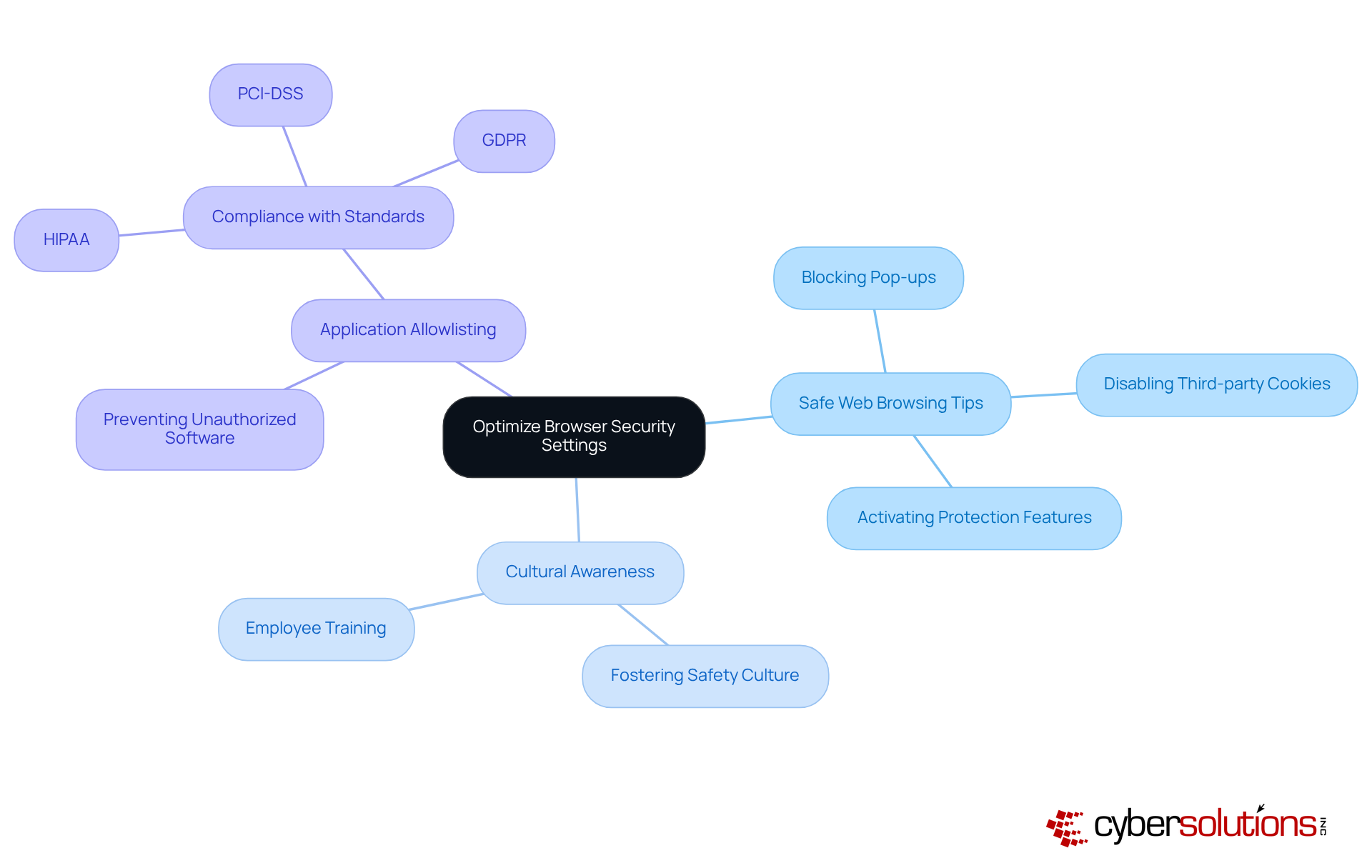
Implementing browser security settings, such as customizing preferences, is essential for safeguarding against malware and various online threats. C-suite leaders must actively foster a culture of awareness regarding safety among employees by encouraging them to review and customize their browser settings, incorporating best practices. Key adjustments include:
- Blocking pop-ups
- Disabling third-party cookies
- Activating features that enhance protection during web browsing
Research indicates that 76% of Americans believe companies should improve their information protection efforts, underscoring the increasing need for enhanced security measures. Furthermore, 92% of Americans express concern about their online privacy, highlighting the necessity for organizations to take proactive measures in this area. Notably, 44% of data breaches involve exposure of personal information, emphasizing the stakes involved in neglecting browser security.
In addition to browser settings, implementing security policies can significantly enhance a company's defenses. By allowing only approved applications to run, organizations can proactively prevent malware, ransomware, and unauthorized software from executing. This approach not only reduces the attack surface but also helps comply with standards such as HIPAA, PCI-DSS, and GDPR.
Organizations that implement security protocols, along with training and awareness programs, not only reduce risks but also enhance their overall cybersecurity stance. By creating an environment where employees are prepared to handle their browser protection efficiently, companies can greatly lessen their susceptibility to cyber threats by providing necessary resources. C-suite leaders should implement these changes as soon as possible to ensure a safer browsing experience for their teams.
Install Reputable Security Software: Defend Against Malware and Threats
Installing trustworthy protection software is vital for defending against malware and other cyber threats. C-suite leaders must ensure that all devices within the organization are equipped with current security software, which offers protection against potential attacks. Organizations focusing on cybersecurity have noted significant improvements, with efficient software solutions able to block more than 90% of recognized malware threats.
The effect of keeping up-to-date cannot be emphasized enough; outdated systems are prime targets for cybercriminals, as they often exploit unpatched vulnerabilities. Entities that neglect to enhance their protective measures encounter a 200% rise in data breaches, highlighting the importance of proactive security strategies.
Incorporating security software into your security framework is a critical step in enhancing your entity's defenses. This approach prevents unauthorized applications from executing and significantly reduces the risk of attacks, making it harder for attackers to exploit vulnerabilities. By permitting only sanctioned applications to operate, entities can successfully prevent malware, ransomware, and zero-day attacks before they inflict damage. Additionally, security software supports compliance, ensuring that your organization adheres to strict data protection protocols.
Expert insights show that combining advanced protective solutions, such as Next-Generation Antivirus (NGAV) with machine learning capabilities, improves the ability to identify and counteract emerging threats. Organizations employing AI and automation for protection save an average of $2.22 million each year compared to those that do not, demonstrating the financial benefits of robust cybersecurity. These solutions not only safeguard sensitive data but also bolster overall organizational resilience against cyberattacks.
Recent advancements in security software include features like automated endpoint isolation, which can contain malware and prevent the spread of infections, and secure web gateways, which provide an additional layer of defense by monitoring and filtering web traffic in real time, along with threat intelligence. Continuous monitoring of application activity is also crucial, as it ensures immediate identification and blocking of unauthorized software attempts. By implementing these latest protective solutions, including advanced firewalls, organizations can significantly reduce the risks linked to malware and ensure a strong cybersecurity stance.

Manage Browser Extensions: Regularly Review for Security Risks
Consistent oversight and evaluation of browser extensions are paramount in maintaining a robust protective posture against cyber threats. C-suite leaders must champion the use of secure extensions and endorse the exclusive use of those sourced from trusted providers. This proactive strategy significantly mitigates the risk of vulnerabilities that cybercriminals may exploit. For instance, during the Cyberhaven attack, nearly 400,000 users were impacted due to a compromised extension, underscoring the potential hazards of unmonitored browser tools. Furthermore, statistics reveal that a considerable percentage of employees manage extensions frequently without sufficient oversight, leading to security gaps.
To alleviate these risks, organizations should implement comprehensive policies that delineate clear guidelines on approved extensions and conduct regular audits to identify potentially harmful ones. Expert recommendations indicate that thorough inspections of installed extensions, along with ongoing training about security practices, are essential safe web browsing tips for C-suite leaders. By cultivating a culture of vigilance and compliance regarding browser extensions, organizations can fortify their overall security posture and effectively guard against emerging threats.

Conclusion
In a landscape where cyber threats are continually evolving, the imperative for C-suite leaders to prioritize safe web browsing practices cannot be overstated. By adopting a proactive approach to cybersecurity, executives can significantly bolster their organization’s defenses against potential breaches. The strategies outlined here underscore the necessity of implementing robust security measures—from regular browser updates to the use of strong passwords and two-factor authentication—ensuring that sensitive information remains well-protected.
Key insights, such as the importance of:
- Avoiding public Wi-Fi
- Utilizing VPNs
- Recognizing phishing attempts
- Managing browser extensions
highlight the multifaceted nature of online security. Each recommendation serves as a crucial component in constructing a comprehensive cybersecurity framework that not only safeguards data but also fosters trust among stakeholders. Organizations that embrace these safe web browsing tips are better equipped to navigate the complexities of the digital landscape.
The significance of these practices extends beyond mere compliance; they embody a commitment to protecting digital assets in a world where security breaches can lead to dire consequences. C-suite leaders are urged to champion these initiatives within their organizations, cultivating a culture of vigilance and responsibility. By taking decisive action and prioritizing cybersecurity, businesses can not only shield their sensitive information but also ensure long-term success and resilience in the face of emerging threats.
Frequently Asked Questions
What services does Cyber Solutions Inc. provide for cybersecurity?
Cyber Solutions Inc. offers a comprehensive range of cybersecurity services, including Compliance as a Service (CaaS) for regulatory adherence and Incident Response solutions to identify, contain, and mitigate cyber threats.
Why is it important for organizations to follow safe web browsing tips?
Following safe web browsing tips helps organizations reduce risks associated with web browsing, safeguard sensitive information, enhance security, foster trust among stakeholders, and support business continuity and compliance.
How can regularly updating a browser improve cybersecurity?
Regularly updating a browser addresses known vulnerabilities that cybercriminals exploit, significantly reducing potential attack vectors and enhancing overall organizational security.
What is application allowlisting and how does it contribute to cybersecurity?
Application allowlisting is a security practice that ensures only approved applications run on a network, effectively blocking unauthorized software and malware, thereby strengthening defenses against cyber threats.
What is the significance of using strong passwords for online accounts?
Using strong and unique passwords for every account is crucial for protecting sensitive information and minimizing the risk of credential theft, which is involved in a significant percentage of data breaches.
How can credential managers enhance security for organizations?
Credential managers create complex passwords and securely store them, reducing the risk of reusing credentials and helping organizations adhere to security frameworks that require specific credential management practices.
What statistics highlight the risks associated with weak or reused passwords?
59% of users admit to reusing credentials despite knowing the risks, and 81% of hacking-related breaches in corporate environments arise from weak or reused access credentials.
What proactive strategies can C-suite executives implement to safeguard their organizations from cyber threats?
C-suite executives can implement safe web browsing tips, enforce browser updates, utilize application allowlisting, and promote the use of credential managers to enhance security and protect against evolving cyber threats.
List of Sources
- Cyber Solutions Inc.: Comprehensive Cybersecurity Services for Safe Browsing
- researchgate.net (https://researchgate.net/publication/394790050_Generative_AI_for_cyber_threat_intelligence_applications_challenges_and_analysis_of_real-world_case_studies)
- omnicybersecurity.com (https://omnicybersecurity.com/case_studies/case-study-inside-a-red-team-engagement)
- ibm.com (https://ibm.com/think/insights/cybersecurity-dominates-concerns-c-suite-small-businesses-nation)
- aratum.com (https://aratum.com/cybersecurity-in-the-age-of-ai-navigating-risk-and-opportunities)
- Update Your Browser Regularly: Ensure Security with the Latest Versions
- omnicybersecurity.com (https://omnicybersecurity.com/case_studies/case-study-inside-a-red-team-engagement)
- Use Strong Passwords: Protect Your Accounts with Unique Combinations
- 8 Scary Statistics about the Password Reuse Problem (https://enzoic.com/blog/8-stats-on-password-reuse)
- secureframe.com (https://secureframe.com/blog/password-statistics)
- spacelift.io (https://spacelift.io/blog/password-statistics)
- us.norton.com (https://us.norton.com/blog/privacy/password-statistics)
- Enable Two-Factor Authentication: Enhance Security for Your Online Accounts
- The Importance of Using Two-Factor Authentication (2FA) (https://blogs.chapman.edu/information-systems/2024/10/04/the-importance-of-using-two-factor-authentication-2fa)
- itsecuritywire.com (https://itsecuritywire.com/featured/two-factor-authentication-day-a-call-for-stronger-cybersecurity)
- rublon.com (https://rublon.com/blog/2fa-two-factor-authentication)
- loginradius.com (https://loginradius.com/blog/identity/benefits-of-mfa)
- malteksolutions.com (https://malteksolutions.com/5-practical-security-improvements-for-small-businesses)
- Avoid Public Wi-Fi: Protect Your Data from Potential Threats
- atera.com (https://atera.com/blog/best-cybersecurity-quotes)
- omnicybersecurity.com (https://omnicybersecurity.com/case_studies/case-study-inside-a-red-team-engagement)
- sentinelone.com (https://sentinelone.com/cybersecurity-101/cybersecurity/remote-working-security-risks)
- sqmagazine.co.uk (https://sqmagazine.co.uk/remote-work-cybersecurity-statistics)
- Use a VPN: Secure Your Internet Connection for Safer Browsing
- linfordco.com (https://linfordco.com/blog/vpn-encryption)
- 1800officesolutions.com (https://1800officesolutions.com/guide/vpn-virtual-private-guide)
- bytagig.com (https://bytagig.com/articles/the-importance-of-vpn-safeguarding-your-data-when-you-connect-to-the-internet)
- Recognize Phishing Attempts: Stay Alert to Suspicious Links and Emails
- qamadness.com (https://qamadness.com/case_studies/cybersecurity-assessment-for-a-leading-bank-in-a-gcc-country)
- rapid7.com (https://rapid7.com/blog/tag/phishing)
- Adjust Browser Security Settings: Optimize Your Browsing Experience
- ghacks.net (https://ghacks.net/2022/07/29/microsoft-edges-enhanced-security-mode-explained)
- support.mozilla.org (https://support.mozilla.org/en-US/kb/enhanced-tracking-protection-firefox-desktop)
- explodingtopics.com (https://explodingtopics.com/blog/data-privacy-stats)
- Over 150 data privacy statistics companies need to know about in 2026 (https://usercentrics.com/guides/data-privacy/data-privacy-statistics)
- 110+ Data Privacy Statistics: The Facts You Need To Know In 2026 (https://secureframe.com/blog/data-privacy-statistics)
- Install Reputable Security Software: Defend Against Malware and Threats
- Key Cyber Security Statistics for 2026 (https://sentinelone.com/cybersecurity-101/cybersecurity/cyber-security-statistics)
- fcc.gov (https://fcc.gov/communications-business-opportunities/cybersecurity-small-businesses)
- cynet.com (https://cynet.com/endpoint-protection-and-edr/10-reasons-your-business-needs-endpoint-protection-software)
- welivesecurity.com (https://welivesecurity.com/en/business-security/case-cybersecurity-successful-businesses-built-protection)
- varonis.com (https://varonis.com/blog/cybersecurity-statistics)
- Manage Browser Extensions: Regularly Review for Security Risks
- stateofsecurity.com (https://stateofsecurity.com/best-practices-for-managing-browser-extensions-in-a-corporate-environment)
- solutionsreview.com (https://solutionsreview.com/endpoint-security/browser-extensions-are-a-security-blindspot-4-steps-to-take-control)
