

Introduction
Understanding the complexities of IT infrastructure is essential for organizations aiming to maintain operational continuity in an unpredictable environment. Failover—an automatic switch to a backup system during a primary system failure—stands out as a vital element of business resilience. This article explores the significance of failover strategies, demonstrating how they not only protect against costly downtime but also boost overall operational efficiency. As businesses confront the daunting challenge of unexpected outages, one question emerges: how can organizations effectively implement failover systems to ensure seamless continuity and safeguard their bottom line?
Define Failover: Understanding Its Role in IT Infrastructure
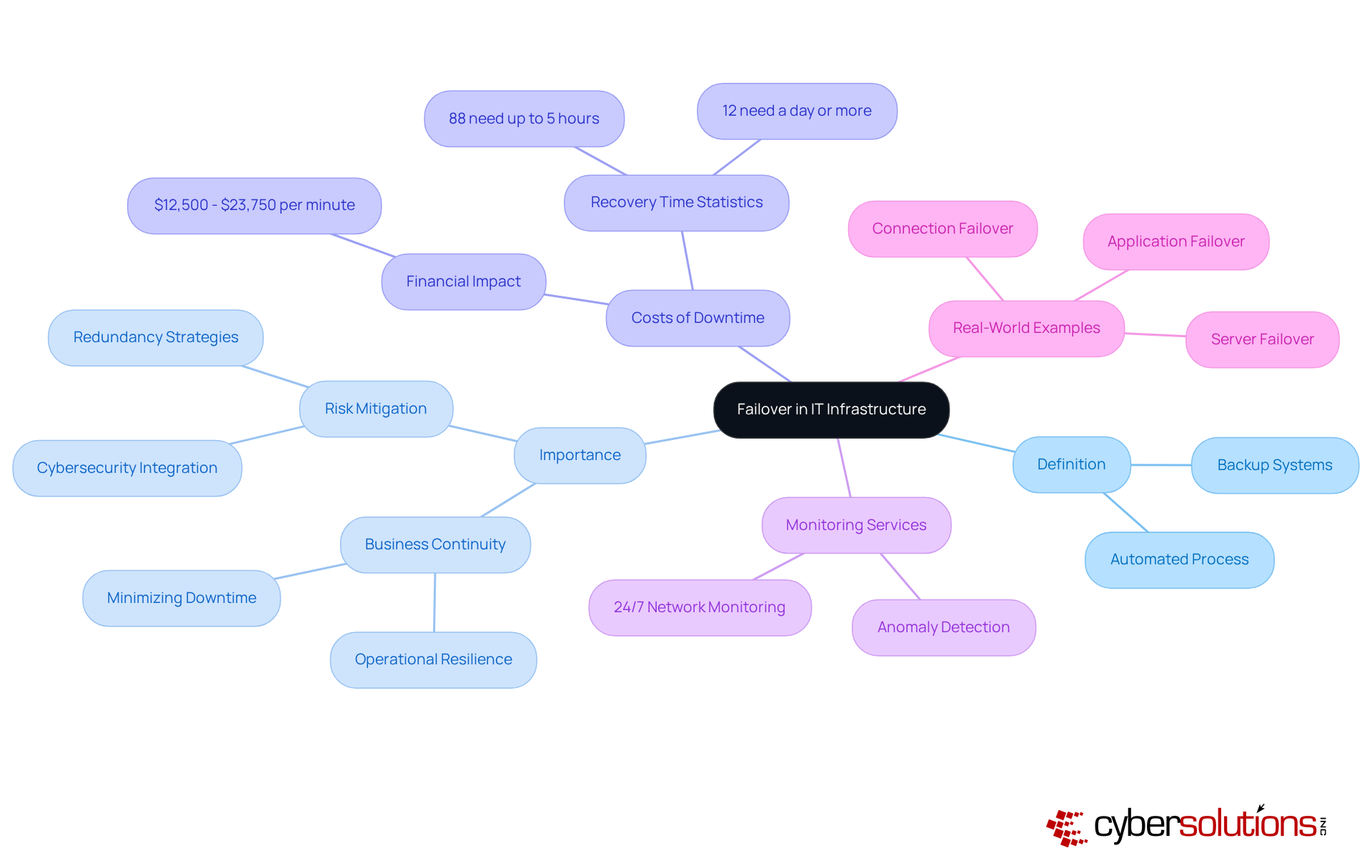
Failover is not merely a technical term; it serves as a vital lifeline for businesses. This automated process illustrates its importance, as it allows a system to seamlessly switch to a standby or backup system when the primary one fails or experiences an outage. In today’s fast-paced IT landscape, it is crucial to understand its role. It ensures that organizations remain operational, even during failures. It can manifest in various forms—hardware redundancy, software solutions, and network configurations—all working together to help organizations mitigate the risks associated with unexpected failures and disruptions.
Consider the staggering costs associated with IT downtime: it can range from $12,500 to $23,750 per minute. These figures starkly illustrate the financial impact of outages. Furthermore, research shows that 88% of geographically distributed companies take up to five hours to restore their network after a failure, with 12% requiring a day or more. Such statistics underscore the pressing need for robust failover systems to ensure business continuity.
To enhance resilience, 24/7 monitoring systems are indispensable. Continuous oversight of network activities allows organizations to detect anomalies and potential vulnerabilities in real-time. This proactive approach enables swift action to prevent downtime or breaches, effectively safeguarding against threats like ransomware and phishing attacks. Ongoing observation ensures that questionable behaviors are identified and addressed before they escalate into major issues, highlighting the necessity of integrating monitoring with comprehensive cybersecurity plans.
Real-world examples further illustrate the effectiveness of these backup mechanisms. For instance, in a data center, when a server's power supply fails, a backup system activates a secondary power source, ensuring operations continue without interruption. Similarly, connection redundancy guarantees continuous network connectivity by redirecting traffic through alternative routes during internet service disruptions. This is vital for businesses that rely on constant internet access for operations such as credit card transactions and remote work. Such implementations not only protect against downtime but also enhance overall operational efficiency, making redundancy a cornerstone of modern IT strategies. Moreover, the failback procedure—reverting operations to the main setup after an interruption—is essential for ensuring continuity and minimizing disruptions.
Explain the Importance of Failover in Ensuring Business Continuity
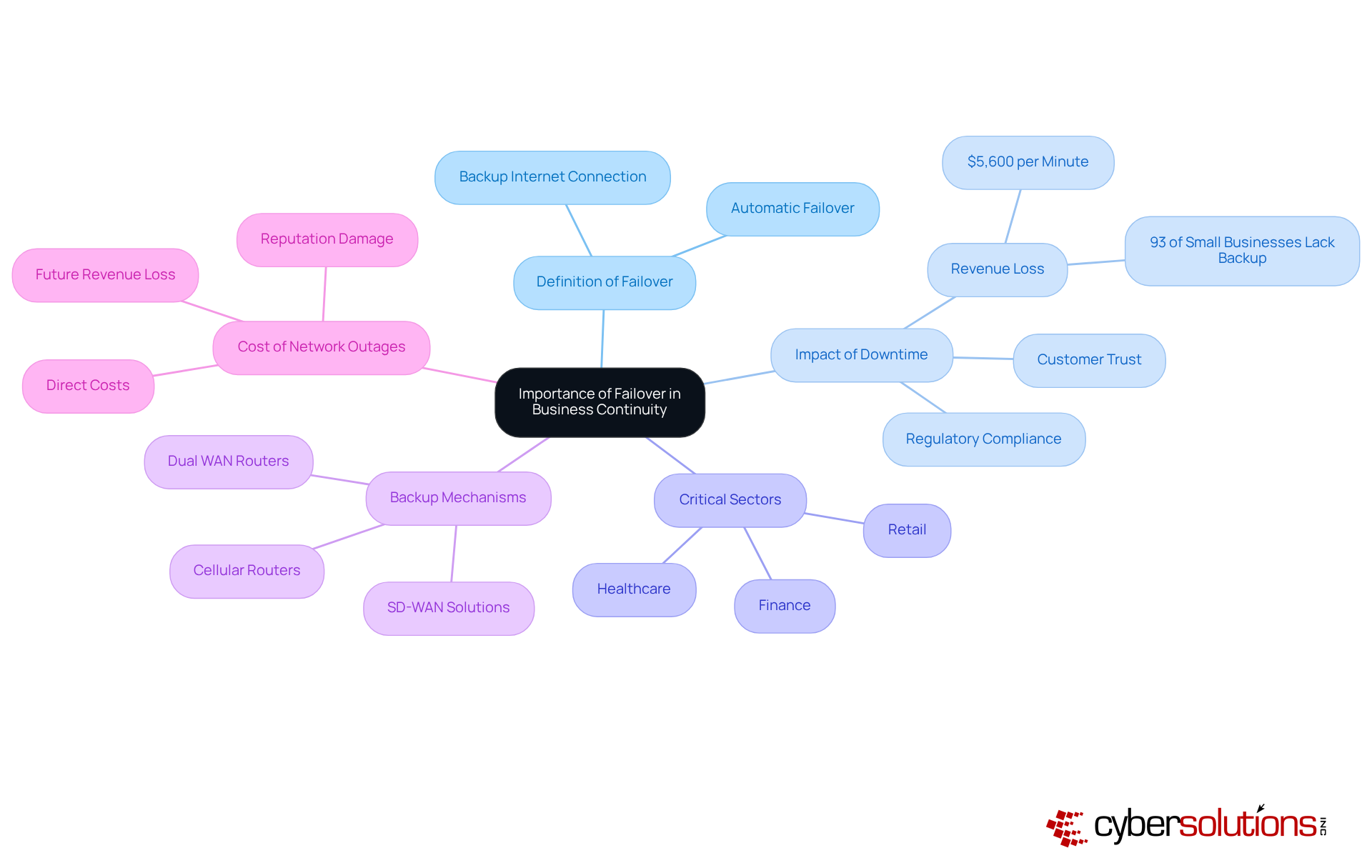
Failover is not merely a technical necessity; rather, it serves as a cornerstone of effective business operations. In an era where unforeseen disruptions can strike at any moment, organizations must ensure they can sustain operations seamlessly. By implementing robust failover systems, companies significantly mitigate the risks associated with downtime, which can lead to lost revenue, diminished customer trust, and potential regulatory repercussions.
Consider critical sectors like healthcare and finance, where the integrity and accessibility of data are paramount. Here, failover solutions are not merely beneficial; they are essential for keeping vital services operational. This capability safeguards sensitive information and ensures business continuity. The swift transition to backup systems not only enhances resilience but also fosters a proactive risk management strategy.
Did you know that network outages can cost businesses approximately $5,600 every minute? This staggering figure underscores the importance of investing in failover solutions. It's not just a protective measure; it's a strategic investment in preserving business continuity and operational efficiency.
Explore Types of Failover Configurations and Their Applications
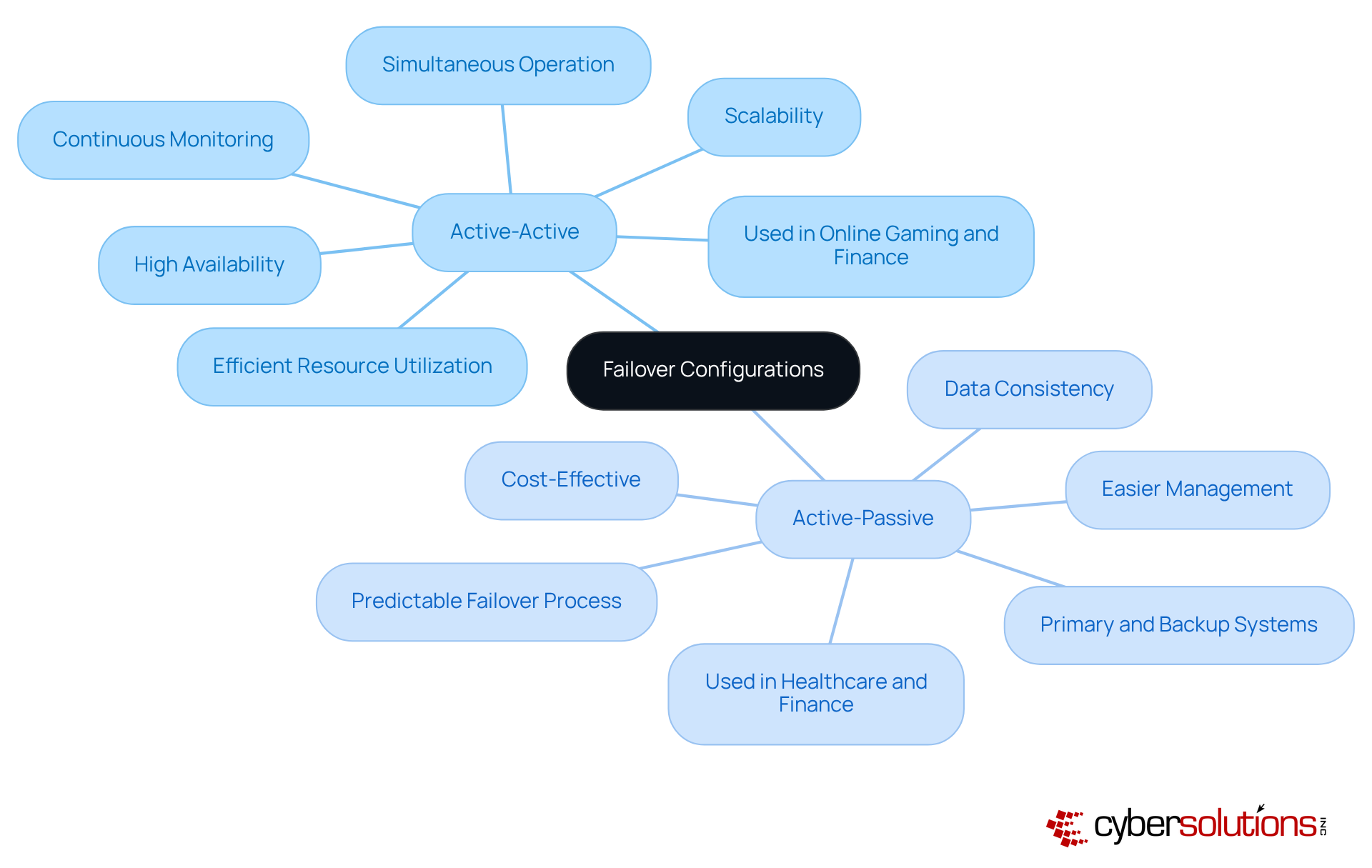
Understanding failover is essential for maintaining business continuity, as these setups come in various forms tailored to meet specific organizational needs. The two primary configurations are active-active and active-passive.
In an active-active configuration, multiple units operate simultaneously, sharing workloads and providing redundancy. This arrangement not only boosts performance but also ensures that if one component fails, others can seamlessly take over, resulting in nearly zero downtime. Industries like online gaming and finance reap significant benefits from this model, as it facilitates efficiency and rapid response times—critical factors for user satisfaction and operational efficiency. Continuous monitoring of these networks is vital for understanding performance, as it allows for quick identification of issues and minimizes potential disruptions. Cyber Solutions offers tools to detect anomalies and vulnerabilities, ensuring that suspicious activities are addressed before they escalate into threats.
Conversely, the active-passive configuration features one primary system managing the workload while a backup system remains on standby, ready to engage in case of a failure. This approach is often preferred in sectors such as healthcare and finance, where reliability and uptime are crucial. Active-passive systems are generally easier to manage and can be more cost-effective, making them suitable for applications where the criticality of operations does not require constant engagement of all nodes.
Choosing between these setups involves considering factors like cost, complexity, and the critical nature of the applications involved. While active-active systems may entail higher initial costs due to the need for all nodes to be operational, they provide enhanced performance. In contrast, active-passive systems may lead to longer outage durations during transitions but offer a straightforward path to maintaining operations on a budget.
Understanding and comparing these configurations empowers organizations to implement the most effective failover strategies tailored to their operational context, ensuring resilience against disruptions and maintaining business continuity.
Outline Best Practices for Implementing Effective Failover Systems
Implementing effective failover systems is not just a necessity; it’s a critical component of organizational resilience. In today’s fast-paced environment, where disruptions can occur at any moment, having a robust failover strategy is essential. Here are key best practices that every organization should adopt:
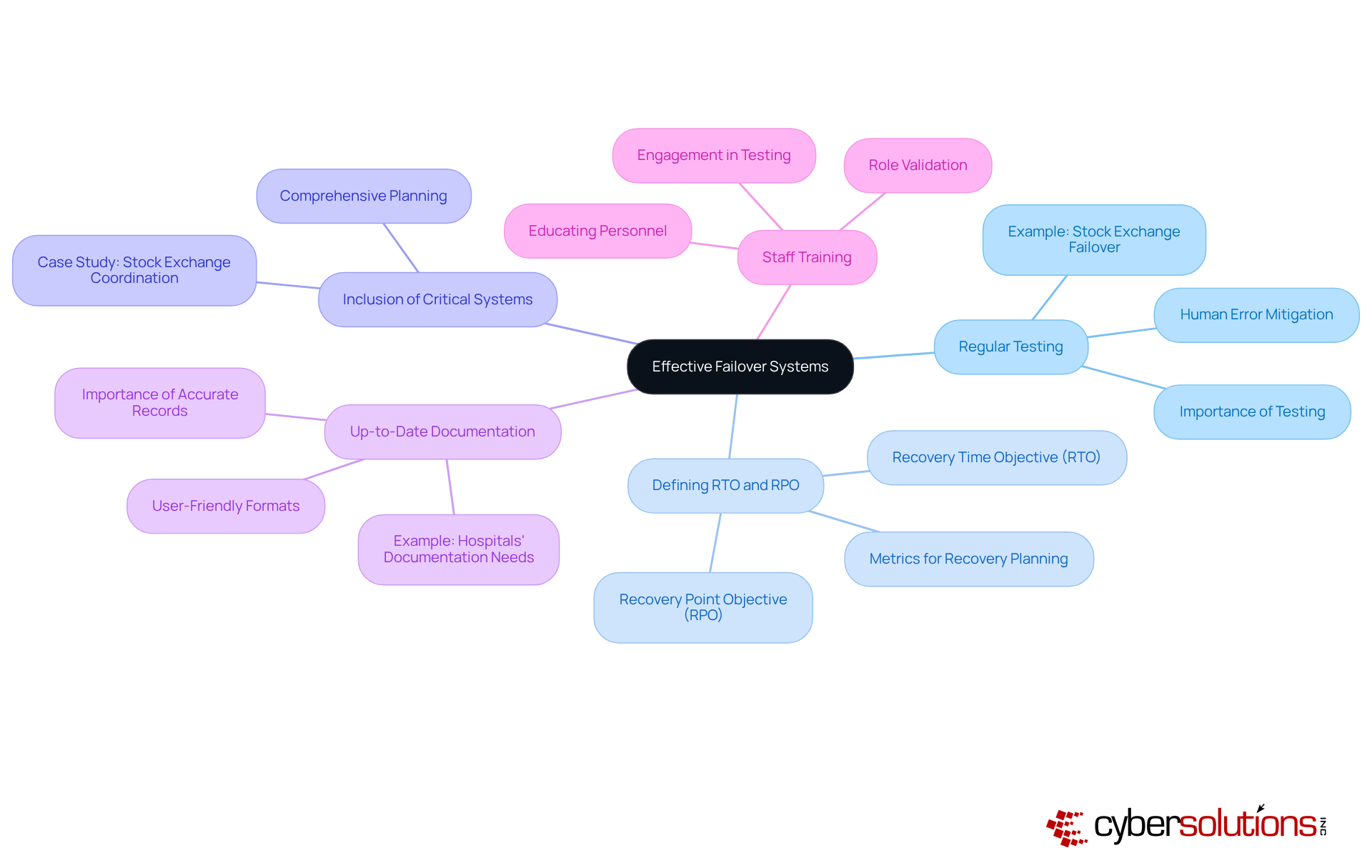
- Testing: Conducting frequent tests of failover systems is crucial to ensure they operate as intended during actual failures. Organizations that engage in regular end-to-end testing of their processes significantly enhance their preparedness. For instance, a major stock exchange conducts tests every six months to meet regulatory requirements, illustrating the importance of proactive measures. With nearly four-fifths of all outages caused by human error, effective testing becomes vital to mitigate risks associated with such errors.
- Objectives: Establishing clear Recovery Time Objectives (RTO) and Recovery Point Objectives (RPO) is essential for directing the transition process. These metrics help organizations understand their maximum allowable downtime and data loss, which are critical for effective recovery.
- Inclusion of Critical Systems: Ensuring that all critical systems are included within the failover plan is paramount. A case study involving the stock exchange's backup test illustrates this complexity, requiring coordination of thousands of activities and transitioning numerous services. This highlights the importance of comprehensive planning to minimize the risk of overlooking essential components during a disruption.
- Documentation: Maintaining accurate and current records of the backup procedure facilitates swift recovery. Organizations that prioritize documentation can significantly reduce the time required to respond to incidents, as demonstrated in successful recovery exercises that utilize detailed runbooks. Moreover, employing user-friendly formats for documentation is crucial, especially in high-stress situations like those faced by hospitals, to enhance clarity and facilitate quick recovery.
- Staff Training: Educating personnel on backup procedures is essential to reduce confusion during emergencies. Engaging all relevant IT personnel in testing validates their roles and ensures everyone is prepared to act effectively when needed. This approach aligns with insights from external sources about the importance of having on-call engineers fully engaged during tests that demonstrate readiness.
By adhering to these best practices, organizations can bolster their resilience against disruptions and ensure a rapid recovery when failures occur. Are you ready to take the necessary steps to safeguard your organization?
Conclusion
Understanding the concept of failover is crucial for any organization that wants to maintain operational continuity amid unexpected disruptions. It’s not just a technical term; it’s a strategic approach that ensures critical systems stay functional, safeguarding business operations and preserving customer trust. By implementing effective failover mechanisms, businesses can significantly mitigate the risks associated with downtime, which can lead to severe financial and reputational consequences.
This article has delved into the multifaceted nature of failover, emphasizing its importance in business continuity planning and the various configurations available, such as active-active and active-passive setups. The staggering costs tied to network outages and the essential role that robust backup systems play in sectors like healthcare and finance have been highlighted. Moreover, best practices for implementing effective failover strategies—like regular testing, clear recovery objectives, and comprehensive staff training—have been discussed. These insights serve as a roadmap for organizations aiming to bolster their resilience against potential disruptions.
In an era where operational disruptions are increasingly prevalent, the significance of failover cannot be overstated. Organizations must prioritize the development and implementation of robust failover strategies to ensure they can swiftly recover from failures and continue serving their customers. By investing in effective backup systems and fostering a culture of preparedness, businesses not only protect their operations but also position themselves for long-term success in an unpredictable landscape.
Frequently Asked Questions
What is failover in IT infrastructure?
Failover is an automated process that allows a system to switch to a standby or backup system when the primary system fails or experiences an outage. It is crucial for maintaining the operational continuity of critical workloads, applications, and services.
Why is failover important for businesses?
Failover is important because it minimizes downtime and preserves business continuity, helping organizations mitigate the risks associated with unexpected failures and disruptions.
What are the costs associated with IT downtime?
The costs of IT downtime can range from $12,500 to $23,750 per minute, highlighting the significant financial impact of unexpected outages.
How long does it typically take to restore a network after a failure?
Research shows that 88% of geographically distributed companies take up to five hours to restore their network after a failure, with 12% requiring a day or more.
What role does network monitoring play in failover strategies?
24/7 network monitoring and alert services are essential for detecting anomalies and potential vulnerabilities in real-time, enabling swift action to prevent downtime or breaches.
Can you provide examples of failover mechanisms in action?
In a data center, if a server's power supply fails, a backup system activates a secondary power source to ensure operations continue. Additionally, connection redundancy allows traffic to be redirected through alternative routes during internet service disruptions, maintaining continuous connectivity.
What is the failback procedure?
The failback procedure involves reverting operations to the main setup after an interruption, which is essential for ensuring continuity and minimizing disruptions.
List of Sources
- Define Failover: Understanding Its Role in IT Infrastructure
- ericsson.com (https://ericsson.com/en/blog/2025/2/understanding-failover-an-essential-component-of-enterprise-systems)
- datablaze.com (https://datablaze.com/news/the-resilient-enterprise-why-network-failover-is-important)
- business.att.com (https://business.att.com/learn/articles/why-a-failover-for-your-network-tech-and-security-is-a-must.html)
- infrascale.com (https://infrascale.com/system-updates-disaster-recovery-statistics-usa)
- inseego.com (https://inseego.com/resources/blog/failover-and-failback-are-crucial-to-effective-business-continuity)
- Explain the Importance of Failover in Ensuring Business Continuity
- bbnet.ie (https://bbnet.ie/post/ensuring-business-continuity-the-importance-of-failover-connectivity)
- geolinks.com (https://geolinks.com/why-internet-failover-is-a-must-have-for-business-continuity)
- justinc.com (https://justinc.com/blog/business-continuity-with-failover-internet)
- inseego.com (https://inseego.com/resources/blog/failover-and-failback-are-crucial-to-effective-business-continuity)
- ericsson.com (https://ericsson.com/en/blog/2025/2/understanding-failover-an-essential-component-of-enterprise-systems)
- Explore Types of Failover Configurations and Their Applications
- blog.purestorage.com (https://blog.purestorage.com/purely-educational/active-active-vs-active-passive-decoding-high-availability-configurations-for-massive-data-networks)
- aerospike.com (https://aerospike.com/blog/active-active-vs-active-passive)
- business.att.com (https://business.att.com/learn/articles/what-is-failover-for-business-continuity.html)
- jscape.com (https://jscape.com/blog/active-active-vs-active-passive-high-availability-cluster)
- g2.com (https://g2.com/articles/failover)
- Outline Best Practices for Implementing Effective Failover Systems
- ericsson.com (https://ericsson.com/en/blog/2025/2/understanding-failover-an-essential-component-of-enterprise-systems)
- cutover.com (https://cutover.com/blog/failover-testing-crucial-simulating-network-outages)
- cachefly.com (https://cachefly.com/news/mastering-digital-resilience-understanding-and-implementing-failover-systems)
- vercel.com (https://vercel.com/blog/preparing-for-the-worst-our-core-database-failover-test)
- ovationhc.com (https://ovationhc.com/best-practices-for-hospital-disaster-recovery-and-preparedness)
